
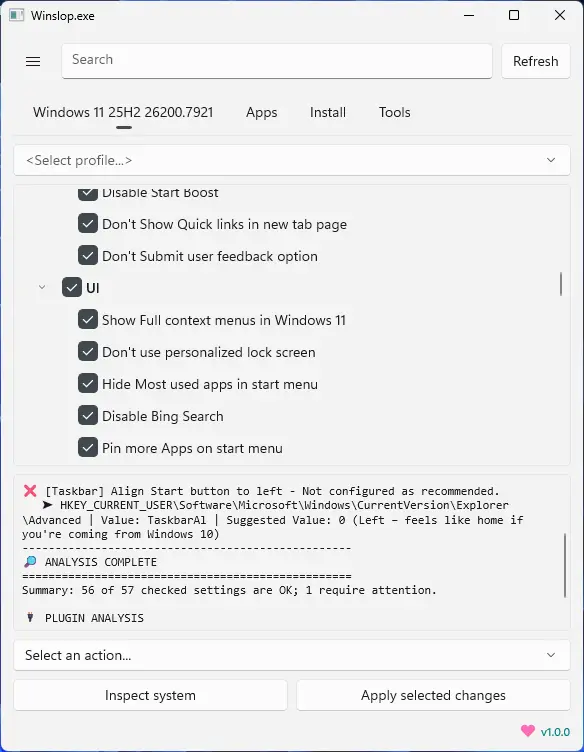
Winslopr, developed by the creator of Flyoobe, is a lightweight Windows utility that removes unnecessary system slop, reduces bloat, and restores full user control. A focused, local fork of CrapFixer, Winslopr shows exactly what changes will occur, allowing users to review and revert actions. It works entirely offline, with no AI, cloud, or telemetry. Perfect for users who want a cleaner, transparent, and minimal Windows experience, Winslopr simplifies system maintenance, optimizes performance, and eliminates forced, opaque, or redundant features while keeping Windows itself intact.
Winslopr key features:
- Removes system slop – eliminates unnecessary or redundant Windows components.
- Reduces bloatware – optimizes resource usage for faster performance.
- Full user control – all changes are transparent, reviewable, and reversible.
- Local and offline operation – no AI, cloud, or telemetry involved.
- Deterministic behavior – predictable, consistent, and safe modifications.
- Fork of CrapFixer – smaller, focused, and easier to maintain codebase.
- Improves system performance – reduces overhead and unnecessary processes.
- Targeted optimization – only removes opaque, forced, or optional slop.
- Visibility of changes – shows exactly what will be modified before applying.
- Lightweight tool – minimal footprint, no unnecessary layers or assistants.
Winslopr 26.04.04 changelog:
- [New] Unified Plugins & Scripts management: Plugins and Tool Scripts are now managed in a single dialog (PluginsDialog) instead of two separate places (Plugins and Scripts/Extensions). Routing is based on the manifest type= field: type=tool --> Scripts/ folder, Default --> Plugins/ Folder
- [Improved] Reduced unnecessary resource usage and made the app feel smoother in daily use, which is saying something given that WinUI 3 still behaves like a small monster now and then
- [Fix;Critical] Fix winget source agreements on fresh Windows installs. winget list and winget upgrade now run with --accept-source-agreements --disable-interactivity, so the Install tab works out of the box without needing a prior manual winget interaction in the terminal #77
- [Improved] UI has been refined across the app to feel lighter, cleaner, and more modern
- [Added] "Plugins" entry to the settings flyout which opens Plugins dialog directly
- [Improved] Per-entry folder-aware installed state detection via File.Exists(targetDir + fileName). This fixes false positives where same-named files in different folders were incorrectly shown as installed
- [Removed] ThirdPartyDetector as third-party tools are now discoverable and installable directly via the Plugins dialog
- [Removed] Share feature from the settings dropdown (redundant)
- [Removed] Cleaned up obsolete Localization keys: Settings_ToolScripts, Settings_OpenToolsPage, MenuShare
- [Updated] Localization es-ES; zh-CN
Download: Winslopr 26.04.04 | 43.3 MB (Open Source)
View: Winslopr Website | Screenshot
 Get alerted to all of our Software updates on Twitter at @NeowinSoftware


















0 Comments
Load the comments and join the conversation!
Read the comments, ask the editors questions, show respect and join the conversation.