
AeroFTP is a fast, modern, and easy-to-use file transfer app designed to help you manage files across servers and cloud services from one simple interface. Built for Windows, macOS, and Linux, it lets you connect to FTP, SFTP, WebDAV, S3 storage, GitHub, and popular cloud providers without hassle.
With AeroFTP, you can turn almost any server into your own personal cloud and keep your files organized, synced, and always accessible. It supports reliable two-way sync, background syncing, file versioning, and selective folders, making it ideal for both personal use and small businesses.
Whether you're backing up important documents or managing multiple online accounts, AeroFTP helps you stay organized and in control.
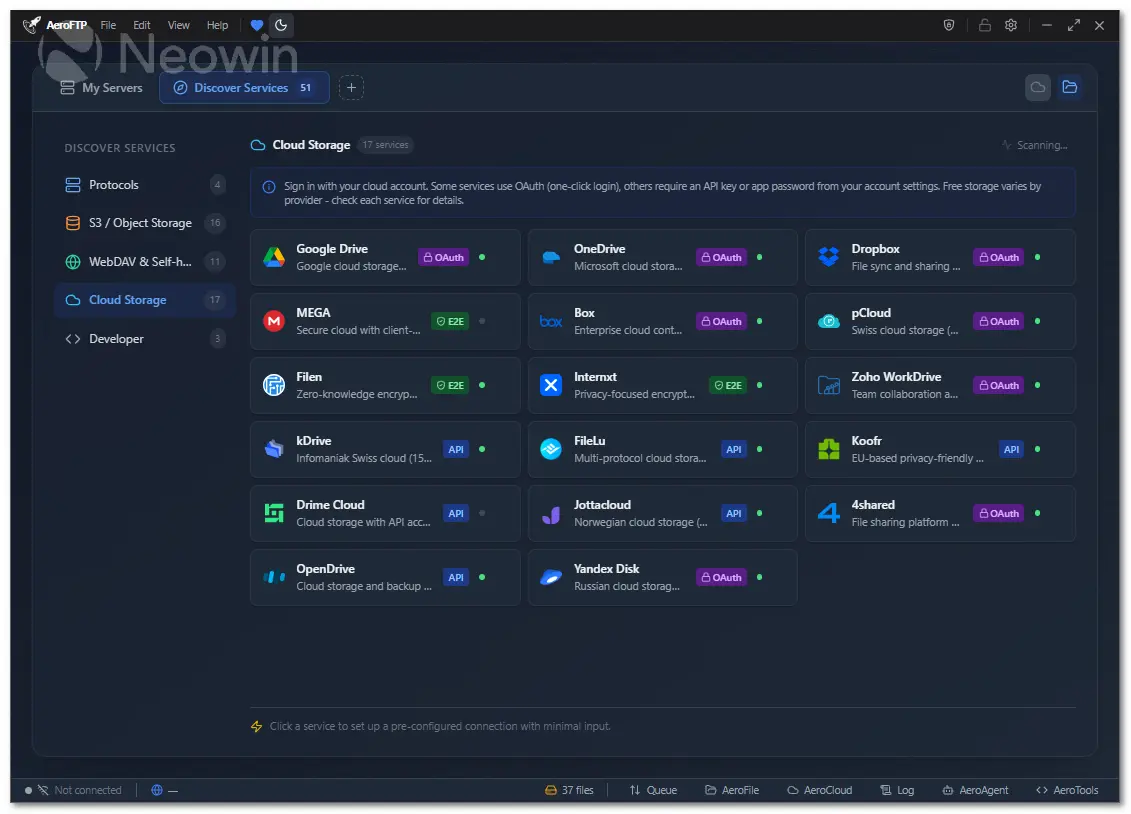
AeroFTP includes a clean dual-pane layout for simple drag-and-drop transfers, quick previews, tabs for multiple connections, and smart search tools to find files instantly. Its six built-in modules — AeroCloud, AeroFile, AeroSync, AeroVault, AeroTools, and AeroPlayer — make it more than just a file transfer client. You can manage cloud storage, automate file tasks, sync folders in real time, protect sensitive documents, edit files, and even preview media.
With support for 51 cloud and developer platforms, AeroFTP offers step-by-step setup guides and recommended settings so you can connect everything effortlessly.
AeroFTP key features:
- 25 protocols (FTP, FTPS, SFTP, WebDAV, S3, Google Drive, Dropbox, OneDrive, MEGA, and more)
- AeroVault v2 encrypted containers (AES-256-GCM-SIV, Argon2id)
- Cryptomator vault support (format 8)
- AeroAgent AI assistant with 19 providers and 47 tools
- Monaco code editor (VS Code engine) for remote file editing
- Integrated terminal with theme sync
- AeroCloud bidirectional sync with background service
- Dual-pane file browser with drag-and-drop
- Archive browser (ZIP, 7z, TAR, RAR) with selective extraction
- CLI with 30 subcommands and batch scripting
- 47 languages supported
- 4 themes (Light, Dark, Tokyo Night, Cyber)
- Zero telemetry - all credentials stored locally
- Cross-platform (Linux, Windows, macOS)
AeroFTP 3.4.4 changelog:
Added
- Immich provider: Native integration with Immich self-hosted photo management via REST API (1427 lines). Browse albums, upload/download, delete (soft trash), create albums, search, share links, SHA-256 checksum. API key auth, zero OAuth required
- PixelUnion preset: EU-hosted Immich cloud (16 GB free) with dedicated connection form, subdomain-based URL, featured in Discover Services
- Media Services category: New Discover panel category with Camera icon for photo/video management services
- Immich CLI support: Full aeroftp-cli --profile support for Immich protocol - connect, ls, put, get, find, mkdir, rm, stat, link, hashsum
- Immich UI protections: Rename, batch rename, cut/move, and nested mkdir automatically disabled for Immich connections
- Transfer event bridge: SyncPanel uses DOM CustomEvent bridge for transfer progress, decoupling from direct Tauri listener
- FTP timeout configuration: Structured FtpTimeoutConfig with per-operation timeouts (connect, list, command, upload, disconnect)
- Connection settings: Timeout, max concurrent transfers, and retry count exposed in settings panel
- Transfer orchestrator: New transfer_orchestrator.rs module for parallel transfer coordination
- FTP session pool: New ftp_session_pool.rs for connection pooling in parallel transfers
Fixed
- Immich file sizes: Use fileSizeInByte field from Immich EXIF data (was showing 0 bytes)
- Immich search: Client-side filename filtering from [All Assets] (API metadata search is exact-match only)
- Immich upload in root: Files uploaded to root now go to All Assets instead of failing with "Album not found"
- CLI download to directory: get command with trailing / destination now appends remote filename instead of failing
- CLI Immich protocol: Added "immich" to CLI protocol mapping
Changed
- Provider registration audit: Added immich to all provider lists across frontend and backend
- Documentation: Updated README provider grid, PROTOCOL-FEATURES.md, PROVIDER-INTEGRATION-GUIDE.md, docs.aeroftp.app with 2 new provider guides and Photo & Media category
- i18n: 10+ new keys translated across all 47 locales
- Dependencies: Updated Tauri plugins, removed orphan russh-keys; bumped tokio, crossterm, react-virtuoso, libc, semver
AeroFTP 3.4.7 changelog:
Added
- rclone config import: Import server profiles directly from rclone.conf files. Auto-detects config path, supports 17 rclone backend types (FTP, SFTP, S3, WebDAV, Google Drive, Dropbox, OneDrive, MEGA, Box, pCloud, Azure Blob, Swift, Yandex Disk, Koofr, Jottacloud, Backblaze B2, OpenDrive). Passwords are de-obfuscated from rclone's reversible AES-256-CTR scheme and stored in AeroFTP's AES-256-GCM encrypted vault
- rclone config export: Export server profiles to rclone.conf format for use with rclone CLI. Passwords are obfuscated using rclone's standard scheme for full compatibility
- CLI import rclone subcommand: aeroftp import rclone [path] [--json] for headless rclone config scanning with structured JSON output
- rclone UI in Export/Import dialog: New "rclone" section with Import and Export options, preview with server selection, OAuth re-auth notice, unsupported remotes listing
Fixed
- MEGA default mode: New MEGA profiles now default to Native API instead of MEGAcmd. Existing profiles without an explicit mode are treated as Native API in the UI and backend, preventing incorrect "MEGAcmd" labels on profiles that were never configured for it
Download: AeroFTP 3.4.7 | Portable ~30.0 MB (Open Source)
Links: AeroFTP Home page | Documentation | Screenshot
 Get alerted to all of our Software updates on Twitter at @NeowinSoftware




















1 Comment
Load the comments and join the conversation!
Read the comments, ask the editors questions, show respect and join the conversation.