A couple of weeks ago, we discussed how the general public is angry that Microsoft has embedded an "Unlock Premium" button in its Teams app and set it to be always visible when the app is open in a full window. With Microsoft still reeling from this negative feedback, it seems like the company has made yet another mistake, this time drawing the ire of its Excel user base.
Over on its dedicated Excel feedback portal, several threads have been initiated by Excel customers who are furious that Microsoft has decided to insert a floating Copilot button directly into their sheets. This button appears at the bottom-right corner of the sheet, and there is no way to hide it completely. Users can right-click it and select Dock, but that only slides the button to the side of the screen with a caret-like behavior that launches the Copilot side panel and returns the floating button if you click on it. You can check it out below:
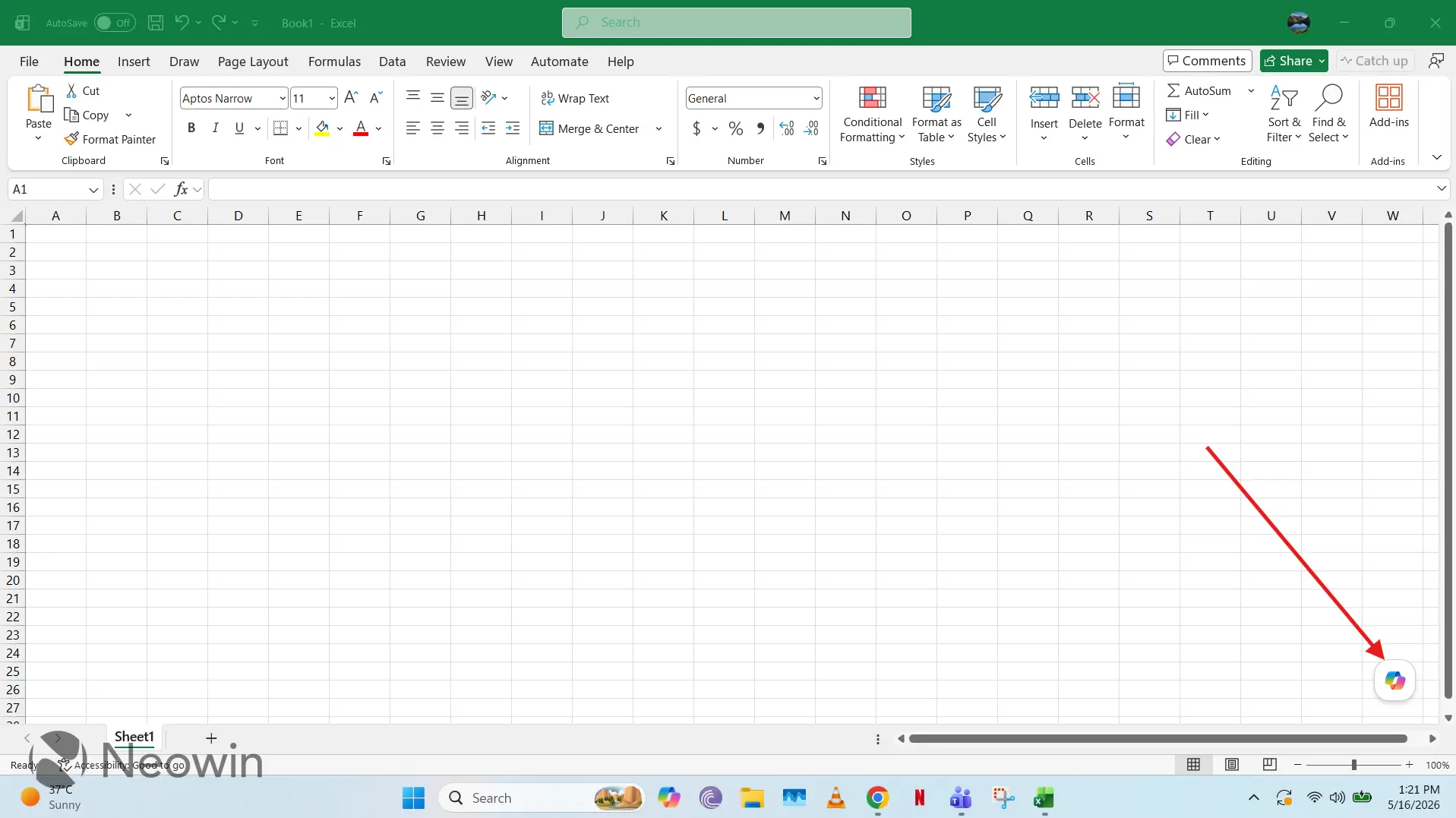
If you hover on the Copilot button, it shows you options to research with Copilot, create a table, and "teach me something with Excel". Clicking the Copilot icon itself or the options that hover over it will all launch the Copilot side panel.
People are understandably not happy with this new positioning of the Copilot button and have been requesting that Microsoft either hide it or return it to its original position in the toolbar at the top. Some have highlighted the new placement to be "visually disruptive", while others have talked about how it obscures the data beneath the button, a nuisance while taking screenshots.
Some feedback from trending threads is listed below:
- With the change in Excel functionality due to MC1282571, the Copilot icon is currently being rolled out to appear in the bottom right. We would like the addition of a feature to hide the Copilot icon or to change the settings so that it appears on the ribbon, as it did previously.
- The icon is visually disruptive and gets in the way for those that do NOT want to use Copilot - and lots of people don't. And of course, speaking of which, even uninstalling it does not work, because it just gets reinstalled in the next update. What gives? Please stop trying to force people to use your apps when they do not want to. Only thing that it does is to make them look at alternatives. I know I certainly am.
- Please get rid of the floating copilot icon at the bottom right of my Excel screen, or give me a way to turn it off. I do not want, nor need Copilot in any capacity. It's presence is infuriating.
- This is atrocious implementation. I capture screenshots for validation, and this is inserting itself over the data, which already has limited space on my screen. The button also blocks clicking the scroll bar at the point it overlaps (docked and undocked), at least on MacOS 26.4.1 (25E253). Putting a button over the working content was not a good move by Microsoft. There needs to be a toggle or something to move it back to the ribbon (without requiring the admin to do it for our work 365 accounts). Or just undo this change, it was completely unecessary.
- This is a horrible 'upgrade'. Please provide a way to turn it off.
- Not being able to turn this feature off is terrible. The icon appears in valuable spreadsheet space.
As can be surmised, Excel customers are not happy that their usable space is being stolen by an intrusive Copilot icon. However, it remains to be seen how, and if, Microsoft will respond to this feedback.


















15 Comments
Load the comments and join the conversation!
Read the comments, ask the editors questions, show respect and join the conversation.