Winhance is an open-source Windows enhancement utility designed to help users debloat, optimize, and customize Windows 10 and 11. It provides a user-friendly interface for removing unwanted apps, legacy components, and optional features safely, giving you more control over your system. With Winhance, you can improve performance, reduce clutter, and enhance privacy without the need for a clean install.
Beyond basic debloating, Winhance offers extensive optimization tools. Users can tweak power plans, adjust gaming and performance settings, control notifications, and manage Windows Update behavior. Privacy-focused settings allow you to limit telemetry and data collection, while system customization options let you personalize the taskbar, Start menu, Explorer, and Windows themes. Winhance also supports installing or removing software efficiently, including external apps via WinGet integration, streamlining both new setups and daily maintenance.
New AI privacy groups have been added for Windows AI, Microsoft Edge AI, and Microsoft Office AI, giving users clearer control over AI-related telemetry and feature usage. In addition, new settings in Gaming & Performance introduce AI taskbar pin toggles, options to remove AI apps, and controls for AI services and scheduled tasks, allowing users to better manage how AI components run in the background and appear in the system.
For advanced users and IT professionals, Winhance integrates WIMUtil, a tool for creating custom Windows installation ISOs with automated configuration. You can generate autounattend.xml files, inject drivers, and apply your chosen Winhance settings automatically during installation. Most changes are non-destructive and reversible, with clear explanations in the GUI. Whether you’re optimizing a single PC or managing multiple systems, Winhance delivers a faster, cleaner, and highly personalized Windows experience.
The Winhance.Installer.exe includes both Installable and Portable versions during setup.
Winhance supports both Windows 10 and Windows 11 64-bit versions. It's regularly updated to ensure compatibility with the latest Windows updates and features.
Winhance key features:
- Debloat Windows – Safely remove unwanted apps, features, and legacy components.
- Optimize Performance – Tune system settings for speed, responsiveness, and gaming.
- Privacy Enhancements – Control telemetry, data collection, and notifications.
- Power Management – Configure power plans and advanced energy settings.
- Windows Update Control – Adjust update behavior for stability and convenience.
- Theme Customization – Switch between light/dark mode and adjust system colors.
- Taskbar & Start Menu Tweaks – Modify layout, icons, and behavior.
- Explorer Customization – Adjust file explorer appearance and functionality.
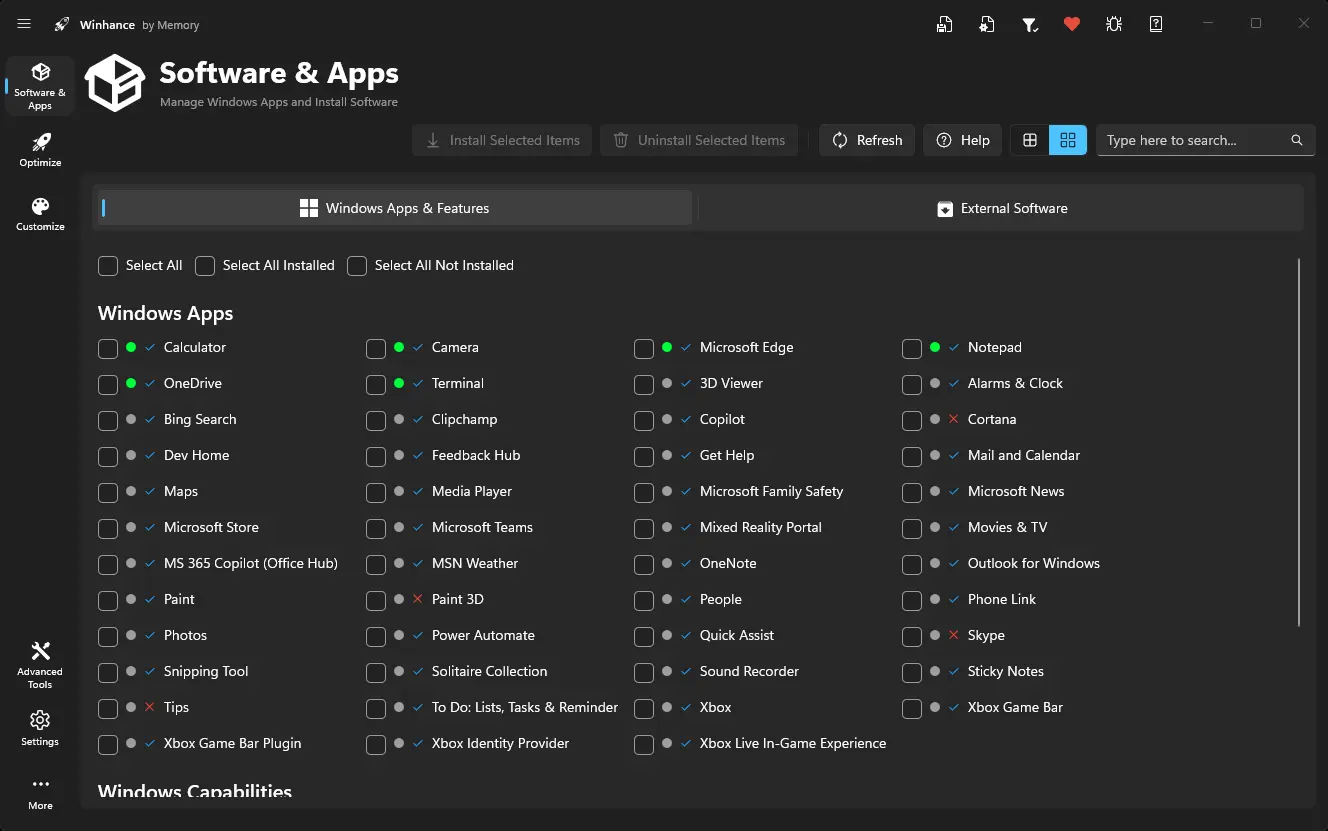
- Software Management – Install/remove Windows apps and optional features.
- External Apps Installation – Deploy essential apps via WinGet integration.
- Configuration Management – Save, export, and import Winhance settings easily.
- Automation with WIMUtil – Create custom Windows ISOs with integrated settings.
- Autounattend.xml Generator – Automate Windows installations with preconfigured options.
- Driver Integration – Include current system drivers in custom ISOs.
- Non-Destructive Changes – Reversible settings with clear explanations in the GUI.
Winhance 26.05.22 changelog:
Features
- App icons throughout Software & Apps. Windows Apps and External Apps now show real product icons instead of generic placeholders. Icons are resolved automatically from installed app packages, app binaries, WinGet, and the Microsoft Store, then cached locally so they load instantly on later visits.
- New view modes for Software & Apps. Alongside the existing compact and table views, you can now switch to a Card view to browse apps the way you prefer.
- Refreshed status badges in Software & Apps. The install-status badges and icons across Windows Apps and External Apps now use a single, modernized style.
- System Restore toggle. A new toggle in Optimize lets you enable or disable Windows System Restore (System Protection) directly from Winhance.
- DNS over HTTPS. The DNS Server setting now includes DNS-over-HTTPS options for encrypted DNS lookups.
- Disable Autoplay toggle. A new Explorer customization turns Autoplay off, and restores the Windows default when switched back.
- More granular control. Hardware Overlays and the Telephony Service have each been split into their own settings so you can control them independently.
- New external apps. Playnite has been added to the Gaming category, and App Installer is now available under Windows Apps.
- Persian (Farsi) language support, with right-to-left text rendering fixes for both Persian and Arabic.
Bug Fixes
- Fixed the Windows Apps tab occasionally getting stuck on a loading spinner because of startup race conditions.
- Fixed settings incorrectly showing a "Custom" badge on a fresh Windows install — settings with no value set in the registry now correctly resolve to their default option.
- Fixed the Import Config button staying disabled after exiting config review mode.
- Removed a faulty internet-connection check that could block app installs even when you were online.
- Large app installs no longer time out prematurely — the timeout now tracks installer activity instead of a fixed time limit.
- Winhance now detects and can uninstall external apps that were installed from the Microsoft Store.
- Winhance no longer offers to reinstall Microsoft Store apps that Microsoft has retired.
- Quick Actions and the per-card "Reset to Defaults" now use the same logic and behave identically.
- Home and Gallery are now correctly hidden from the Explorer navigation pane on Windows 11 25H2.
- Fixed Start Menu Bing Search not being disabled on Windows 11 25H2.
- Improved detection of XnView, Steam, and Visual C++ runtimes as installed external apps.
- Fixed Russian navigation labels overflowing the sidebar buttons.
- Fixed text rendering in the Power > Multimedia settings.
- Fixed a locale-dependent issue with power-setting values on systems that use non-English number formats.
- Improved Narrator and keyboard accessibility across Software & Apps, Power Plan, the sidebar navigation, WimUtil, and quick-set buttons.
- WimUtil now auto-expands the remaining steps once ISO extraction finishes.
- Cleared stale Chocolatey records and improved handling of bundled metapackages.
- Fixed the broken License link.
Improvements
- PowerShell-based settings now run in-process instead of launching an external PowerShell session — faster, more reliable, and with no dependency on the system's PowerShell.
- Winhance now uses its bundled WinGet by default for installs and uninstalls, so it works consistently even when the system's WinGet is missing or outdated.
- Winhance now has a warning label for uninstalling items like Microsoft Edge and App Installer, since removing it can destabilize Windows.
- Improved detection of apps installed via WinGet, Chocolatey, and Windows app packages.
Download: Winhance 26.05.22 | 61.1 MB (Open Source)
Links: Winhance Website | Github | Screenshot
 Get alerted to all of our Software updates on Twitter at @NeowinSoftware



















0 Comments
Load the comments and join the conversation!
Read the comments, ask the editors questions, show respect and join the conversation.