If you read Neowin regularly, you may have seen our GEEKOM A9 Max review dropped around two weeks ago. The one major thing that held it back was the fact that it is shipping with just one memory stick (DIMM) of 32GB DDR5 SODIMM. This is important because to fully utilize the onboard graphics' capabilities, two RAM sticks are required to achieve full memory bandwidth.
As a refresher, a single DDR5 stick splits its 64-bit data bus into two independent 32-bit sub-channels; using two sticks opens up the full 128-bit wide memory bus, maximizing the data transfer rates between your RAM and CPU or iGP.
I said near the end of the review that I would revisit this mini PC with a second 32GB memory stick, which is also the ideal configuration for it, since most of our benchmarks performed even worse than the 2024 A9 Max, which included a Ryzen AI 9 HX 370, but much more importantly the 2024 Edition had 32GB of Dual Channel DDR5 memory (2x16G).
As a reminder, here are the A9 Max 2026 Edition's full specifications, including the updated 64GB of memory:
| GEEKOM A9 Max 2026 Edition | ||
|---|---|---|
|
Dimensions |
|
|
| Size | 135 × 132 × 46.9 mm (W × D × H) 5.32 x 5.2 x 1.8 inches | |
|
Weight |
690 g (self-weighed) | |
|
CPU |
AMD Ryzen AI 9 HX 470, 12C, 24T (Base 2.0 GHz, Boost 5.2 GHz) 24 MB L3 Cache, TDP: 28W, cTDP: 54W |
|
|
Graphics |
AMD Radeon 890M (16 CU's, 3000 MHz) | |
| NPU | 55 TOPS (dedicated) with a combined 86 TOPS | |
|
Memory |
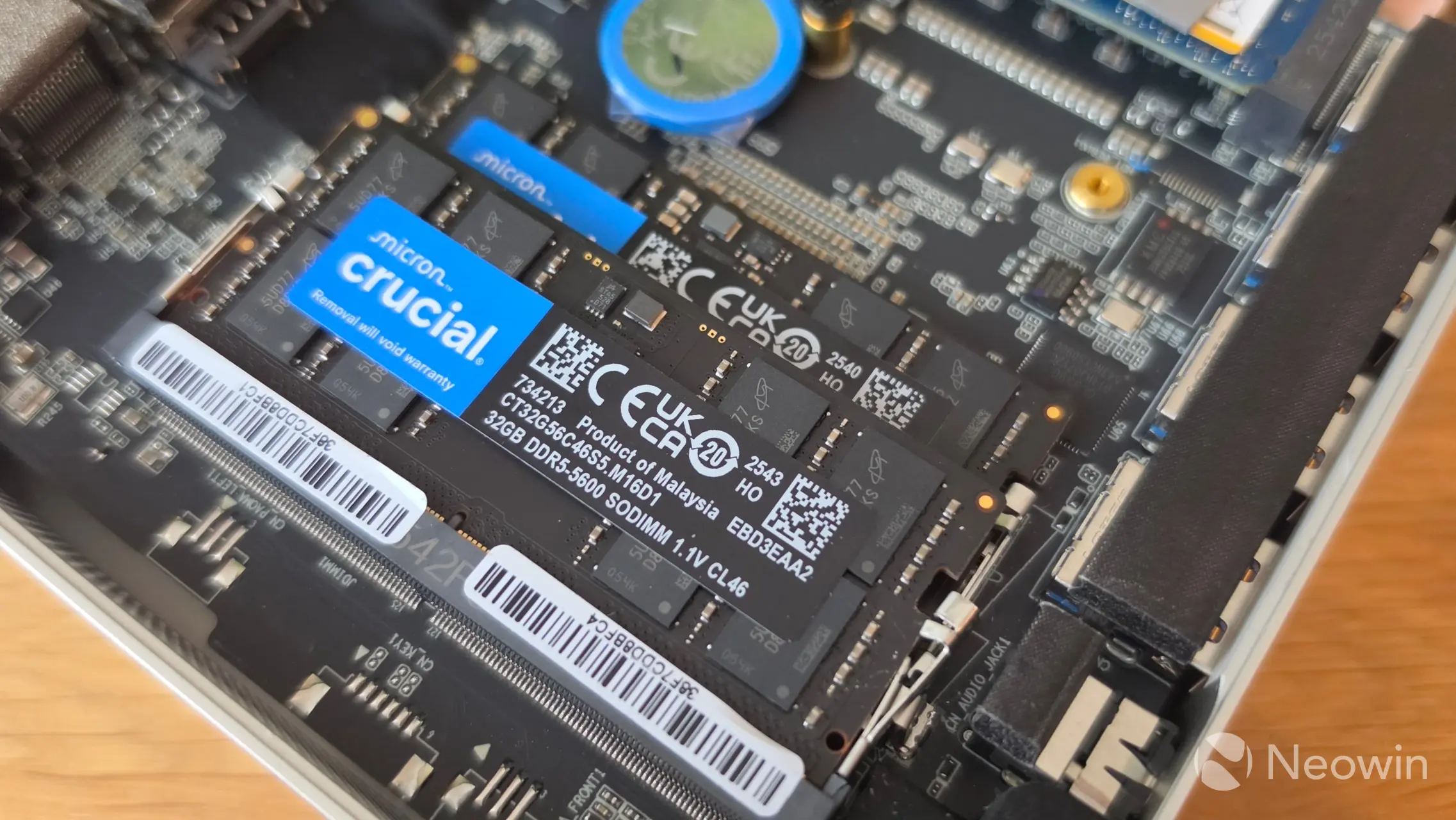
2 x Crucial CT32G56C46S5 32GB DDR5-5600 SODIMM (up to 128GB) | |
|
Storage |
1 x M.2 2280 PCIe Gen 4 x4, Kingston OM8TAP42048K1-A00 2TB 1 x M.2 2230 PCIe Gen 4 x4, Unpopulated |
|
| Audio | HDA CODEC | |
|
Operating System |
Windows 11 Pro 25H2 | |
|
Bluetooth |
Bluetooth v5.4 | |
|
Ethernet |
Intel® 10/100/1000/2500 Mbps RJ45 Ethernet | |
|
Wireless LAN |
MediaTek MT7925 M.2 Wi-Fi 7 LAN card | |
|
|
|
|
|
Rear I/O ports |
1 × USB 3.2 Gen 2 Type-A 1 × USB 2.0 Type-A 1 × USB 4.0 Type-C DP-Alt-Mode / PD-In 1 × USB 4.0 Type-C DP-Alt-Mode, 2 × Ethernet RJ45 2.5 Gbit/s 2 × HDMI 2.1 FRL 1 × DC-In |
|
| Front I/O ports | 3 × USB 3.2 Gen 2 Type-A 1 × USB 3.2 Gen 2 Type-A Always On 1 × 3.5 mm headphone jack |
|
| SD Card slot | 1 × SD card reader 4.0 | |
| Kensington Lock | Yes | |
| Power | 19V, (120W External PSU) | |
| Certification | CE, FCC, CB, CCC, SRRC, RoHS | |
| Warranty | 3 years | |
|
MSRP |
$1,799 (with 32GB) | |
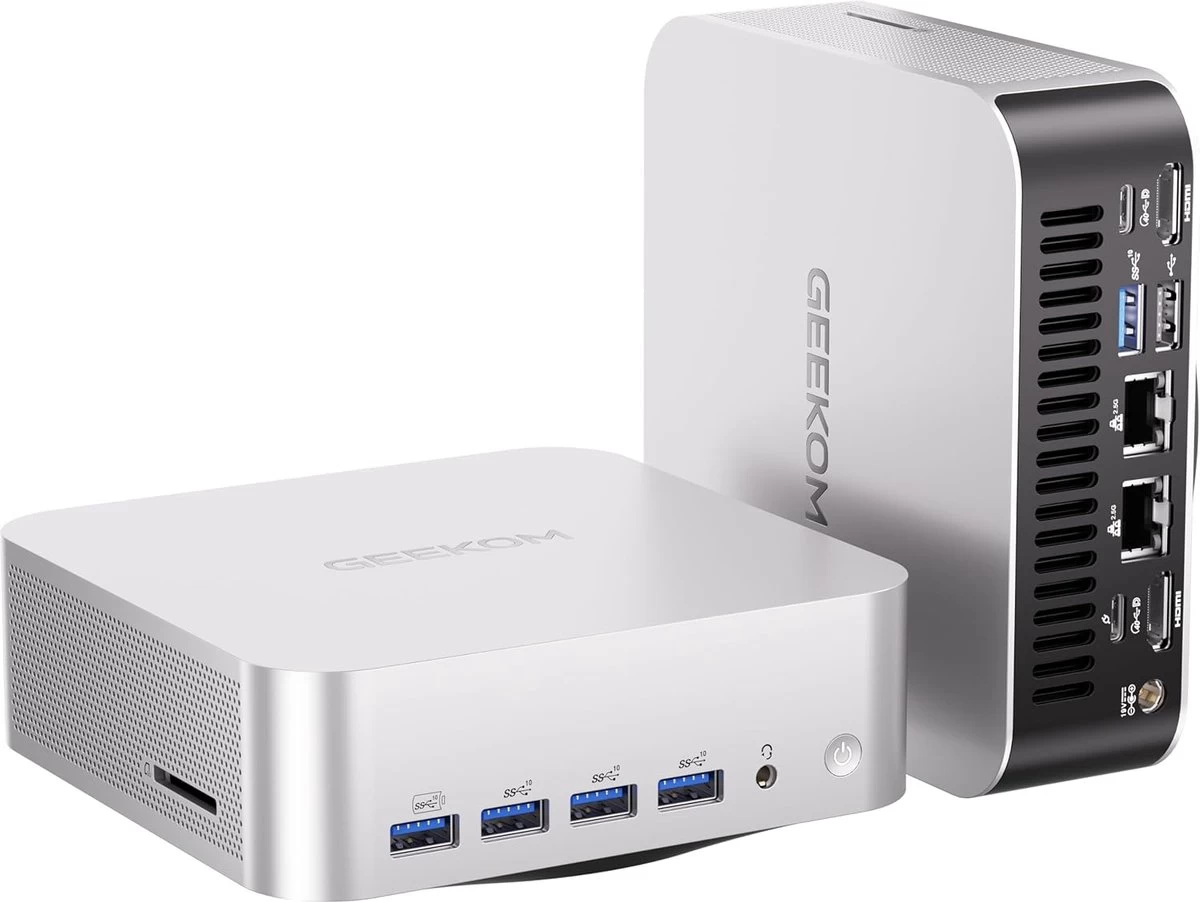
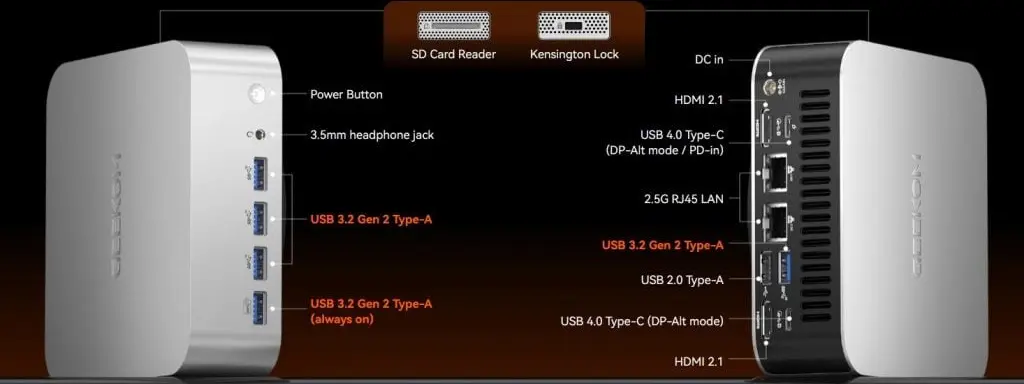
To be clear, GEEKOM does not offer the A9 Max 2026 Edition with 64GB. My contact at the company provided the extra 32GB so we could run the benchmarks again in the optimal conditions of the hardware.
Introduction
The A9 Max 2026 Edition is powered by the January-released AMD Ryzen AI 9 HX 470 mobile CPU built on the Zen 5 architecture with Socket FP8. Thanks to AMD Simultaneous Multithreading (SMT), the 12-core count is effectively doubled, to 24 threads. It runs at a base speed of 2.0 GHz and can boost to a max turbo frequency of 5.2GHz. However, overclockability is limited on this chip since the multiplier is locked.
On the graphics front, the HX 470 includes a Radeon 890 M integrated GPU with a max GPU frequency of 3000 MHz across 16 cores. It has been said that the iGPU is equivalent to the NVIDIA GeForce GTX 1650 in gaming and synthetic benchmarks. On the AI front, the HX 470 features a dedicated NPU (55 TOPS) and is rated at up to 86 TOPS, combining CPU cores, GPU cores, and NPU. Other highlights include DDR5 memory at 5600 MT/s, WiFi 7, Bluetooth 5.4, an SD card slot, and a Kensington Lock.
AI PC?
This qualifies as a Copilot+ PC thanks to the dedicated NPU delivering up to 55 TOPS, and as previously mentioned, with help from the CPU and iGPU cores, it is capable of a combined 86 TOPS.
Usage
BIOS
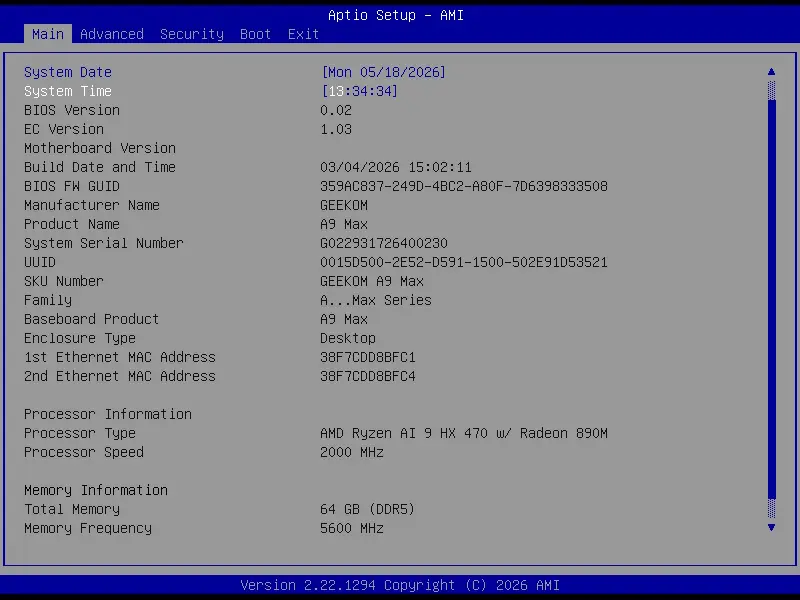
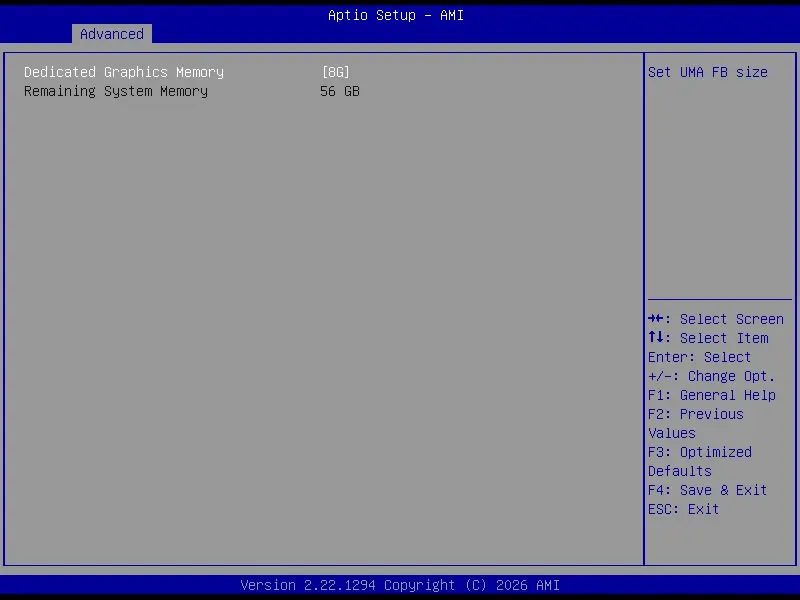
The A9 MAX 2026 Edition includes an AptiBIOS, which is not locked down; you can edit it to your heart's content, here it is showing off the 64GB in Main, and I set the 890M iGPU to 8GB shared memory, because after doing a search it was recommended that the sweet spot for the integrated graphics is between 4-8GB with more than 32GB installed.
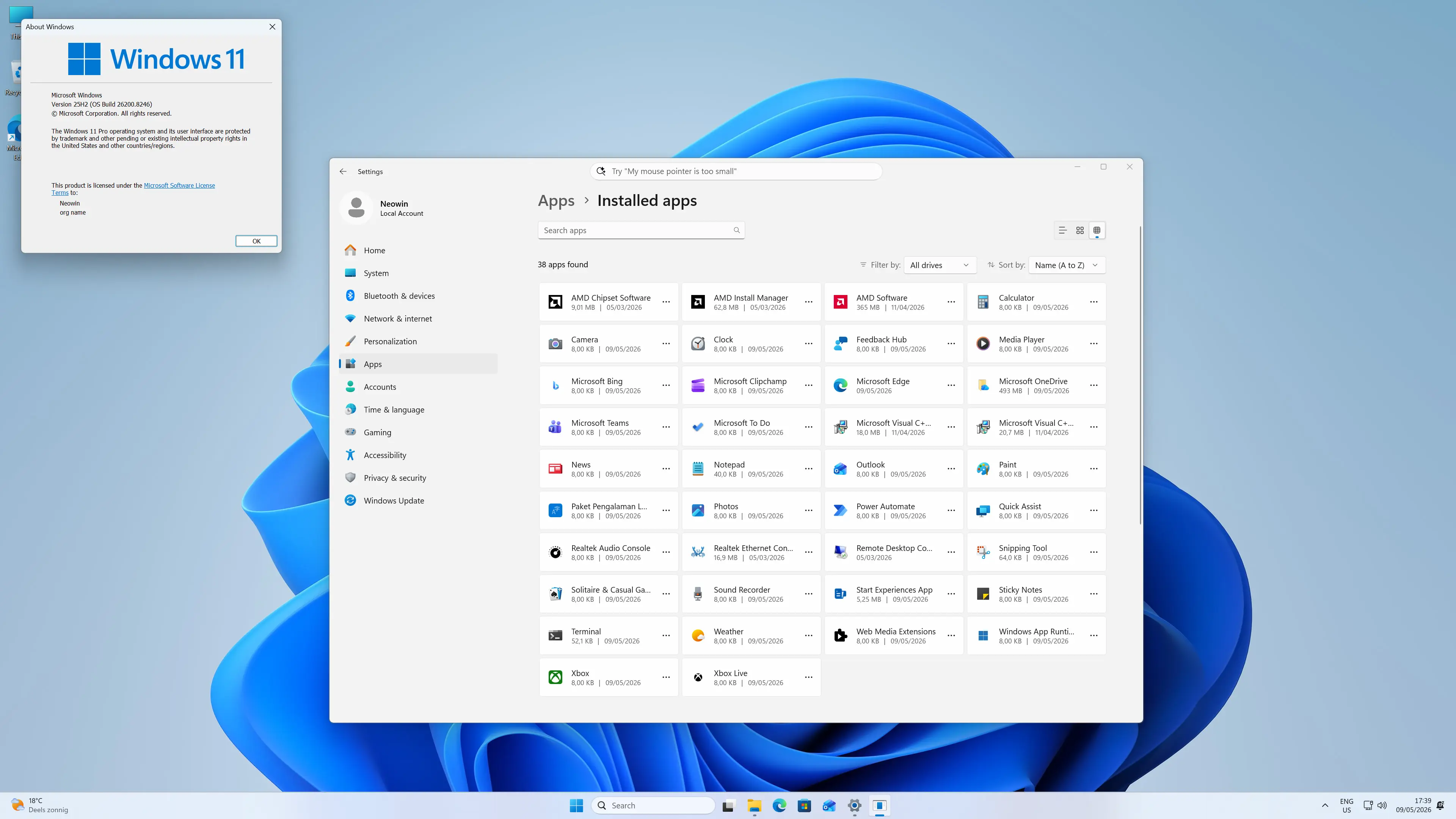
On first boot, you are prompted to complete the setup of Windows 11 Pro, meaning you do not have to fork out for a license, which is nice. After the setup is finished, I am happy to report that it does not come with any bloatware installed. The OOBE also installs several updates to Windows 11 25H2, so the updates were relatively minimal.
Benchmarks
With all that out of the way, I reran the benchmarks and added the HX 370-powered A9 MAX for comparison. The A9 Max 2026 Edition is running Windows 11 Professional 25H2 build with the latest (May 2026) updates, and the latest AMD Graphics and Chipset drivers (26.5.2 and 8.02.18.557).
I checked GEEKOM's support page for driver downloads or a BIOS update, but the A9 MAX 2026 Edition is still not listed there yet.
For the benchmarks, I used Cinebench 2024, Cinebench 2026, 7-Zip, AS SSD, and CrystalDiskMark. 3DMark, PCMark 10, Procyon (Windows ML for CPU and GPU, and Intel OpenVINO for NPU) was provided to Neowin by UL Solutions; Primate Labs Inc. provided us with commercial versions of Geekbench 6, and Geekbench AI.
3DMark Time Spy tests gaming capability with DX12 graphics performance. PCMark tests are a mix of CPU and real-world productivity tests, such as using an office suite, web browsing, light photo/video editing, and making conference calls. Cinebench stresses the entire CPU as it is a multi-threaded rendering test. Geekbench is a synthetic benchmark that is great for a quick look at the potential performance across a wide range of workloads.
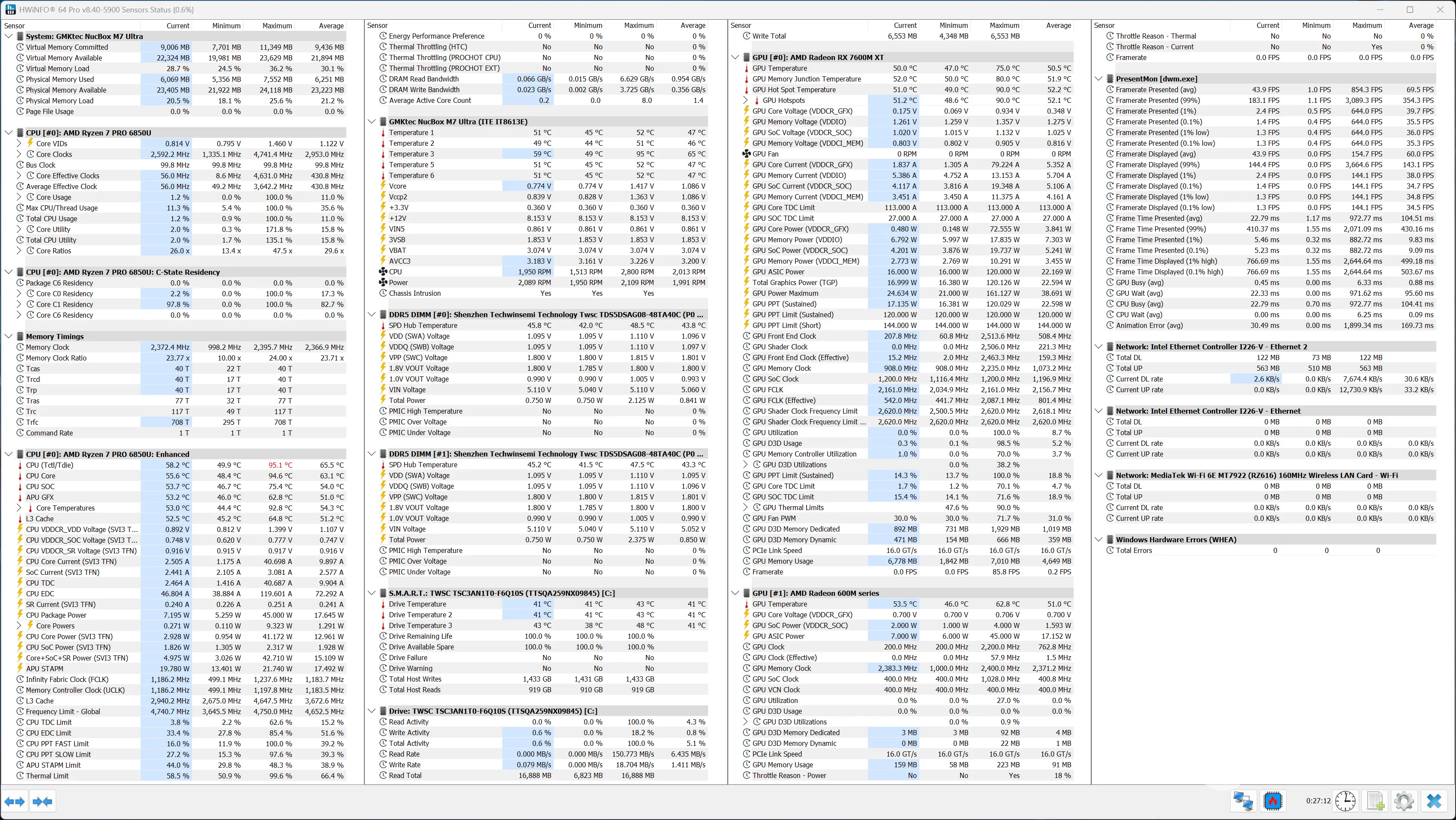
I also used HWiNFO to monitor hardware sensors and temperature readings.
| GEEKOM A9 MAX 2026 Edition |
64GB Dual Channel Ryzen AI 9 HX470 64GB |
32GB Single Channel Ryzen AI 9 HX470 32GB |
A9 MAX (2024) Ryzen AI 9 HX370 |
|---|---|---|---|
| 3DMark: Time Spy Steel Nomad Light Steel Nomad Fire Strike Wild Life |
4,149 3,579 752 8,711 22,345 |
2,295 2,042 391 4,928 11,803 |
3,732 3,293 518 8,579 20,773 |
| PCMark 10: Standard Extended test |
9,300 8,856 |
8,596 7,342 |
7,762 7,675 |
|
(CV 1.0) Windows ML CPU |
117 255 1,901 |
105 167 1,491 |
129 255 788 |
| (CV 2.0) Windows ML NPU Windows ML GPU AMD Ryzen AI NPU |
1,163 362 1,164 |
856 212 866 |
- - - |
| Geekbench 6: Single Multicore Compute (OpenCL) Compute (Vulkan) |
2,980 15,379 43,142 49,663 |
2,922 11,706 32,986 33,647 |
2,885 15,196 39,233 |
| Geekbench AI |
Single, Half, Quantized |
Single, Half, Quantized |
Single, Half, Quantized |
| ONNX CPU ONNX DirectML OpenVINO CPU |
4083, 2015, 7779 7883, 13634, 5731 5993, 6054, 15774 |
3619, 1850, 7222 5207, 10398, 3820 5118, 5074, 14735 |
4229, 2100, 7774 7596, 12469, 5730 6197, 6177, 16420 |
| Cinebench 2024: Single Core Multi Core |
120 1,192 |
120 1,048 |
120 1,146 |
| Cinebench 2026: Single Core Multi Core |
662 4,926 |
652 4,472 |
|
| 7-Zip | 123,984 | 110,999 | 123,551 |
(CV 1.0) = Procyon Computer Vision test (CV 2.0) = Procyon Computer Vision 2.0 test
Geekbench AI scores are in the following order (left to right): Single Precision, Half Precision, Quantized.
To my surprise, 3DMark and Procyon did not hang once on the "Collecting System Info" task before running a benchmark, like I experienced while running the same tests with 32GB of single-channel RAM; it's even more surprising considering there have been no updates to those programs since I last used them just two weeks ago. I wondered if this somehow made the difference? In any case, I reported my findings to my contact at UL Solutions; hopefully, they will be able to confirm if this is indeed the case.
Below is a table showing the actual increase for each benchmark between a single DIMM stick and dual DIMM sticks:
| Benchmark | 32GB Single Stick | 64GB Dual Stick | % Increase |
|---|---|---|---|
| 3DMark: Time Spy | 2,295 | 4,149 | 80.8% |
| 3DMark: Steel Nomad Light | 2,042 | 3,579 | 75.3% |
| 3DMark: Steel Nomad | 391 | 752 | 92.3% |
| 3DMark: Fire Strike | 4,928 | 8,711 | 76.8% |
| 3DMark: Wild Life | 11,803 | 22,345 | 89.3% |
| PCMark 10: Standard | 8,596 | 9,300 | 8.2% |
| PCMark 10: Extended test | 7,342 | 8,856 | 20.6% |
| (CV 1.0) Windows ML CPU | 105 | 117 | 11.4% |
| (CV 1.0) Windows ML GPU | 167 | 255 | 52.7% |
| (CV 1.0) OpenVINO NPU | 1,491 | 1,901 | 27.5% |
| (CV 2.0) Windows ML NPU | 856 | 1,163 | 35.9% |
| (CV 2.0) Windows ML GPU | 212 | 362 | 70.8% |
| (CV 2.0) AMD Ryzen AI NPU | 866 | 1,164 | 34.4% |
| Geekbench 6: Single | 2,922 | 2,980 | 2.0% |
| Geekbench 6: Multicore | 11,706 | 15,379 | 31.4% |
| Geekbench 6: Compute (OpenCL) | 32,986 | 43,142 | 30.8% |
| Geekbench 6: Compute (Vulkan) | 33,647 | 49,663 | 47.6% |
| Geekbench AI: ONNX CPU (S) | 3619 | 4083 | 12.8% |
| Geekbench AI: ONNX CPU (H) | 1850 | 2015 | 8.9% |
| Geekbench AI: ONNX CPU (Q) | 7222 | 7779 | 7.7% |
| Geekbench AI: ONNX DirectML (S) | 5207 | 7883 | 51.4% |
| Geekbench AI: ONNX DirectML (H) | 10398 | 13634 | 31.1% |
| Geekbench AI: ONNX DirectML (Q) | 3820 | 5731 | 50.0% |
| Geekbench AI: OpenVINO CPU (S) | 5118 | 5993 | 17.1% |
| Geekbench AI: OpenVINO CPU (H) | 5074 | 6054 | 19.3% |
| Geekbench AI: OpenVINO CPU (Q) | 14735 | 15774 | 7.1% |
| Cinebench 2024: Single Core | 120 | 120 | 0.0% |
| Cinebench 2024: Multi Core | 1048 | 1192 | 13.7% |
| Cinebench 2026: Single Core | 652 | 662 | 1.5% |
| Cinebench 2026: Multi Core | 4472 | 4926 | 10.2% |
| 7-Zip | 110999 | 123984 | 11.7% |
It is clear from the above data that memory bandwidth is crucial for such APUs, as the on-board graphics otherwise gets bottlenecked. We saw nearly a doubling of performance in the instance of 3DMark's Steel Nomad, which tests rasterization. Its "Light" version also sees a decent uplift despite not being as graphically demanding.
Aside from synthetic gaming benchmarks, AI performance in Computer Vision also improves substantially when the iGP is utilized. The CPU also sees some significant gains.
The two results that surprised us are the Z-Zip one and Cinebench. Typically, compression and decompression workloads benefit from memory bandwidth, but in this case, we only saw an 11% increase. Cinebench, though, rarely sees gains from system memory improvements, but in this case, on multi-core runs, we see both the 2024 and 2026 versions getting quite a lot better.
Browser Performance
Next up, I tested browsing performance using Speedometer 3.1. Speedometer provides a value and also a range showing the lowest and highest scores after three runs, as indicated in the chart below (best to worst) by the two scores for each browser.
| Browser rank | Low: 32GB / 64GB | High: 32GB / 64GB |
|---|---|---|
| Edge | 35.6 / 37.5 | 36.9 / 37.5 |
| Chrome | 35.6 / 34.8 | 36.8 / 37.3 |
| Firefox | 27.8 / 28.1 | 28.5 / 28.9 |
When testing with 32GB Single Channel memory, it was clear that Edge and Chrome left Firefox in the dust with 7.8 on the low and 8.4/8.3 on the high, respectively. There was no daylight between Chrome and Edge on the low, coming in with 35.6 together, while there's only a 0.1 difference on the high, giving Edge the win with 36.9.
When retesting with 64GB Dual Channel memory, the gains were marginal. Edge seemed to benefit the most with a consistent score of 37.5 on three runs, bettering its score on the low by 1.9 on the low and 0.5 on the high. Chrome lost 0.8 points on the low, but gained half a point on the high. Firefox also fared better, gaining 0.3 on the low and 0.4 on the high.
Disk performance
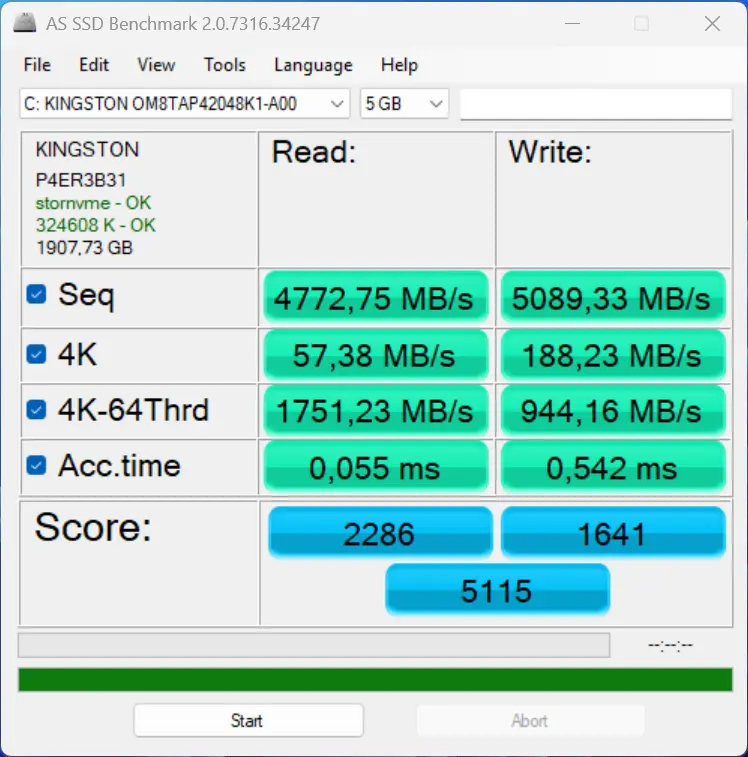
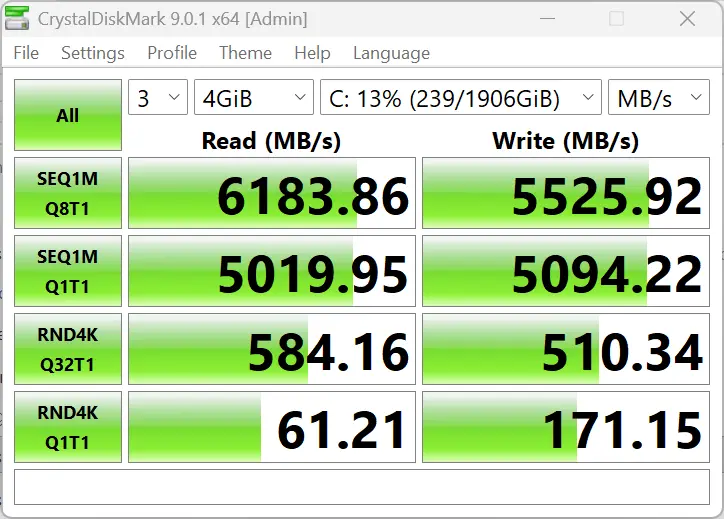
I retested the SSD's capability using AS SSD and CrystalDiskMark with Dual Channel RAM.
| AS SSD | CrystalDiskMark |
|---|---|
|
|
|
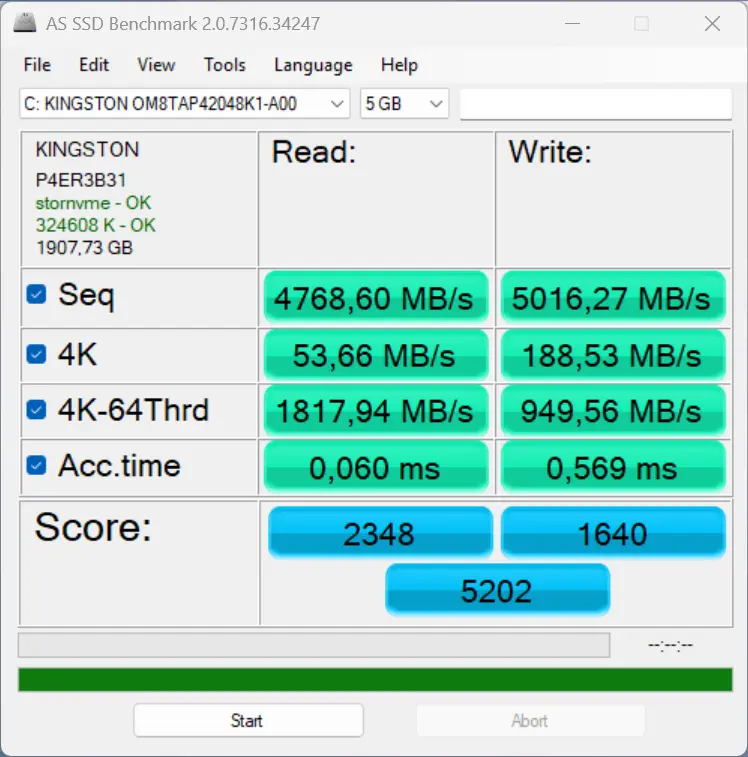
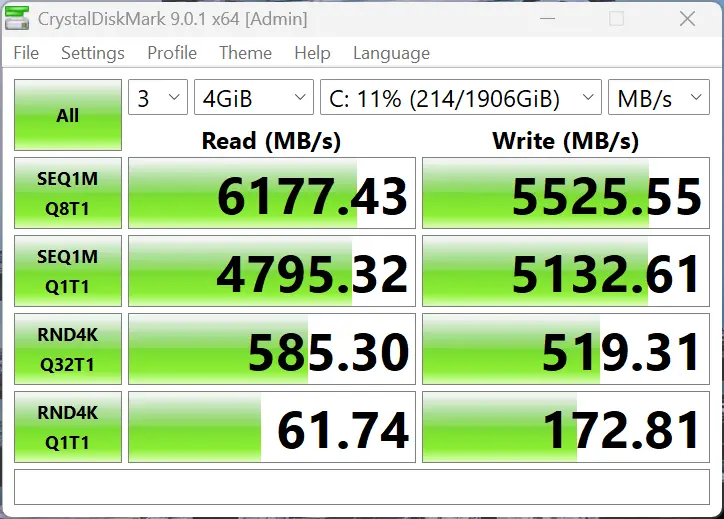
The A9 Max 2026 Edition comes with a 2TB Kingston OM8TAP42048K1-A00 2TB SSD, and it easily exceeds the official 6,100/5,400 MB/s read/write rating for the drive in CrystalDiskMark, but not so in AS SSD, though for some reason.
As expected, there wasn't much uplift at all compared to AS SSD + CrystalDiskMark with 32GB Single Channel RAM, since it mostly relies entirely on disk performance.
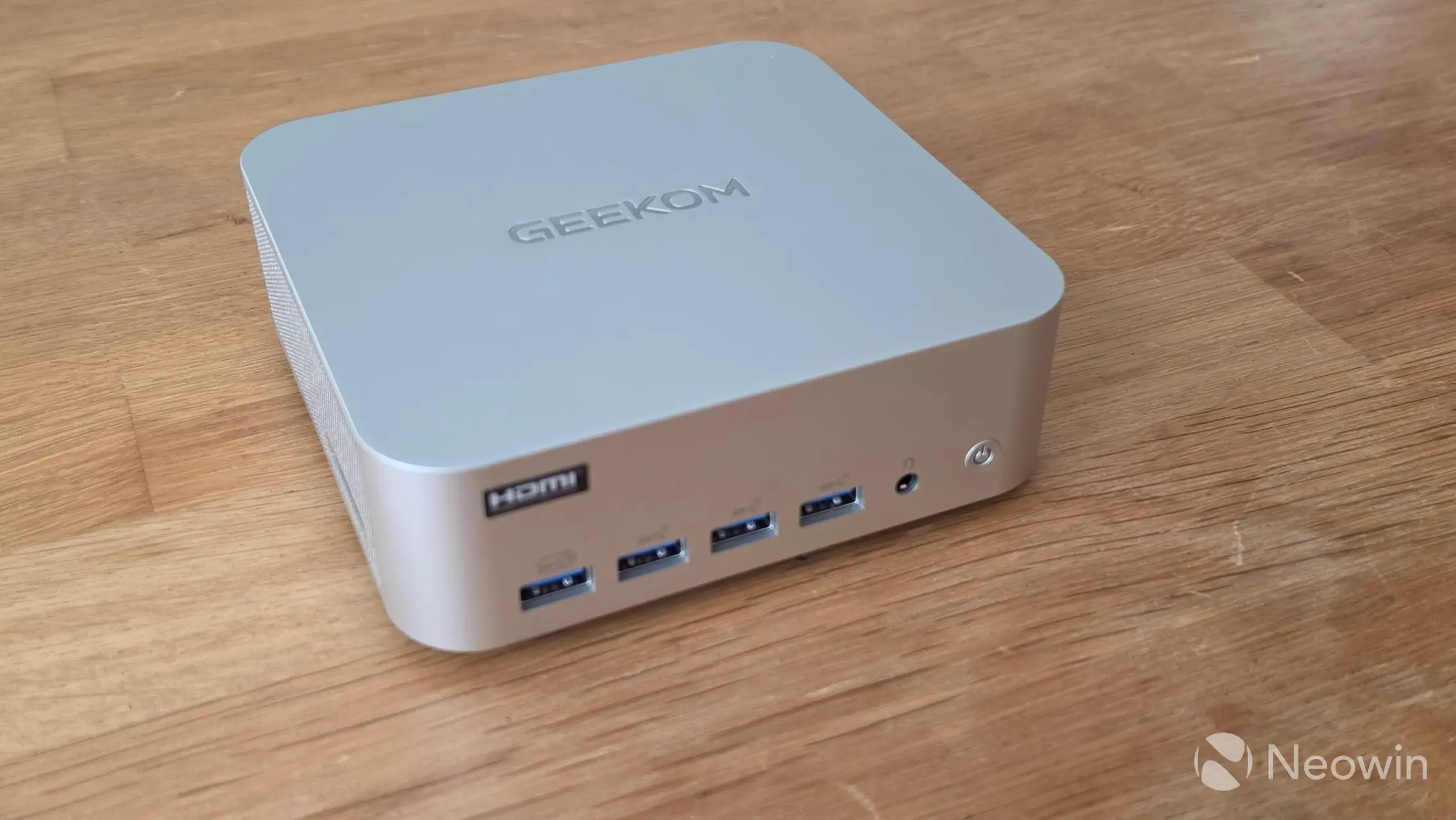
Despite running all of the above benchmark tests, the A9 Max 2026 Edition did not get hot (or even warm) to the touch, and no annoying noises were coming from the single fan that cools the unit. The Highest CPU temperature recorded was during the Cinebench 2026 CPU (Single Core) test, where the CPU Core reached 83.9 °C.
Real-world Gaming
We next test a real game to see how the doubling of the memory bandwidth helps in actual gaming.
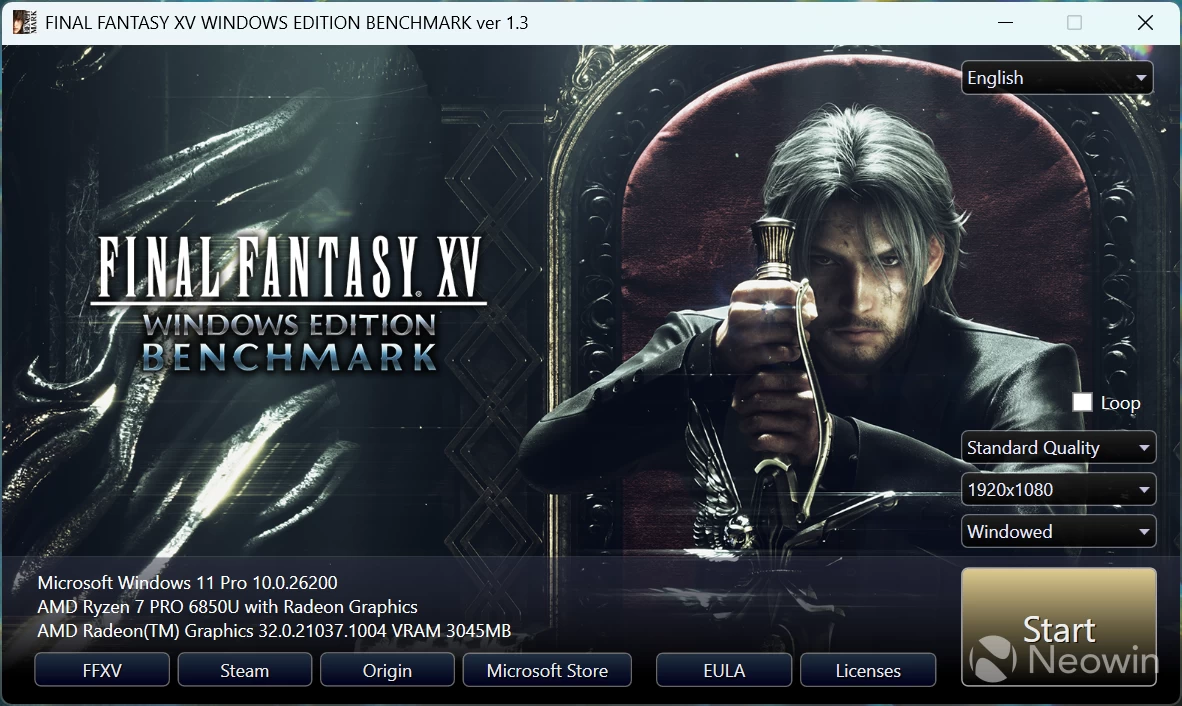
Final Fantasy XV
To gauge the capability of the 16CU Radeon 890M, I ran the standalone Final Fantasy XV Windows Edition Benchmark on different resolutions at the Standard Quality preset to see what kind of gaming performance one can expect from the onboard GPU.
The full scores are below, and are based on the settings detected for the game, which was Standard quality.
Final Fantasy V Benchmarks
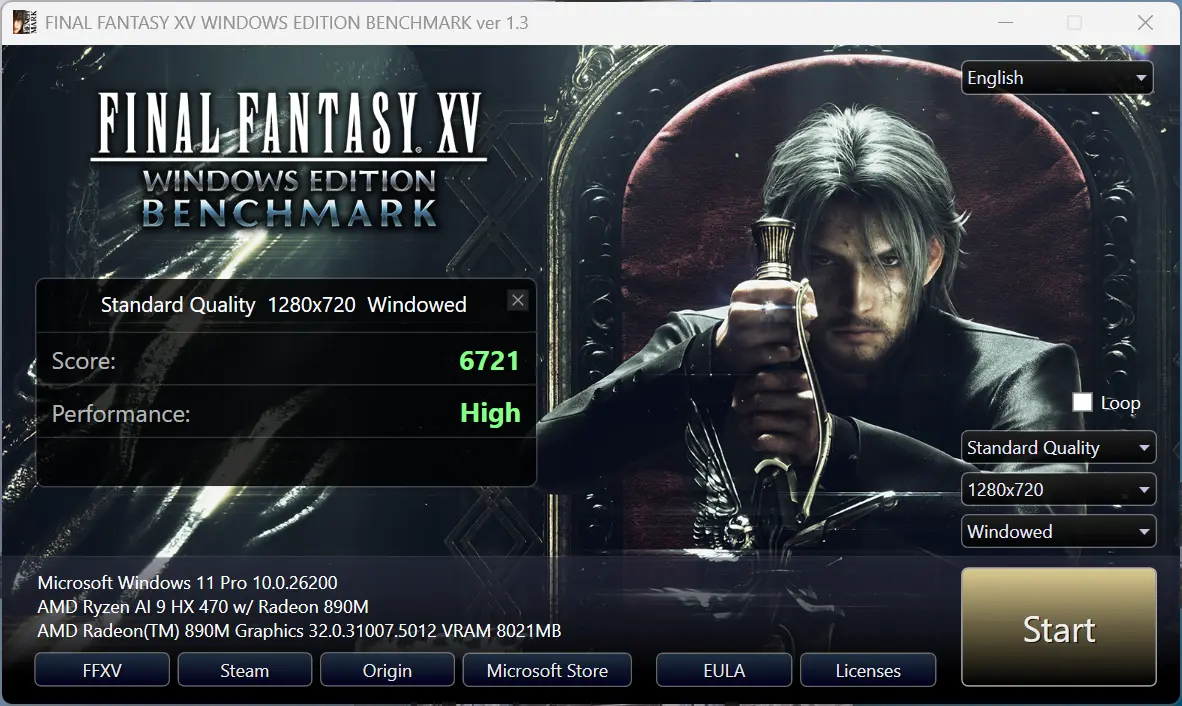
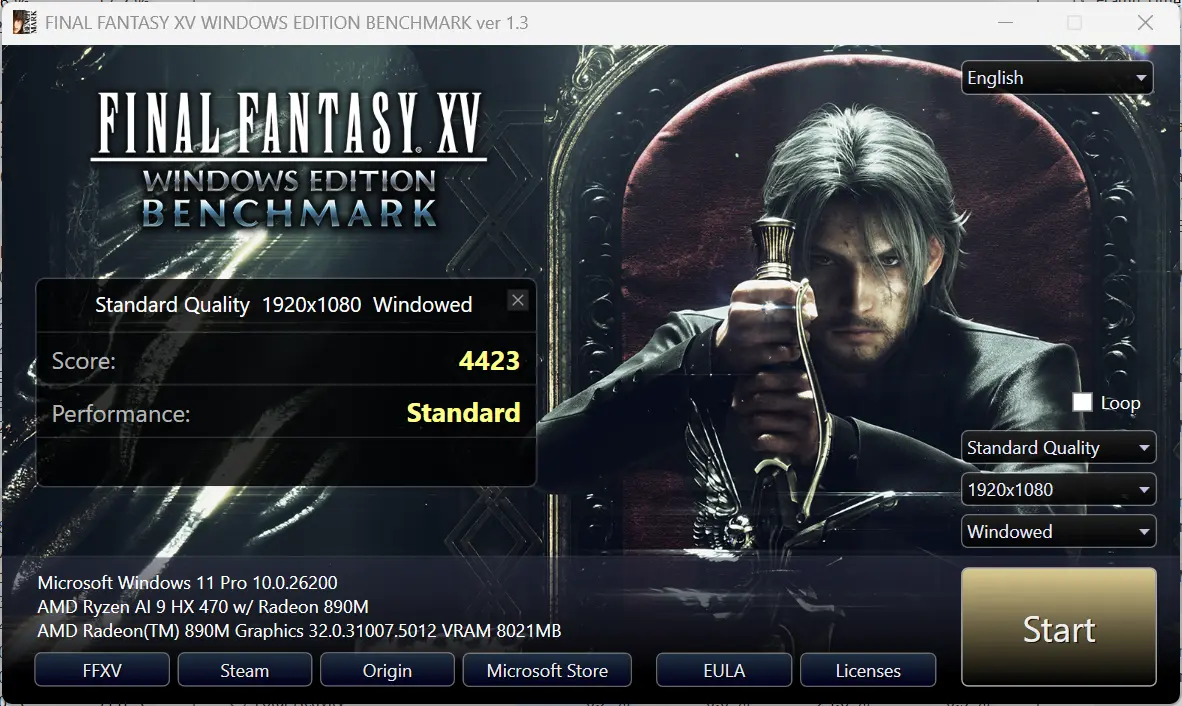
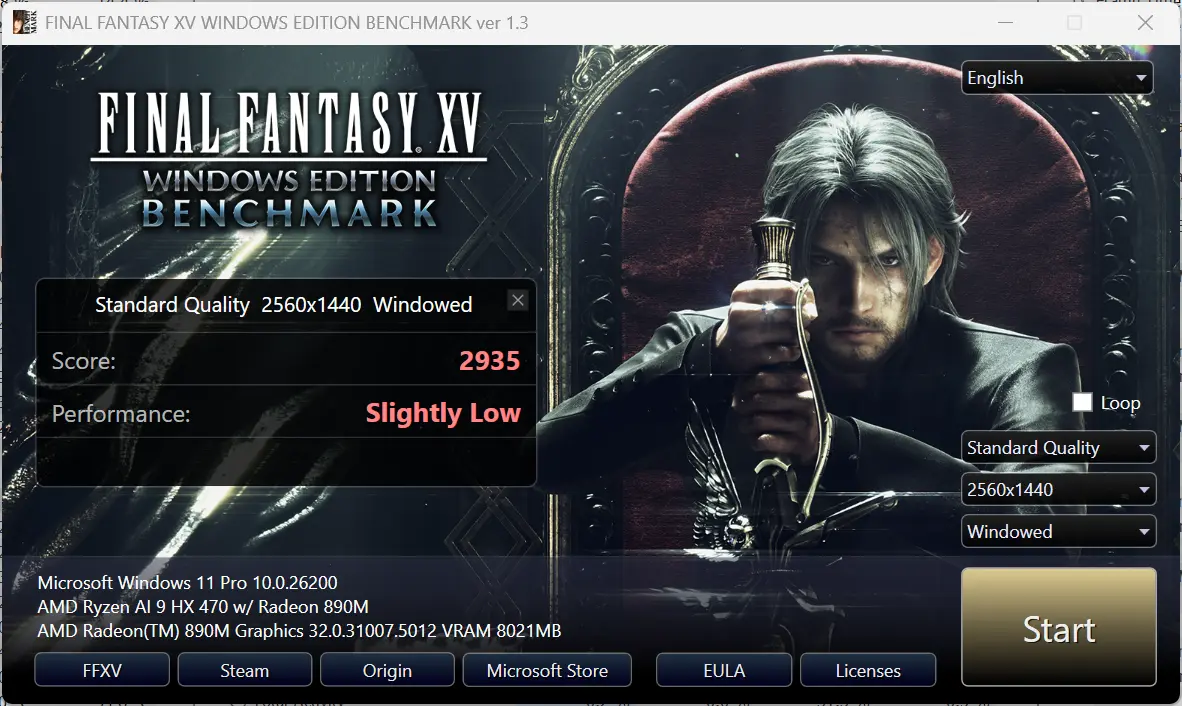
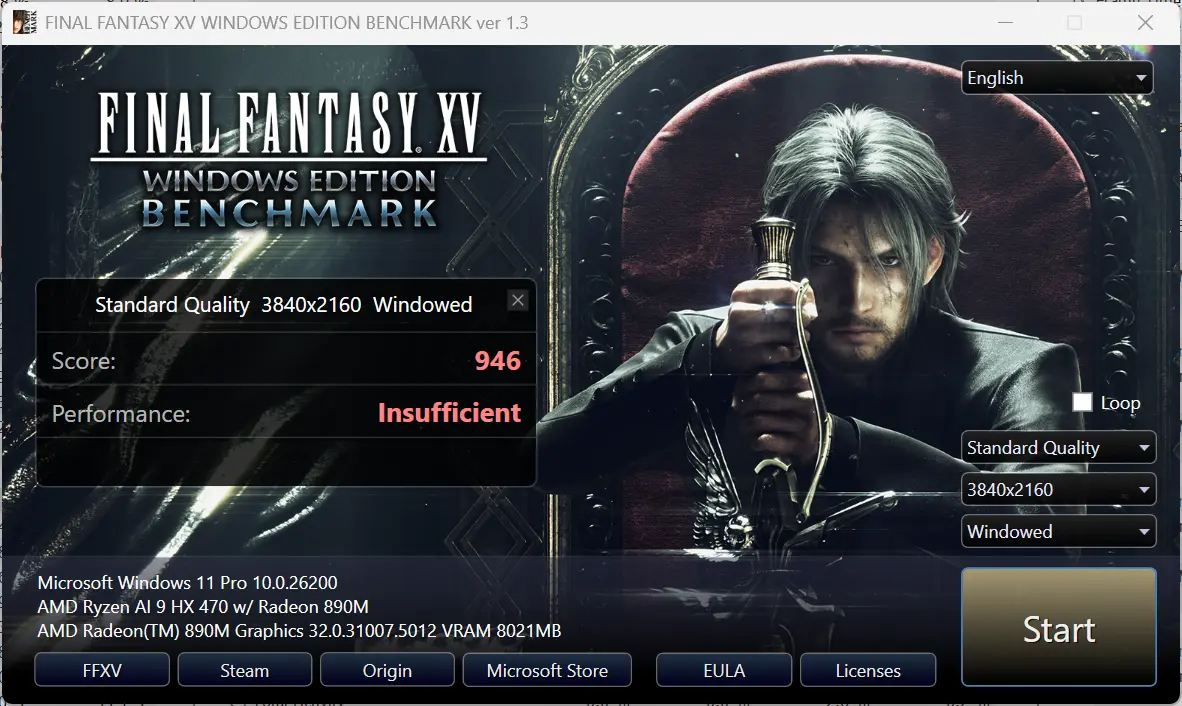
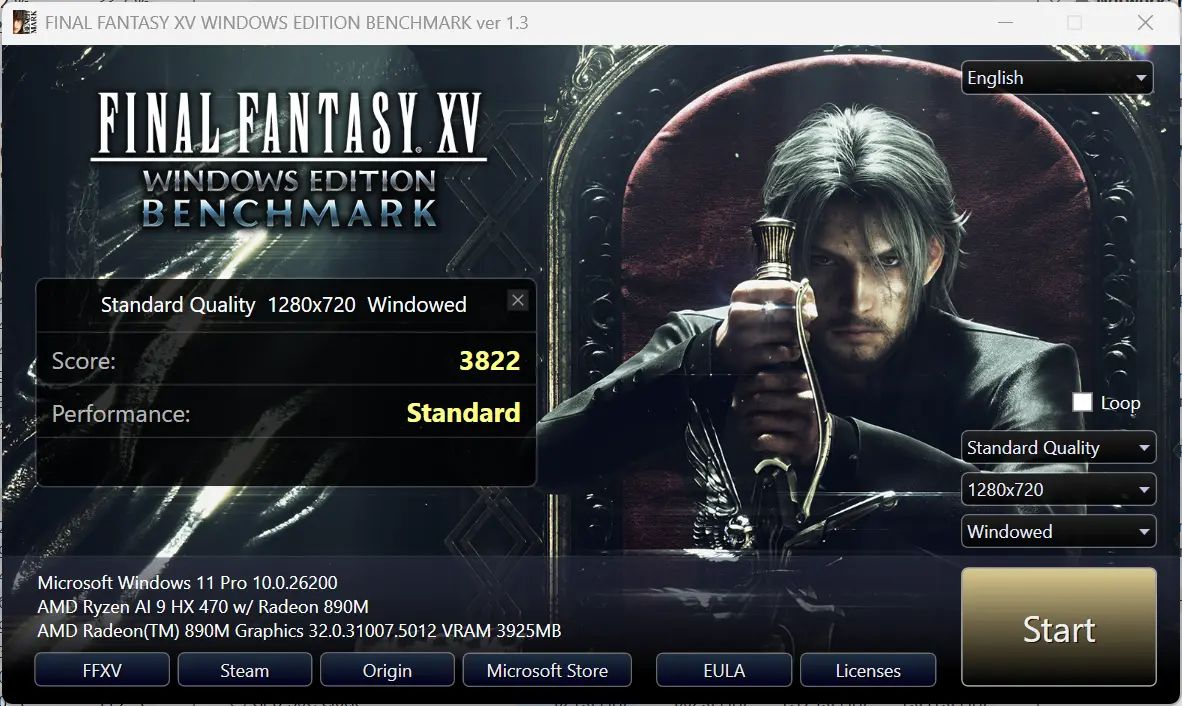
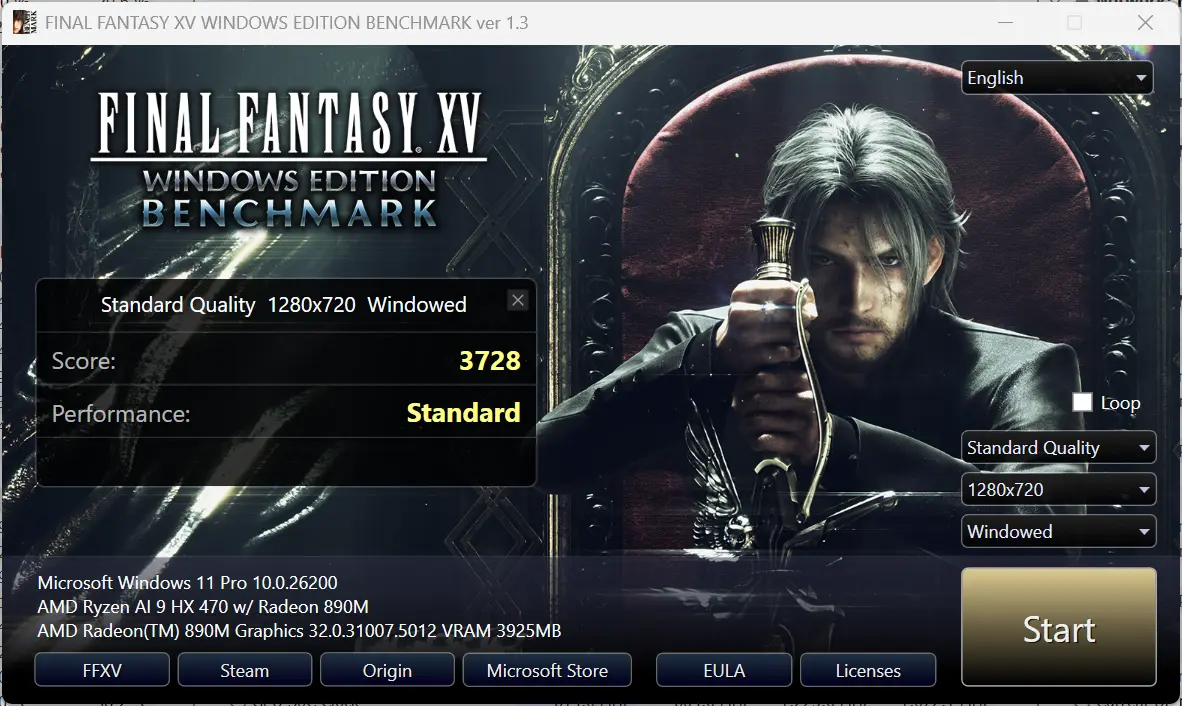
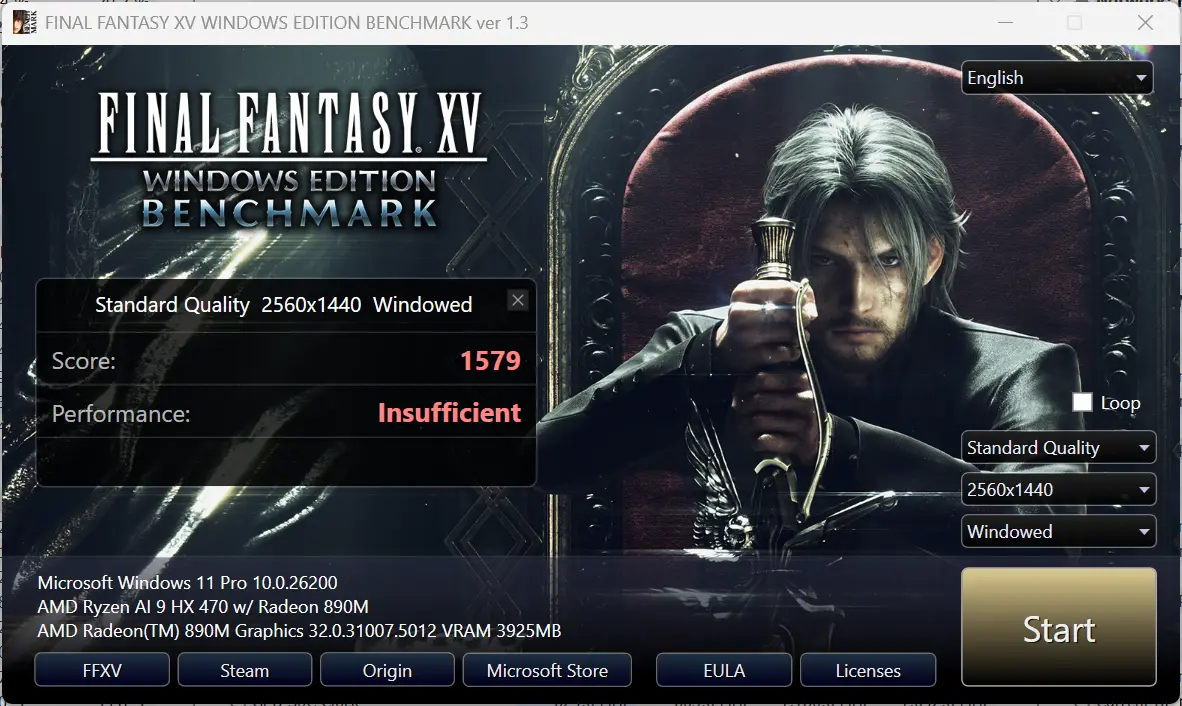
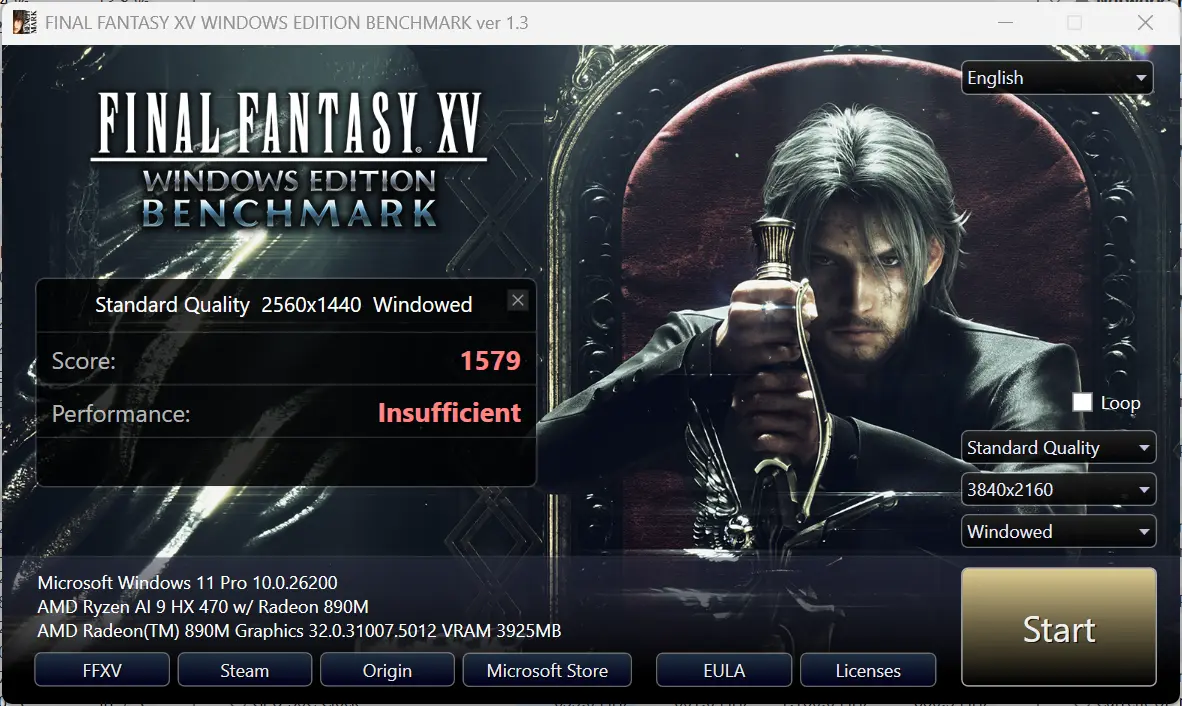
Again, we're using the single and dual DIMMs for comparison.
As far as heat goes, I measured the following:
| CPU | GPU | |
|---|---|---|
| 32GB (Single Channel) | 77°C | 72.5°C |
| 64GB (Dual Channel) | 82.4°C | 77.1°C |
As you can see, with dual-channel memory, it seems everything had to work a little harder and therefore was a bit hotter.

The scores are as we had expected. As the resolution goes up, the need for bandwidth also increases, more so than the need for pixel power crunching. As such, the 64 GB dual-DIMM A9 MAX keeps widening its gap over the 32GB configuration. While at 720p the former is 76% better, by the time we get to 4K, that split increases to 96%.
Heat
Despite running all of the above benchmark tests, the A9 Max 2026 Edition did not get noticeably warm on the outer shell. The Highest CPU temperature recorded was during the PCMark test, where the GPU Core reached 95.1 °C.
Infrared thermal imaging
| Top | Bottom |
|---|---|
|
|
|
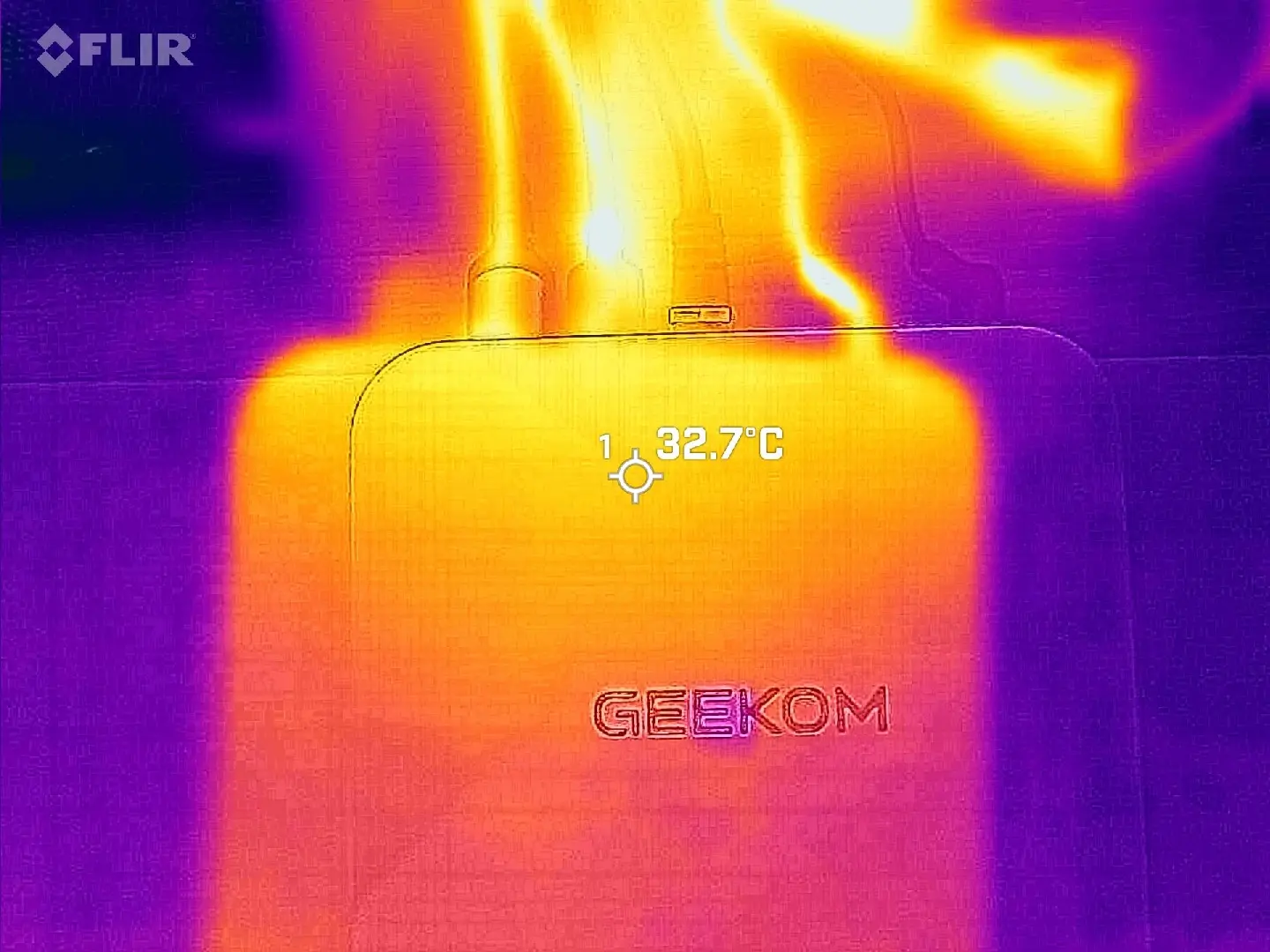

Regarding heat, I measured a slight increase on the top at 32.7°C, and around the same on the bottom at 32.6°C in Dual Channel mode. That was a slight bump from the 27.7°C measured while I was pointing my FLIR ONE Gen 3 thermal camera at a hotspot on the bottom during the same TimeSpy benchmark test, with a more uniform 24.8°C across the top of the A9 Max in Single Channel mode.
Conclusion
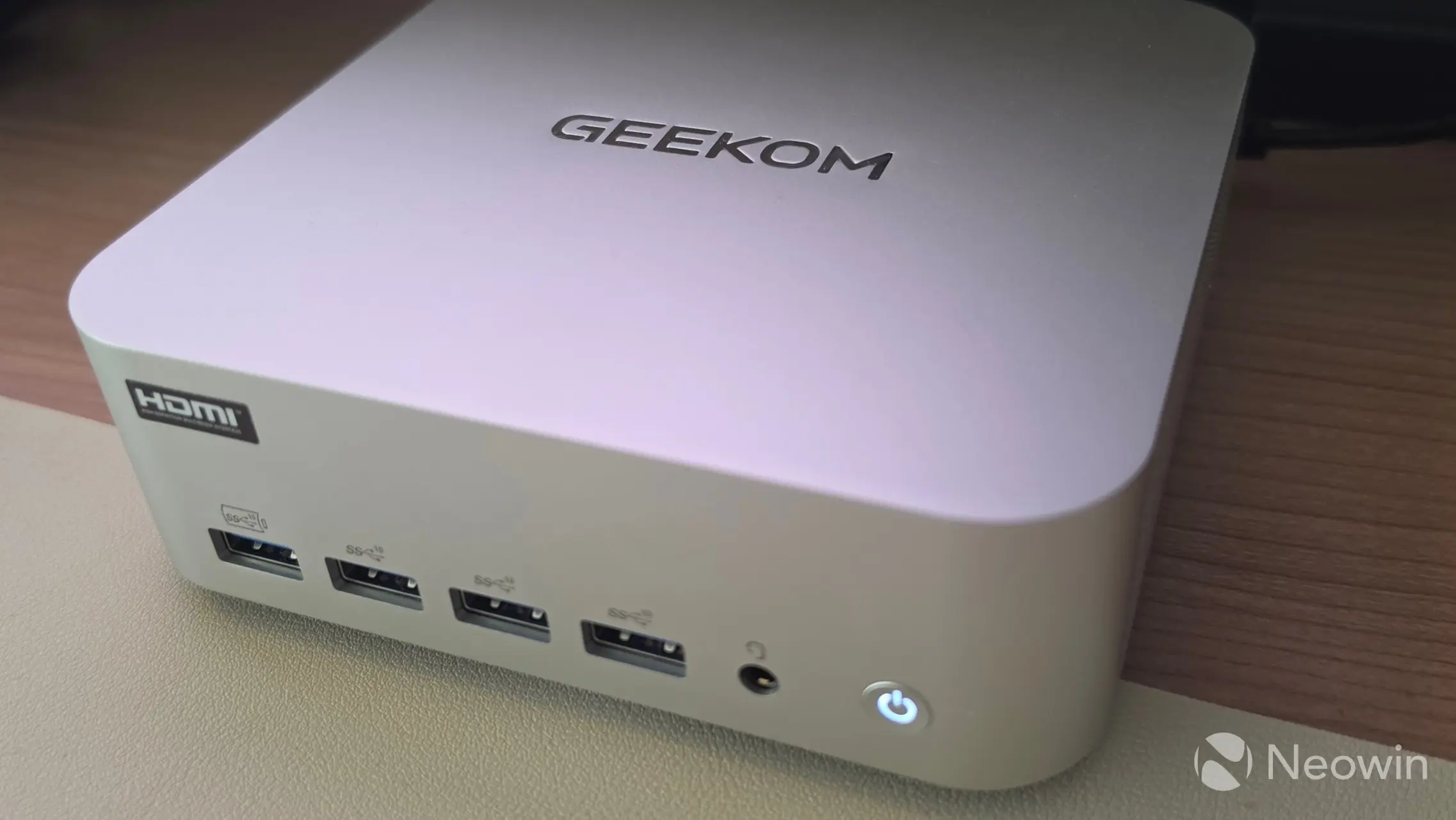
I'll skip the summary conclusion I made in the original review, but yeah, the original score still stands because GEEKOM does not offer a dual-channel configuration, seriously nerfing its own hardware. Assuming you've made it this far, at an MSRP of $1,799, the A9 Max 2026 Edition is also not cheap, even if we consider that GEEKOM currently has it discounted down to $1,399 on the official website.
It's clear that the A9 Max 2026 Edition performs far better with Dual Channel memory, so you could tell yourself that the $400 discount pays for the additional memory stick ($389.99 on Newegg), which will definitely help a lot, especially on the gaming and AI workload side.
Where to buy and a coupon
To sweeten the deal a bit more, you can save an additional 8% on the discounted price with our coupon: NWA9MAX26 upon checkout. It will stay valid until Nov 1, 2026.








1 Comment
Load the comments and join the conversation!
Read the comments, ask the editors questions, show respect and join the conversation.