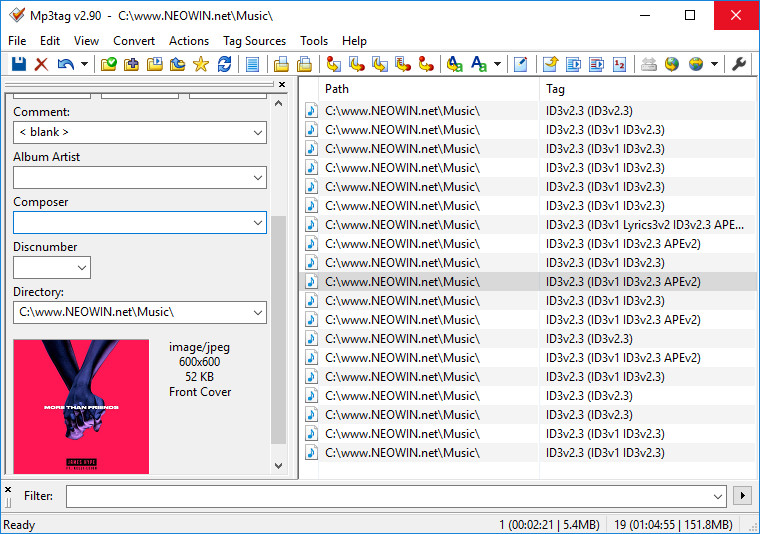
Mp3tag is a powerful and yet easy-to-use tool to edit metadata (ID3, Vorbis Comments and APE) of common audio formats. It can rename files based on the tag information, replace characters or words from tags and filenames, import/export tag information, create playlists and more. The program supports online freedb database lookups for selected files, allowing you to automatically gather proper tag information for select files or CDs.
Mp3tag supports the following audio formats:
- Advanced Audio Coding (aac)
- Free Lossless Audio Codec (flac)
- Monkeys Audio (ape)
- Mpeg Layer 3 (mp3)
- MPEG-4 (mp4 / m4a / m4b / iTunes compatible)
- Musepack (mpc)
- Ogg Vorbis (ogg)
- OptimFROG (ofr)
- OptimFROG DualStream (ofs)
- Speex (spx)
- Toms Audio Kompressor (tak)
- True Audio (tta)
- Windows Media Audio (wma)
- WavPack (wv)
Mp3tag 3.35 changelog:
- This version introduces a new Files options page, enhanced toolbar customization, support for RF64 WAV files, improved Discogs and MusicBrainz tag sources, and many other improvements and fixes. See the Release Notes for more details.
Download: Mp3tag 64-bit | 5.7 MB (Freeware)
Download: Mp3tag 32-bit | 5.2 MB
Link: Mp3tag Homepage | Screenshot
 Get alerted to all of our Software updates on Twitter at @NeowinSoftware















1 Comment
Load the comments and join the conversation!
Read the comments, ask the editors questions, show respect and join the conversation.