Microsoft is rolling out new Windows 11 preview builds in the Insider program, offering users new features and changes to try ahead of public release. In the Experimental channel (formerly Dev), Microsoft is shipping build 26300.8758, while in the Beta channel, users can download build 26220.8754. The changelogs do not contain much, but there is an important update to taskbar settings.
Here is what is new in build 26220.8754:
[Taskbar]
- Taskbar customization just got easier. As we continue to make improvements to the Taskbar experience mentioned last month, we've introduced a dedicated Taskbar Size setting, making it simpler to find, understand, and personalize your ideal taskbar experience.
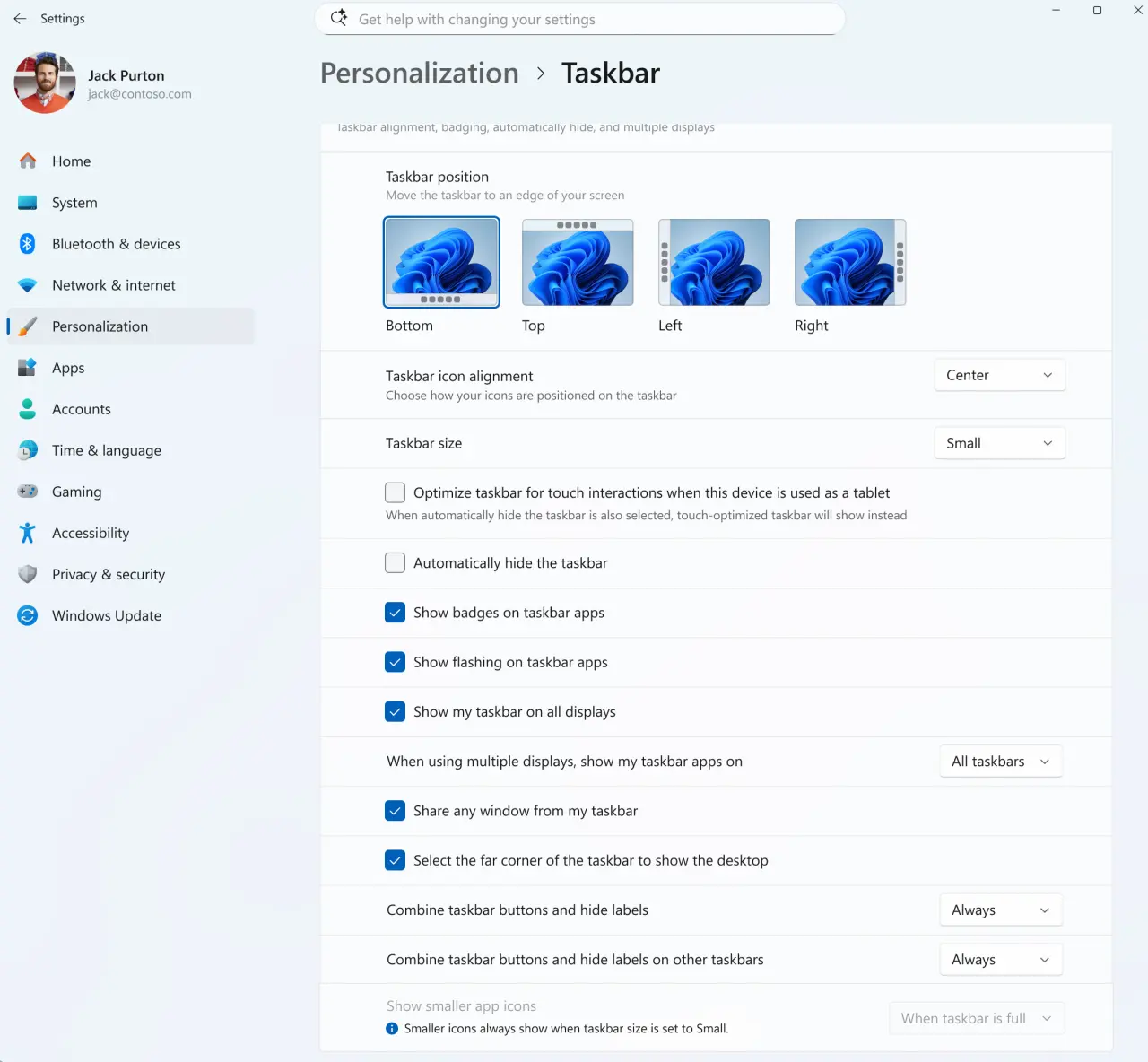
- We've also made refinements to the transitions between taskbar sizes for a smoother overall experience.
[File Explorer]
- We've improved the reliability of thumbnail previews for cloud files in the Details pane. The pane has also been reorganized so file properties are easier to find and review at a glance.
- Fixed an issue where the OneDrive shortcut in File Explorer stops working when File Explorer is run in administrative mode.
- Fixed an issue where the confirmation dialog might display an internal Recycle Bin file name instead of the original file name when permanently deleting a file.
[Sounds]
- Improved system sounds when using Windows in dark mode.
And here is what is new in build 26220.8754:
[Smart card removal policy]
- Administrators can now configure Azure Virtual Desktop (AVD) and Windows 365 sessions that use Microsoft Entra ID (RDS AAD Auth) authentication to automatically disconnect when a redirected smart card is removed. This extends smart card removal policy enforcement to Microsoft Entra authenticated remote sessions, helping organizations meet security and compliance requirements.
[File Explorer]
- Fixed an issue where the OneDrive shortcut in File Explorer stops working when File Explorer is run in administrator mode.
[Taskbar]
- Improved reliability of loading the system tray area of the taskbar.
[Sounds]
- Improved system sounds when using Windows in dark mode.
You can find release notes for build 26300.8758 here and for build 26220.8754 here.
















1 Comment
Load the comments and join the conversation!
Read the comments, ask the editors questions, show respect and join the conversation.