UniGetUI is an application whose main goal is to create an intuitive GUI for the most common CLI package managers for Windows 10 and Windows 11, such as Winget, Scoop and Chocolatey. With UniGetUI, you'll be able to download, install, update and uninstall any software that's published on the supported package managers — and so much more.
UniGetUI features
- Install, update and remove software from your system easily at one click: UniGetUI combines the packages from the most used package managers for windows: WinGet, Chocolatey, Scoop, Pip, Npm and .NET Tool.
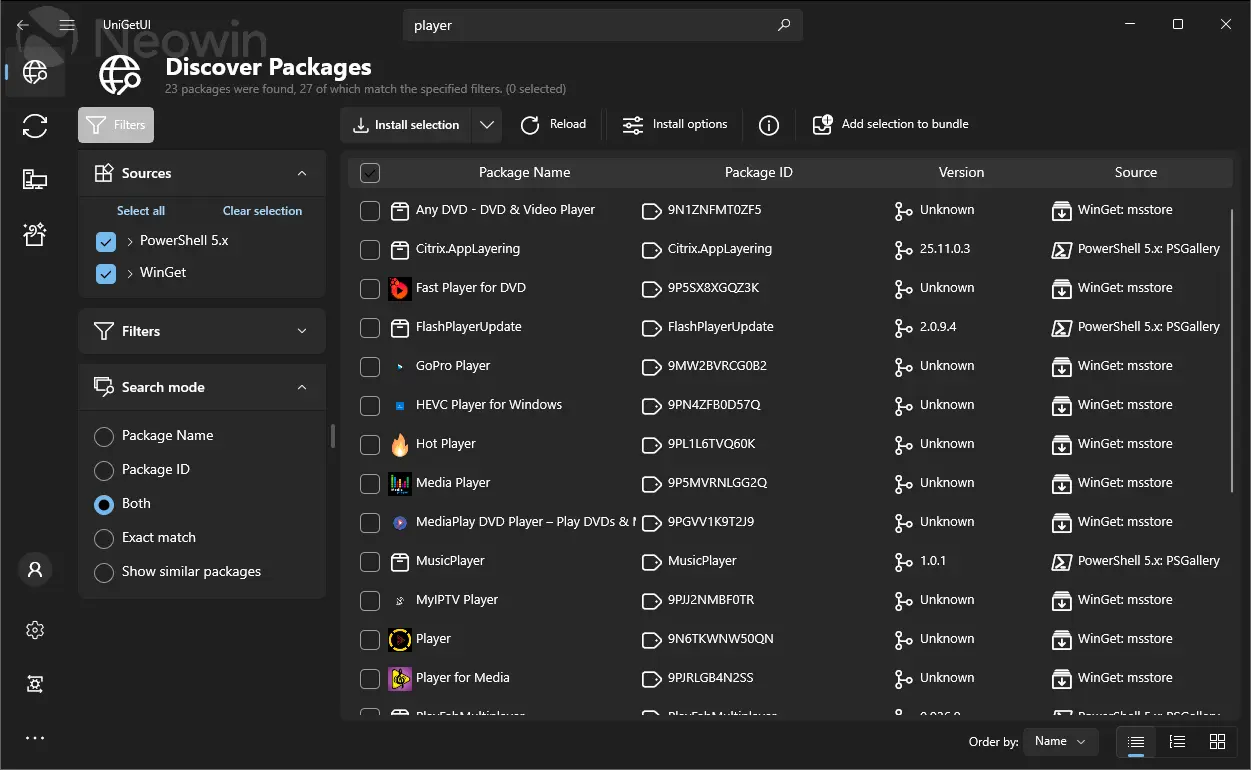
- Discover new packages and filter them to easily find the package you want.
- View detailed metadata about any package before installing it. Get the direct download URL or the name of the publisher, as well as the size of the download.
- Easily bulk-install, update or uninstall multiple packages at once selecting multiple packages before performing an operation
- Automatically update packages, or be notified when updates become available. Skip versions or completely ignore updates in a per-package basis.
- Manage your available updates at the touch of a button from the Widgets pane or from Dev Home pane with UniGetUI Widgets.
- The system tray icon will also show the available updates and installed package, to efficiently update a program or remove a package from your system.
- Easily customize how and where packages are installed. Select different installation options and switches for each package. Install an older version or force to install a 32bit architecture. [But don't worry, those options will be saved for future updates for this package]
- Share packages with your friends to show them off that program you found. Here is an example: Hey @friend, Check out this program!
- Export custom lists of packages to then import them to another machine and install those packages with previously-specified, custom installation parameters. Setting up machines or configuring a specific software setup has never been easier.
- Backup your packages to a local file to easily recover your setup in a matter of seconds when migrating to a new machine
Devolutions UniGetUI 2026.2.2 changelog:
This release marks the completion of UniGetUI's migration from WinUI to Avalonia. With the remaining WinUI components and dependencies now removed, UniGetUI is fully powered by Avalonia. This update also brings Windows 11 Snap Layouts support, refined styling throughout the application, improved log viewing, new illustrations, and significantly smaller release packages.
Highlights
- Further refined the Avalonia user interface to better match WinUI styling and behavior across package lists, navigation elements, dialogs, and controls.
- Added support for Windows 11 Snap Layouts when hovering the maximize button, matching the behavior of native Windows applications.
- Added illustrations for empty and loading package list states, improving visual feedback throughout the application.
- Improved the operation log window so automatic scrolling no longer interrupts users when reviewing previous log entries.
- Reduced installer and application package sizes, resulting in smaller downloads and a significantly leaner Windows distribution.
User Interface Improvements
- Improved package list styling, column headers, backgrounds, hover states, and selection indicators for a more polished and consistent experience.
- Refined sidebar navigation and segmented controls to better align with modern Windows design patterns.
- Improved package tag badges and icon presentation throughout the application.
- Updated several labels, placeholders, and interface elements for improved clarity and consistency.
- Removed the remaining WinUI-specific styling dependencies, further consolidating the application around Avalonia.
Windows Improvements
- Added native Windows 11 Snap Layouts integration for the maximize button.
- Improved maximize button hover and pressed visual states to more closely match native Windows behavior.
Performance & Reliability
- Reduced the size of Windows release packages by removing unnecessary runtime dependencies and optimizing published builds.
- Reduced installer size through improved compression settings.
- Simplified application dependencies and reduced overall maintenance complexity.
Fixes
- Fixed log output auto-scrolling behavior when manually reviewing previous entries.
- Resolved various UI inconsistencies and styling issues across the Avalonia interface.
- Addressed several minor issues and edge cases throughout the application.
Other Changes
- Dependency cleanup and project maintenance.
- Internal code refactoring and infrastructure improvements.
- Additional test coverage and build pipeline optimizations.
Download: UniGetUI 64-bit | Portable | ~90.0 MB (Open Source)
Download: UniGetUI ARM64 | Portable
Links: UniGetUI Home Page | GitHub | Screenshot
 Get alerted to all of our Software updates on Twitter at @NeowinSoftware














0 Comments
Load the comments and join the conversation!
Read the comments, ask the editors questions, show respect and join the conversation.