Google announced the Spring 2026 update for Google Home, bringing a platter of new camera features, updates to automation, and the search giant's latest AI model under the hood. For starters, the Gemini for Home assistant is now powered by the Gemini 3.1 model.
For Google Home devices, Gemini 3.1 offers advanced reasoning to better interpret and process multi-step voice commands. For instance, you can combine different tasks, such as adding new items and updating existing lists, which previously required separate commands.
You can say, "Add ingredients for paella to my shopping list and check off the spices from my pantry list." The new model is now available for those enrolled in Gemini for Home early access.
In the camera department, Google has improved event history and details. Google Home now offers a redesigned UI that keeps the player window visible as you scroll. You can filter your event list by specific criteria, such as Package seen, Person seen, Glass break heard, or Activity Zone.
You will be able to see what happened at a glance through zoomed-in thumbnail previews, now animated clips that focus on the subject. If you are on the Advanced plan of Google Home Premium, you can have enhanced timeline navigation to see event descriptions in timeline view, making it easier to identify interesting moments.
Familiar face previews now include thumbs-up/down feedback buttons to improve face detection accuracy when sending alerts. The feature also keeps your library neat and tidy by automatically removing blurry, ghosted, non-frontal, or small faces.
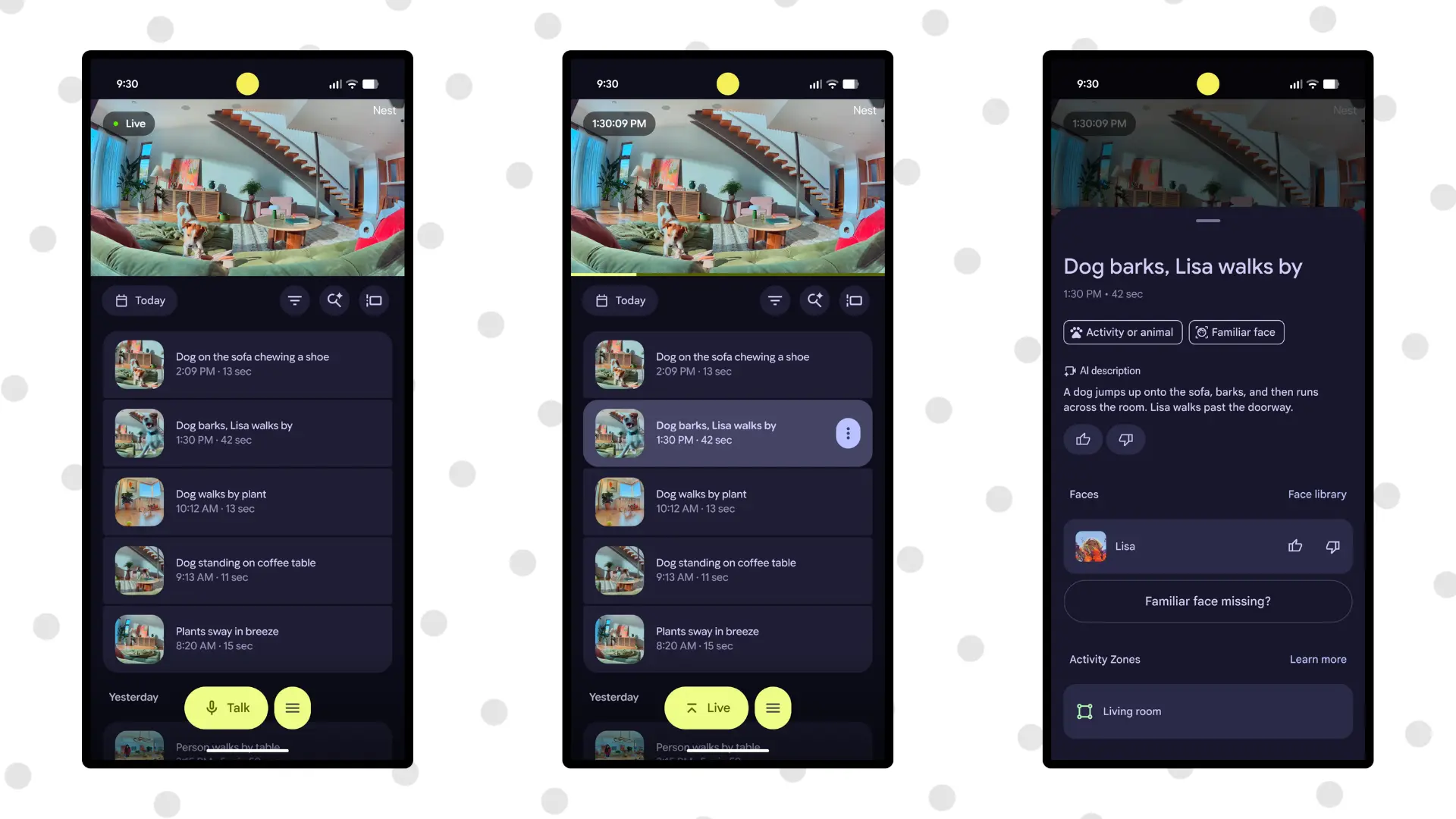
The latest Google Home update also improves camera scrubbing frame rates and clarity so you can scroll through your camera history smoothly. Video history quick seek buttons let you jump 10 seconds forward or backward through your camera's recorded events.
Google Home now comes with simplified camera settings, refined event descriptions, and camera-control gestures for navigation. You can "swipe left/right for Timeline/Events, pull down on the control bar to resize the video player, or swipe down on the camera to dismiss it," Google said in a blog post.
The update brings automation perks in the form of dozens of new starters, conditions, and actions. For instance, you can now build routines that trigger based on specific lock states (if the door is jammed or left ajar) and binary sensors (leak detected or smoke alarm).
The search giant said that it's working on a web version of the Ask Home feature, which will enable you to search your camera history, check on your devices, or create home automations directly from your computer. The feature will be available in public preview in the near future.
Another feature currently available in public preview is "quick action" buttons for expanded notifications for instant device control. It can help if you manage multiple properties, as the Google Home app can switch to the right home without extra clicks.
















0 Comments
Load the comments and join the conversation!
Read the comments, ask the editors questions, show respect and join the conversation.