I am not a particularly active user of Instagram in the conventional sense, but I do use it heavily to share Reels with my wife and siblings. For me, Reels are the lifeblood of Instagram, and just the ability to share my own photos or see someone else's photos isn't enough to convince me to use the app on a daily basis.
As such, me and the Mrs. ran into a major problem yesterday when she realized that while she could see Reels and share them with some of her other friends, she was unable to share them with me. My profile wouldn't appear in the share dialog even though it's usually at the top and it wasn't surfaced even when she manually tried through the search bar.
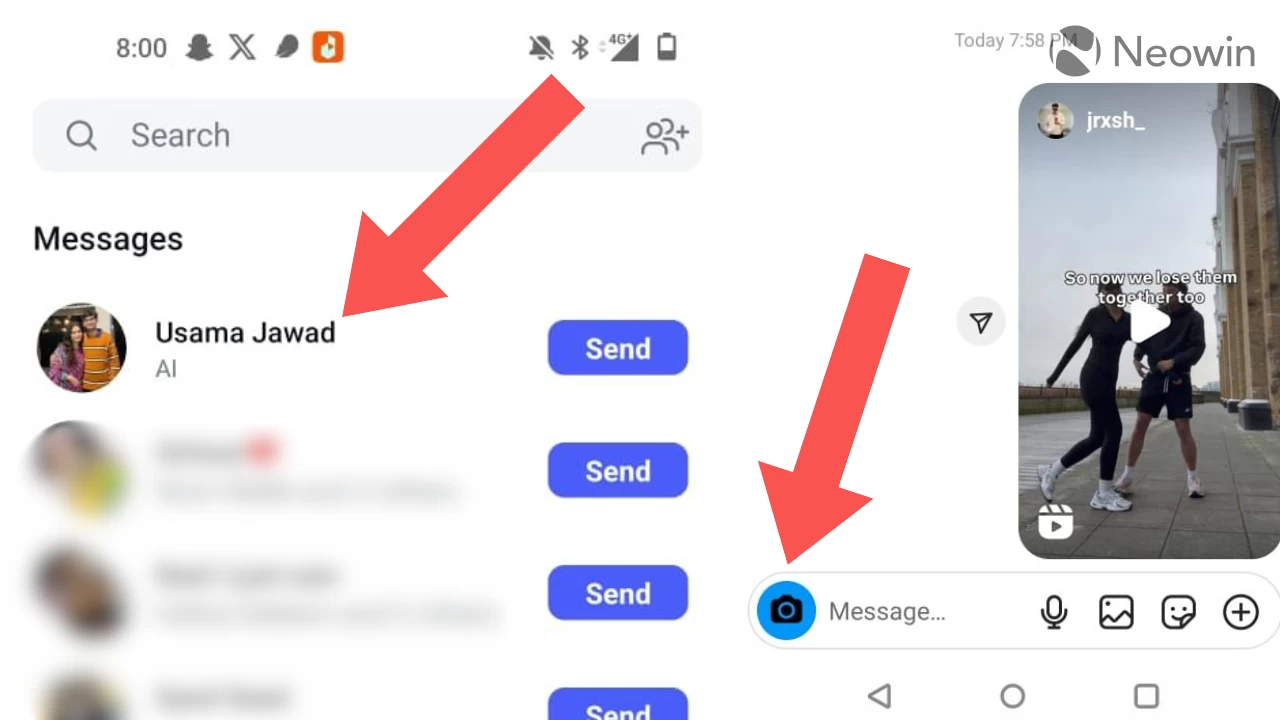
Interestingly, I could still share Reels with her and we could see each other's previously shared content in the chats on our respective phones. We also realized that the camera icon in our chats had changed; usually it's a pink background with a white camera icon in it, but now, it was a blue background with a black camera outline.
For the past day or so, we looked for solutions to this problem which was only affecting our chats, everything else within the app seemed fine, but these efforts were in futile. Just now, the Mrs. noticed that when she pressed on the Share button rather than using the share dialog directly, and then navigated to Instagram Messages, my name finally popped up, but it had "AI" written below it.
Now that we had another clue about what to search for, so we headed to Google and added this piece of the puzzle to our search query. And lo and behold, there are several other people on Reddit who have been experiencing this issue in the past couple of days too. There is a dedicated thread on the topic with a couple of hundred upvotes and a few dozen comments.
Scrolling through the comments frantically as if we were searching for the Holy Grail, me and the Mrs. finally came across recommendations to fix the problem. Apparently, all you need to do is log out and then log in again. We did just that and hallelujah, we can finally share Reels with each other again without a hitch.
It's interesting that there is no media coverage on the topic even though the problem has garnered a decent amount of attention on Reddit. That said, the impact and root cause is currently unknown, we have reached out to Meta for further information and will update this article if the company responds. But for now, if you do experience the bug, just log out and then back in again.
















1 Comment
Load the comments and join the conversation!
Read the comments, ask the editors questions, show respect and join the conversation.