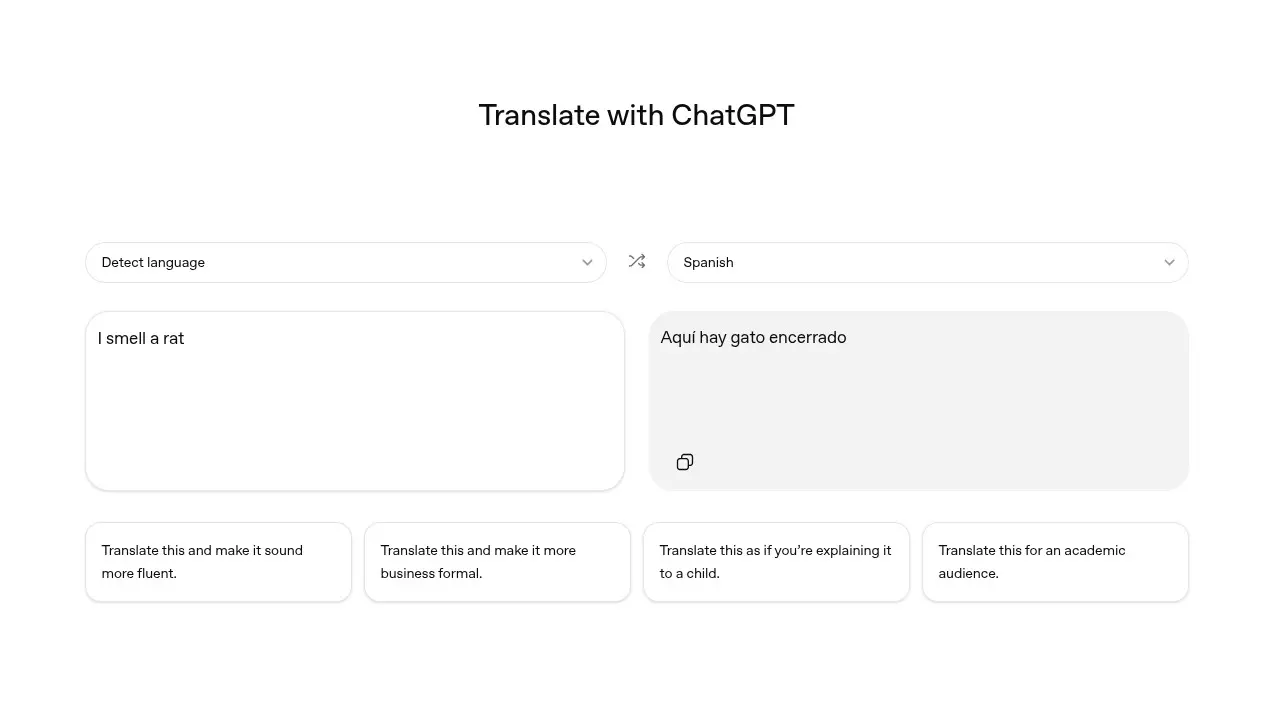
OpenAI has quietly launched the biggest competitor to Google Translate in years, creatively named ChatGPT Translate. It is a standalone web tool designed to translate a piece of text with a focus on content and tone, rather than just literal word-for-word translation. ChatGPT has been able to translate between languages since the start, but this new interface gives you a more focused way to use the AI to translate.
To access the Translate interface, you can just head over to chatgpt.com/translate. Unlike the standard ChatGPT experience, Translate gives you a dual-box layout which is similar to traditional translation software like Google Translate. It has auto-language detection support on the left and your target translation language on the right.
If you want to further transform the outputs you get from your inputs, ChatGPT Translate has instant one-tap refinement options directly under the translation boxes, clicking these, however, will take you to the full ChatGPT experience but auto inserts the prompt based on the one-tap refinement option you clicked on. This definitely feels clunky and it would be nice to see these changes reflected directly on the Translate page.
The refinement options include “Make it more fluent”, “Business formal”, “Explain like I’m 5”, and “Academic”. So, if you want to smooth out robotic phrasing, use professional vocabulary, simplify jargon, or have a tone for research or essays, you can.
If you are using the full ChatGPT experience, you can speak to it directly with your voice in one language and have it respond in another. The voice is now integrated into the main chat so you can see the text and hear the spoken translation simultaneously. You can also upload images of a menu, a street sign, or a document and ChatGPT will translate the text and allow you to ask follow-up questions such as “Which of these dishes are vegetarian?” or “What does this legal clause actually mean for me?”
While Google Translate still supports more languages at over 240, compared to ChatGPT’s 50, ChatGPT has an edge when it comes to translating while maintaining a specific brand voice or cultural relevance.
















3 Comments
Load the comments and join the conversation!
Read the comments, ask the editors questions, show respect and join the conversation.