
AeroFTP is a fast, modern, and easy-to-use file transfer app designed to help you manage files across servers and cloud services from one simple interface. Built for Windows, macOS, and Linux, it lets you connect to FTP, SFTP, WebDAV, S3 storage, GitHub, and popular cloud providers without hassle.
With AeroFTP, you can turn almost any server into your own personal cloud and keep your files organized, synced, and always accessible. It supports reliable two-way sync, background syncing, file versioning, and selective folders, making it ideal for both personal use and small businesses.
Whether you're backing up important documents or managing multiple online accounts, AeroFTP helps you stay organized and in control.
AeroFTP includes a clean dual-pane layout for simple drag-and-drop transfers, quick previews, tabs for multiple connections, and smart search tools to find files instantly. Its six built-in modules — AeroCloud, AeroFile, AeroSync, AeroVault, AeroTools, and AeroPlayer — make it more than just a file transfer client. You can manage cloud storage, automate file tasks, sync folders in real time, protect sensitive documents, edit files, and even preview media.
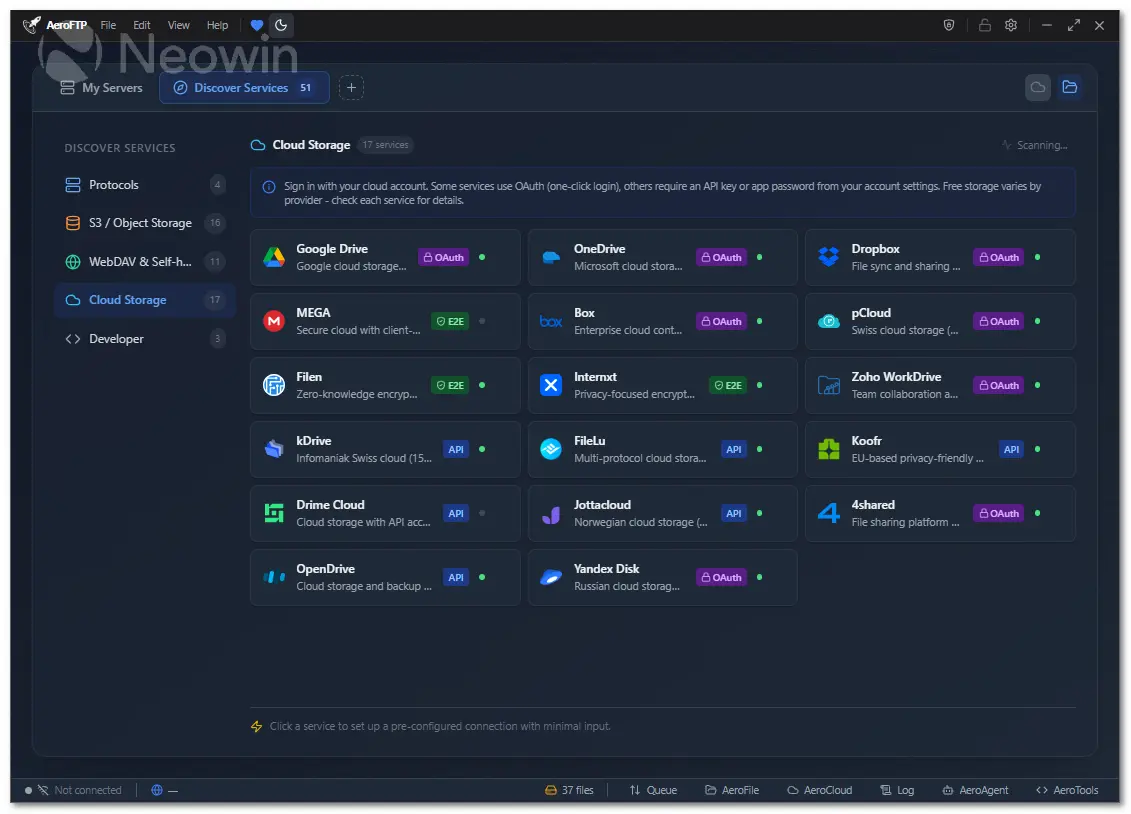
With support for 51 cloud and developer platforms, AeroFTP offers step-by-step setup guides and recommended settings so you can connect everything effortlessly.
AeroFTP key features:
- 25 protocols (FTP, FTPS, SFTP, WebDAV, S3, Google Drive, Dropbox, OneDrive, MEGA, and more)
- AeroVault v2 encrypted containers (AES-256-GCM-SIV, Argon2id)
- Cryptomator vault support (format 8)
- AeroAgent AI assistant with 19 providers and 47 tools
- Monaco code editor (VS Code engine) for remote file editing
- Integrated terminal with theme sync
- AeroCloud bidirectional sync with background service
- Dual-pane file browser with drag-and-drop
- Archive browser (ZIP, 7z, TAR, RAR) with selective extraction
- CLI with 30 subcommands and batch scripting
- 47 languages supported
- 4 themes (Light, Dark, Tokyo Night, Cyber)
- Zero telemetry - all credentials stored locally
- Cross-platform (Linux, Windows, macOS)
AeroFTP v3.4.2 changelog highlights:
- Bisync upgrades: persistent snapshots, conflict modes, resync, deletion detection.
- New flags: max-transfer, retries, backlog, backup dirs, debug dump.
- ncdu TUI for remote disk usage.
- Mount remotes as local FS (FUSE/WebDAV).
- Serve FTP/SFTP from any provider.
- Daemon + job queue with HTTP API.
- Crypt overlay with full zero-knowledge encryption.
- Fix: FTP/FTPS Quick Connect error.
- Change: Sync now compares size + mtime.
AeroFTP 3.4.3 changelog:
Added
- AeroSync conflict strategy: Automatic conflict resolution with configurable strategy per profile — newer, older, larger, smaller, skip, or ask per file
- AeroSync delete orphans: Option to delete files on the destination that no longer exist on the source, with versioning backup strategies (trash can 30 days, keep last 5, staggered hourly/daily/weekly, or disabled)
- AeroSync rename detection: SHA-256 based rename detection identifies moved/renamed files instead of re-transferring them
- AeroSync file filters: Min/max file size and min/max file age filters to control which files are included in synchronization
- AeroSync bandwidth schedule: Preset schedules for bandwidth throttling during office hours (08-18) or night mode (18-08) at 512 KB/s
- AeroSync transfer budget: Configurable total data limit per sync session (100 MB to 50 GB) — sync stops when the budget is exhausted
- AeroSync snapshot rollback: Full restore from snapshot with confirmation dialog showing file count to re-download (previously "coming soon")
- AeroSync delete safety confirmation: Overlay warning showing the exact number of files that will be permanently deleted before sync proceeds
- AeroSync pre-delete archival: Automatic backup of deleted files to .aeroversions/ with 30-day retention before removal during pull sync
- AeroSync custom profile card: QuickMode now shows a "Custom" card when settings do not match any preset profile
- AeroSync bisync delete detection: previously_synced field distinguishes true deletions from new files in bidirectional sync
- Box.com trash management: Restore from trash, permanent delete from trash, move items between folders
- Box.com collaborations: List and add collaborations for shared folder management
- Box.com folder locks: List folder locks (Box File Governance)
- Provider trash commands: Trash listing and empty trash for Zoho, MEGA, OpenDrive, Yandex, pCloud, KDrive
- Archive password support: Browse and extract password-protected ZIP archives, 7z archive support (sevenz_rust), TAR/TAR.GZ/TAR.BZ2/TAR.XZ browsing
- Provider commands module: Extracted provider-specific Tauri commands into dedicated provider_commands.rs for better code organization
- CLI remote bind authentication: --allow-remote-bind flag with auto-generated auth tokens for daemon, serve HTTP/WebDAV/FTP/SFTP when binding to non-loopback addresses. Configurable via AEROFTP_DAEMON_TOKEN and AEROFTP_SERVE_AUTH_TOKEN env vars
Fixed
- Archive path traversal prevention: Reject archive entries containing .. components, absolute paths, or Windows drive prefixes during extraction
- Archive atomic extraction: Files are extracted to a .aerotmp temporary path and renamed on completion, preventing partial data on interrupted extractions
- API key leak prevention: Regex-based sanitization strips API keys (Google, Anthropic, OpenAI, Bearer tokens, x-api-key headers) from error messages before they reach the UI
- Plugin integrity verification: SHA-256 hash check for plugin tools and hooks — execution is skipped if files have been modified. Shell metacharacters in hook commands are rejected
- Shell denylist expansion: Added crontab, nohup, systemctl, service, mount, umount, fdisk, parted, iptables, useradd, userdel, passwd, sudo, pkill, killall to the AI shell command denylist
- MCP tool argument validation: Centralized validate_tool_args() with path sandbox checks for all MCP tool operations
- MCP rate limiting by category: File operations, metadata queries, and compute tasks now have separate rate limit buckets
- Post-update toast: Now shows the updated version number instead of repeating the SHA-256 hash
- Pre-restart overlay: Shows SHA-256 hash as plain text instead of a colored verification badge (verification badge remains in the download toast)
Changed
- i18n: 40 new keys added across all 47 languages for AeroSync advanced controls
- Code formatting: Consistent import organization and error handling patterns across all Rust source files
Download: AeroFTP 3.4.3 | Portable ~30.0 MB (Open Source)
Links: AeroFTP Home page | Documentation | Screenshot
 Get alerted to all of our Software updates on Twitter at @NeowinSoftware















5 Comments
Load the comments and join the conversation!
Read the comments, ask the editors questions, show respect and join the conversation.