
AeroFTP is a fast, modern, and easy-to-use file transfer app designed to help you manage files across servers and cloud services from one simple interface. Built for Windows, macOS, and Linux, it lets you connect to FTP, SFTP, WebDAV, S3 storage, GitHub, and popular cloud providers without hassle.
With AeroFTP, you can turn almost any server into your own personal cloud and keep your files organized, synced, and always accessible. It supports reliable two-way sync, background syncing, file versioning, and selective folders, making it ideal for both personal use and small businesses.
Whether you're backing up important documents or managing multiple online accounts, AeroFTP helps you stay organized and in control.
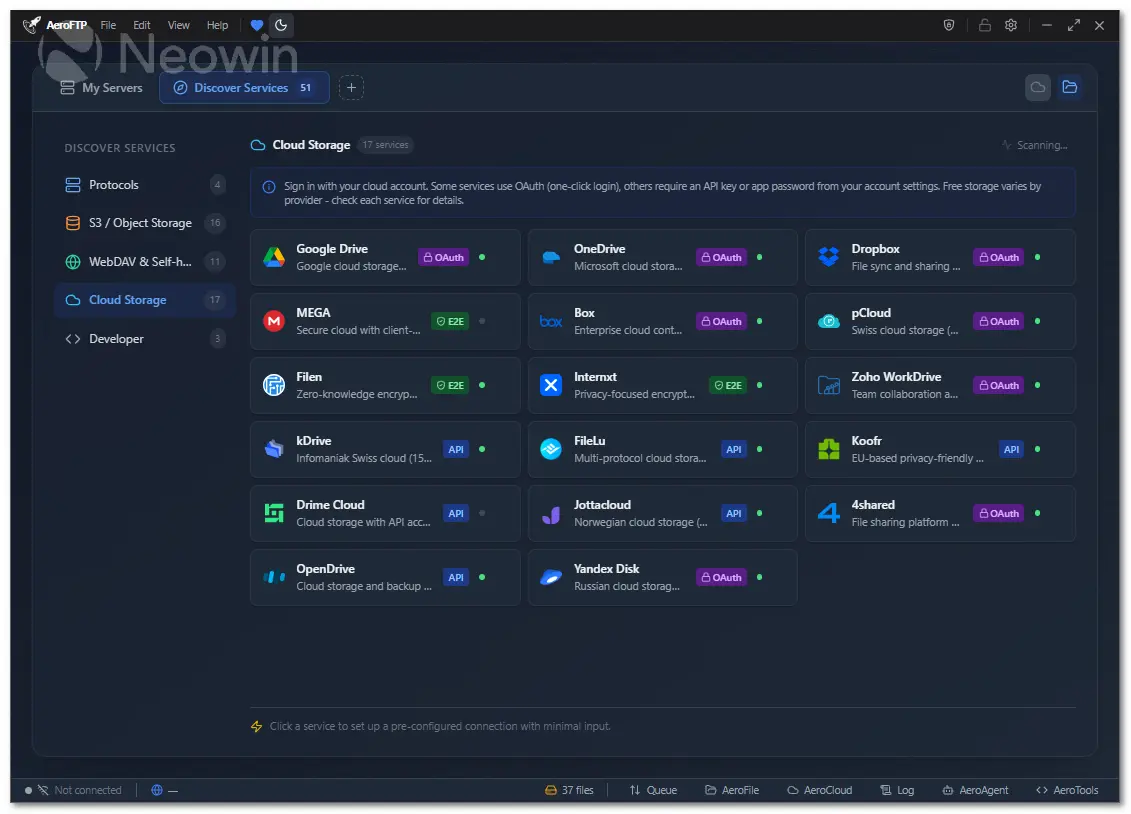
AeroFTP includes a clean dual-pane layout for simple drag-and-drop transfers, quick previews, tabs for multiple connections, and smart search tools to find files instantly. Its six built-in modules — AeroCloud, AeroFile, AeroSync, AeroVault, AeroTools, and AeroPlayer — make it more than just a file transfer client. You can manage cloud storage, automate file tasks, sync folders in real time, protect sensitive documents, edit files, and even preview media.
With support for 51 cloud and developer platforms, AeroFTP offers step-by-step setup guides and recommended settings so you can connect everything effortlessly.
AeroFTP key features:
- 25 protocols (FTP, FTPS, SFTP, WebDAV, S3, Google Drive, Dropbox, OneDrive, MEGA, and more)
- AeroVault v2 encrypted containers (AES-256-GCM-SIV, Argon2id)
- Cryptomator vault support (format 8)
- AeroAgent AI assistant with 19 providers and 47 tools
- Monaco code editor (VS Code engine) for remote file editing
- Integrated terminal with theme sync
- AeroCloud bidirectional sync with background service
- Dual-pane file browser with drag-and-drop
- Archive browser (ZIP, 7z, TAR, RAR) with selective extraction
- CLI with 30 subcommands and batch scripting
- 47 languages supported
- 4 themes (Light, Dark, Tokyo Night, Cyber)
- Zero telemetry - all credentials stored locally
- Cross-platform (Linux, Windows, macOS)
AeroFTP 3.5.4 changelog highlights:
- New aeroftp mcp top-level subcommand, enabling out-of-the-box MCP support for the VS Code extension.
- Unified profile_loader module now shared across CLI + MCP, fixing drift and restoring full S3 profile compatibility.
- Strict JSON-RPC schema validation for MCP tool calls, returning clear Invalid params errors for missing fields.
- Critical S3 MCP fix: bucket, region, endpoint, and path_style now correctly loaded from vault profile options.
- MCP server now initializes credential vault on startup, preventing “Vault not open” failures.
- Per-profile request serialization to avoid mkdir→upload race conditions on slow S3/WebDAV/NAS targets.
- Graceful MCP shutdown with pending task drain via JoinSet (10s timeout) to avoid dropped responses.
- CLI tree crash fixed by resolving clap TypeId conflict between global depth and subcommand depth.
- Improved mkdir→put robustness with retry/backoff and clearer error messages including HTTP status + folder ID.
- Filen share links fixed by always generating a random salt, even for passwordless links.
- FileLu mkdir compatibility improved with tolerant parsing of string-typed fld_id values.
- WebDAV MKCOL success expanded to accept 200, 201, and 204 for real-world server compatibility.
- Clear error for Immich non-media uploads, replacing opaque 400 responses.
- CLI hashsum updated to accept --algorithm/-a (default: sha256), aligning with MCP schema.
- CLI speed updated with --size/-s alias for --test-size, matching S3 and rclone conventions. [full release notes]
Download: AeroFTP 3.5.4 | Portable ~30.0 MB (Open Source)
Links: AeroFTP Home page | Documentation | Screenshot
 Get alerted to all of our Software updates on Twitter at @NeowinSoftware

















0 Comments
Load the comments and join the conversation!
Read the comments, ask the editors questions, show respect and join the conversation.