BATorrent is a lightweight, open-source BitTorrent client built with modern C++ and Qt 6, offering a clean, fast, and privacy-focused alternative to traditional torrent apps. It supports magnet links, .torrent files, resume data, sequential downloading, per-file priorities, and even imports from qBittorrent. Power users benefit from integrated RSS auto-download with regex filtering, duplicate detection, and automatic tracker lists from Stremio. Streaming is seamless thanks to auto-detected players like VLC and IINA.
BATorrent includes robust VPN tools—interface binding, auto-detection for WireGuard-based services like Mullvad and NordLynx, kill switch, proxy support, and IP filtering. A full WebUI enables remote control, while integrations with Plex, Jellyfin, and Emby automate library updates. With themes, speed scheduling, system-tray alerts, and cross-platform support for Windows, Linux, and macOS, BATorrent delivers a polished, high-performance torrenting experience.
BATorrent features:
Core
- .torrent file and magnet link support
- Resume data — picks up where you left off after restart
- Import torrents from qBittorrent
- Create .torrent files from any file or folder
- Sequential download mode
- Per-file priority control (skip, low, normal, high)
- Seed ratio limits with auto-pause
- DHT, PEX, UPnP, NAT-PMP
RSS Auto-Download
- Subscribe to RSS feeds — automatically download new torrents as they appear
- Regex filters — match only what you want (e.g. 1080p|720p, S01E\d+)
- Per-feed settings — custom save path, check interval (5–1440 min), enable/disable
- Auto-download — matched items are downloaded automatically in the background
- Supports magnet links, .torrent URLs, and tags
- Tray notifications when items are auto-downloaded
- Duplicate detection — never downloads the same item twice
Stremio
- Stremio Addon System pre-installed — works out of the box
- Auto tracker list from ngosang/trackerslist
Streaming
- Play while downloading — stream video files before the download is complete
- Supports mp4, mkv, avi, mov, wmv, flv, webm, m4v, ts
- Auto-detects installed players (VLC, IINA, system default)
VPN & Privacy
- Interface binding — lock torrent traffic to a specific network interface (e.g. tun0)
- Auto VPN detection — identifies VPN interfaces (tun, tap, WireGuard, Mullvad, NordLynx, ProtonVPN)
- Kill switch — automatically pauses all torrents if the VPN interface drops
- Auto-resume — resumes only the torrents paused by the kill switch when VPN reconnects
- Proxy support — SOCKS5 and HTTP proxy with optional authentication
- IP filtering — load P2P blocklists to block unwanted IP ranges
- Protocol encryption (enabled / forced / disabled)
WebUI
- Remote management — control torrents from any browser at http://localhost:8080
- REST API with JSON responses
- Add torrents via magnet link or .torrent upload
- Pause, resume, remove torrents remotely
- View peers and files per torrent
- Dark theme matching the desktop app
- HTTP Basic Auth with SHA-256 password hashing
- Configurable port and remote access (localhost vs 0.0.0.0)
Interface
- 3 themes: Dark, Light, Midnight (bat/vampire aesthetic)
- Real-time speed graph
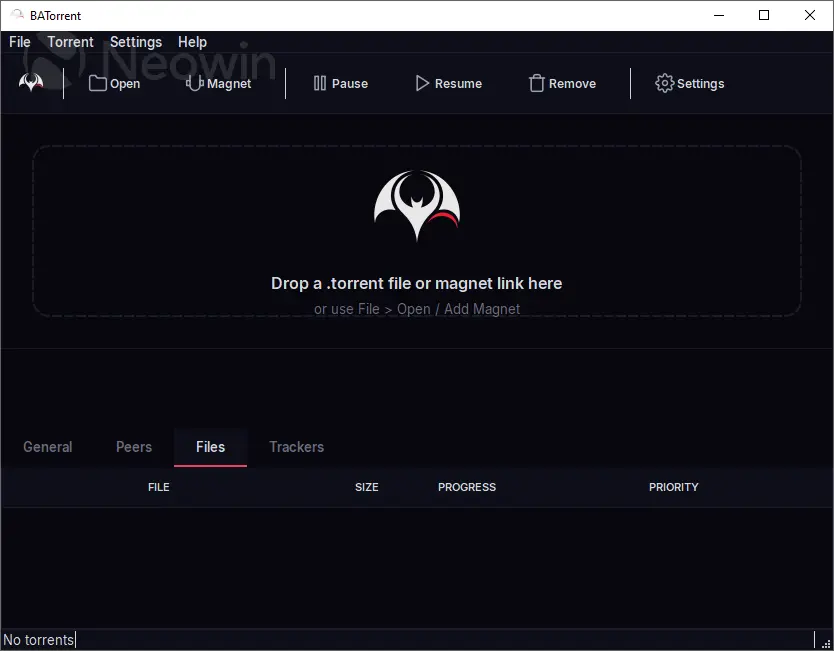
- Detailed panel with tabs: General, Peers, Files, Trackers
- Filter bar: search by name, filter by state (Active, Downloading, Seeding, Paused, Finished)
- Drag & drop .torrent files and magnet links
- Drag & drop reorder in torrent list
- System tray with notifications (download complete, kill switch events, RSS auto-downloads)
- Splash screen with bat animation
- Bilingual: English and Portuguese (BR), auto-detected from system locale
Bandwidth Scheduler
- Alternative speed limits — set different download/upload limits on a schedule
- Time range — configure active hours (e.g. 01:00 to 07:00), supports overnight ranges
- Per-day control — choose which days of the week the schedule applies
- Automatically switches between normal and alternative speeds
Media Server Integration
- Plex — automatically trigger library scan when a download completes
- Jellyfin / Emby — same automatic library refresh via API
- Configure server URL and authentication token/key in Settings
System
- Cross-platform: Windows, Linux, macOS
- Auto-shutdown — automatically shut down PC when all downloads complete (60s cancellable countdown)
- Auto-update system (AppImage on Linux, installer on Windows, DMG on macOS)
- CLI arguments: pass .torrent files or magnet: URIs directly
- Keyboard shortcuts: Space to toggle pause, Ctrl+A to select all, Ctrl+O to open
BATorrent 3.0.3 changelog:
Games
- New "All" search that queries every source at once (game catalogs + torrent indexers) and merges the results — picking a single source is now optional. Game search consumes Hydra-format community catalogs (a default is seeded on first run, and you can remove it), downloads with cover art and clean titles, and caches catalogs for instant reuse.
Covers & titles
- Adding a game now shows the right name and cover instantly, no restart needed. The matcher combines several signals — the torrent's file list, edition/qualifier stripping (Early Access, Complete Edition, GOTY), apostrophes (Baldur's = Baldurs), roman/arabic numerals (GTA V = GTA 5) and Cyrillic titles — and validates the API result instead of guessing, so it stops landing on the wrong title.
Fixes
- A completed torrent could start re-downloading when the .!bt incomplete-file mapping desynced from disk. It now reconciles against what's actually on disk and self-heals on launch.
- Added torrents vanished on restart unless they had downloaded data — every added torrent now persists immediately.
- The Peers tab no longer freezes on large swarms (9k+ peers).
- The welcome dialog no longer reappears on Windows after you tick "don't show again".
Interface
- Reworked README with demo GIFs and localized screenshots (the app shown in your own language).
- Ukrainian added — now eight UI languages.
- About: the Ukrainian flag renders correctly and the Donate button opens GitHub Sponsors.
BATorrent 3.0.4 changelog:
Fixes
- macOS Dock icon no longer appears transparent and can now be customized. The app was overriding the Dock tile at runtime (re-applying the monochrome tray bat on every launch and on light/dark switches), which on some setups left a see-through icon and blocked custom icons. It now leaves the bundled app icon in place. (#14)
Icon
- Enlarged the bat within the macOS app icon so it fills the rounded square better.
Download: BATorrent 3.0.4 | 30.5 MB (Open Source)
Download: BATorrent Portable | 42.4 MB
Links: BATorrent Website | Screenshot
 Get alerted to all of our Software updates on Twitter at @NeowinSoftware


















2 Comments
Load the comments and join the conversation!
Read the comments, ask the editors questions, show respect and join the conversation.