
Out of the blue, Microsoft announced a new section in the Microsoft Store dedicated to Windows personalization. The new "Themes" department, as the name suggests, hosts multiple Windows themes—wallpaper packs with accent colors.
Windows themes in the Microsoft Store are not a new concept. The ability to install Windows themes from the Microsoft Store is nearly a decade-old feature. Now, Microsoft is giving it some well-deserved attention by introducing a single page where users can browse free themes and apply them with a single click.
For now, these themes are somewhat limited. You only get a set of wallpapers and accent colors, so these feel more like glorified wallpaper packs. Sadly, themes do not include sounds, cursors, or icons. Still, there are plenty of good-looking wallpaper collections, which is nice to have, particularly in a single, user-friendly place.
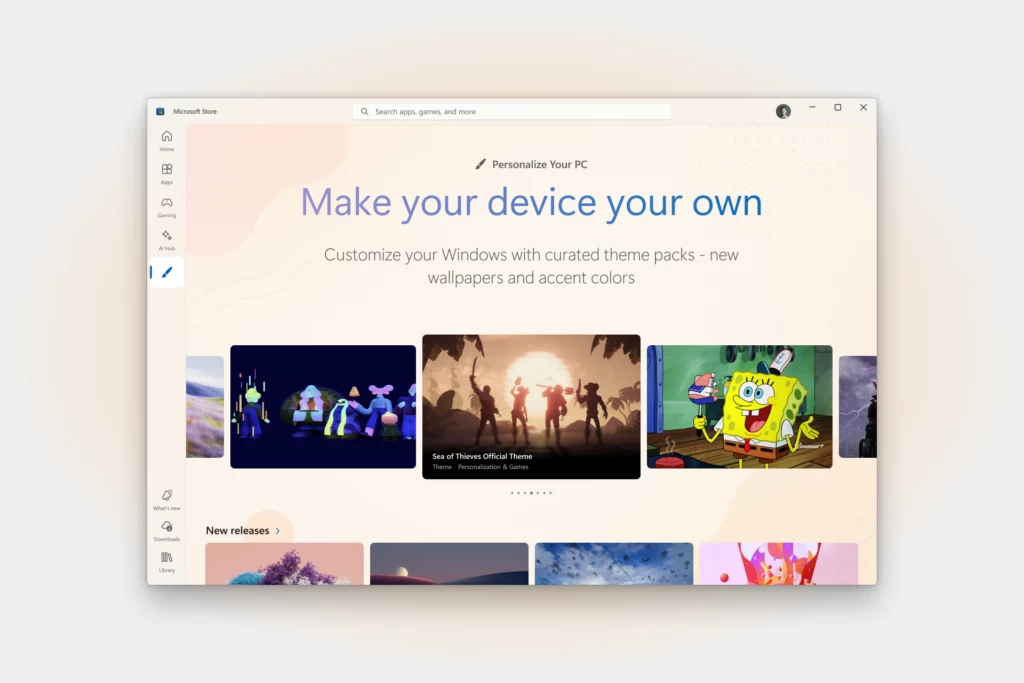
In the announcement post, Microsoft brags that the new section has over 400 themes, 35 of which are new to the store. In the future, Microsoft promises to improve on "making every device a true reflection of its owner," so expect more improvements in this area. You can find some of the best-looking themes and links to them here.
Microsoft says that the Themes department is now rolling out to "select users in the Microsoft Store on Windows," so do not be shocked if your system does not have it (mine is on the latest updates and still has no new Start menu). Still, you can download those themes if you have a direct link to them.
The announcement post on the Windows Experience Blog is not just about wallpapers. Microsoft gave a shout-out to some third-party apps that allow UI modification beyond what stock Windows 11 has to offer, such as TranslucentTB, Lively Wallpaper, and more.














10 Comments
Load the comments and join the conversation!
Read the comments, ask the editors questions, show respect and join the conversation.