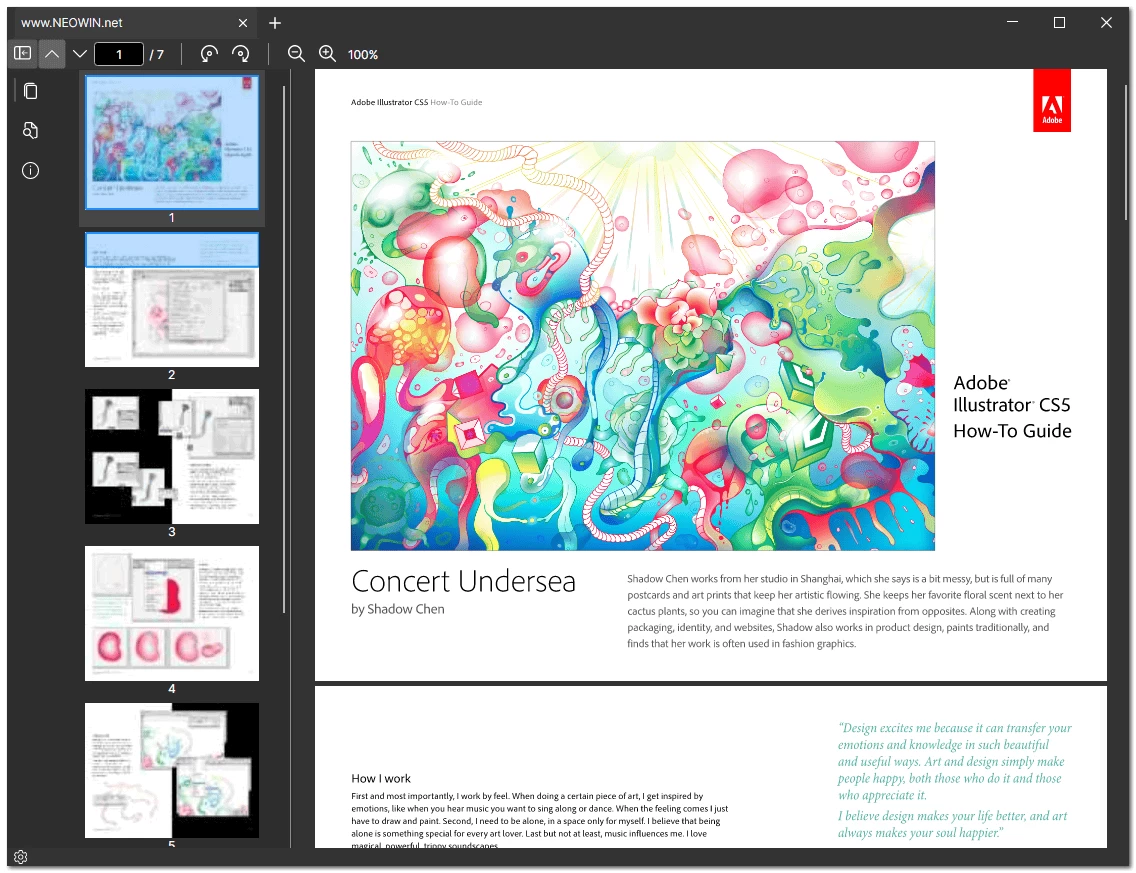
Caly is a lightweight, open-source PDF reader designed for Windows, offering a clean and efficient reading experience. With support for multiple tabs, smooth scrolling, fast navigation, and powerful search, it makes handling PDF documents easy and intuitive. Caly also includes features like text selection, zoom, page rotation, thumbnails, and bookmarks to improve productivity. Its minimal memory footprint ensures fast performance, even with large files. Whether you're reading documents, reviewing content, or managing multiple PDFs at once, Caly provides a modern, responsive interface tailored for everyday use — no installation needed. It's a solid pick if you want a simple, hassle-free PDF reader for Windows.
Key Features
- Tabbed Interface – Open and manage multiple PDF documents in separate tabs with ease.
- Lightning-Fast Navigation – Smooth and responsive page scrolling ensures fast browsing.
- Text Selection & Copy/Paste – Select any text and copy it directly to the clipboard.
- Powerful Search – Instantly find specific words or phrases within any open PDF.
- Thumbnail View – Visually browse document pages with a convenient thumbnail sidebar.
- Bookmark Support – Access and navigate bookmarked sections quickly and efficiently.
- Zoom In/Out – Adjust your view with flexible zoom controls.
- Rotate Pages – Rotate individual pages or the entire document as needed.
- Minimalist UI – Focus on your content with a clean, distraction-free interface.
Caly Pdf 0.1.3.0 changelog:
- Fix bug when opening password protected pdfs
- Full Changelog: 0.1.2.0...0.1.3.0
Download: Caly Pdf Reader 0.1.3.0 | 19.2 MB (Open Source)
Links: Caly Pdf Home Page | Screenshot
 Get alerted to all of our Software updates on Twitter at @NeowinSoftware




















0 Comments
Load the comments and join the conversation!
Read the comments, ask the editors questions, show respect and join the conversation.