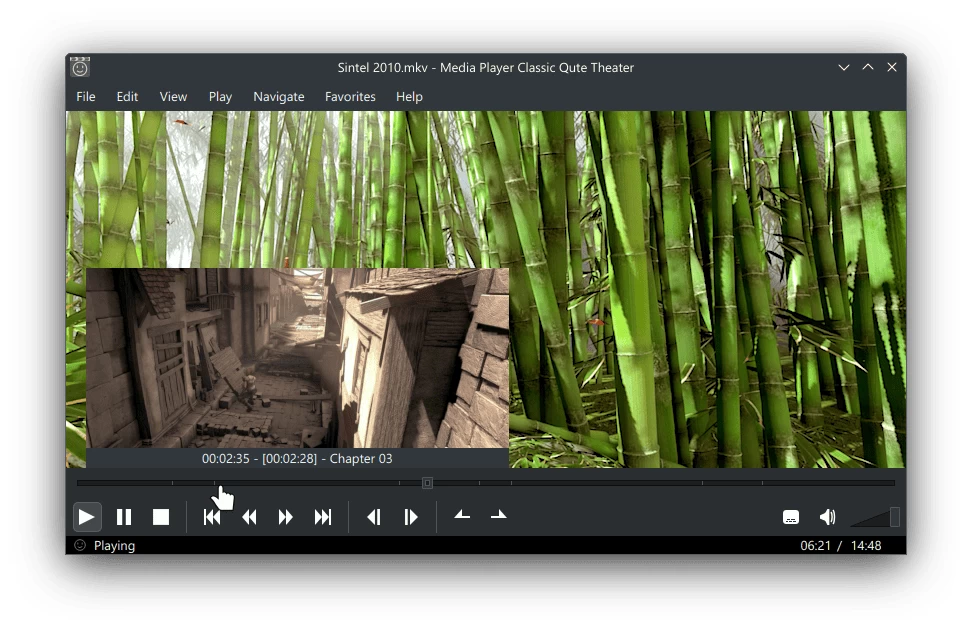
Media Player Classic Qute Theater ("Mpc-Qt") is a multimedia player designed to closely replicate the interface and experience of Media Player Classic Home Cinema ("Mpc-Hc").
While Mpc-Hc is widely regarded as a classic media player for Windows, Mpc-Qt recreates much of its look and functionality using the Qt toolkit. Instead of relying on DirectShow, it uses the powerful libmpv backend for media playback. Though inspired by Mpc-Hc, Mpc-Qt introduces several enhancements rather than serving as an exact clone.
Features and Improvements Over MPC-HC
Mpc-Qt builds upon the classic Media Player Classic Home Cinema (MPC-HC) experience with a range of practical enhancements. It maintains the familiar interface while adding features like multiple playlist support with progress tracking, allowing users to manage different shows or albums without losing their place. Seekbar thumbnail previews make navigation smoother, and integrated online video playback via youtube-dl expands content accessibility directly within the player. Additional improvements include quick queuing for flexible, out-of-order playback, multi-threaded playlist search for instant results, and customizable screenshot templates for neatly labeled captures. Users can display rich metadata in the playlist and personalize the app’s appearance with built-in theming options. While staying true to MPC-HC’s simplicity, Mpc-Qt delivers a more powerful and modern media experience.
Media Player Classic Qute Theater 26.01 changelog highlights:
- Pre-defined audio and video filters: Extra Stereo, Compressor and Crossfeed for audio, and Deinterlace for video.
- Fast seeking is used by default when hardware decoding isn't available
- Support for many video modifications: zoom, switch to 4:3 aspect ratio, free video resize, video move, rotate and horizontal flip.
- Move File to Trash feature which lets you sift through videos or music and remove unwanted ones by pressing a key.
- You can now set custom mpv options in Options > Tweaks.
- The AppImage version now includes auto update information.
- Implement Player Title bar settings by @tbertels in #507 #708
- Frame Timings -> Input Cache Stats by @cmdrkotori in #505 #508 #512
- Add pre-defined audio and video filters support by @tbertels in #514 #712
- Add support for custom mpv options by @tbertels in #519 #536 #635
- Add 'Move File to Trash' feature by @zakius in #523
- mainwindow: Add a crossfeed audio filter for headphones by @tbertels in #535
- Support changing the video zoom level by @tbertels in #539
- Implement gapless playback, read content of archives and playlists containing one file by @tbertels in #541
- settingswindow: Implement more subtitle options by @tbertels in #601
- Add a setting to choose whether to remember Quick Playlist content by @tbertels in #605
- Add option to append opened files to Quick Playlist by @tbertels in #607
- settingswindow: Implement subtitles black background box by @tbertels in #636
- mainwindow: Add 4:3 Aspect ratio command by @tbertels in #638
- Support resizing the video by @tbertels in #641 #658
- Support moving the video by @flandriai in #649
- Add Rotate and horizontal flip feature by @flandriai in #657 [full release notes]
Download: MPC-QT 26.01 | Portable | 120.0 MB (Open Source)
View: MPC-QT Website | MPC-QT@GitHub | Screenshot
 Get alerted to all of our Software updates on Twitter at @NeowinSoftware


















1 Comment
Load the comments and join the conversation!
Read the comments, ask the editors questions, show respect and join the conversation.