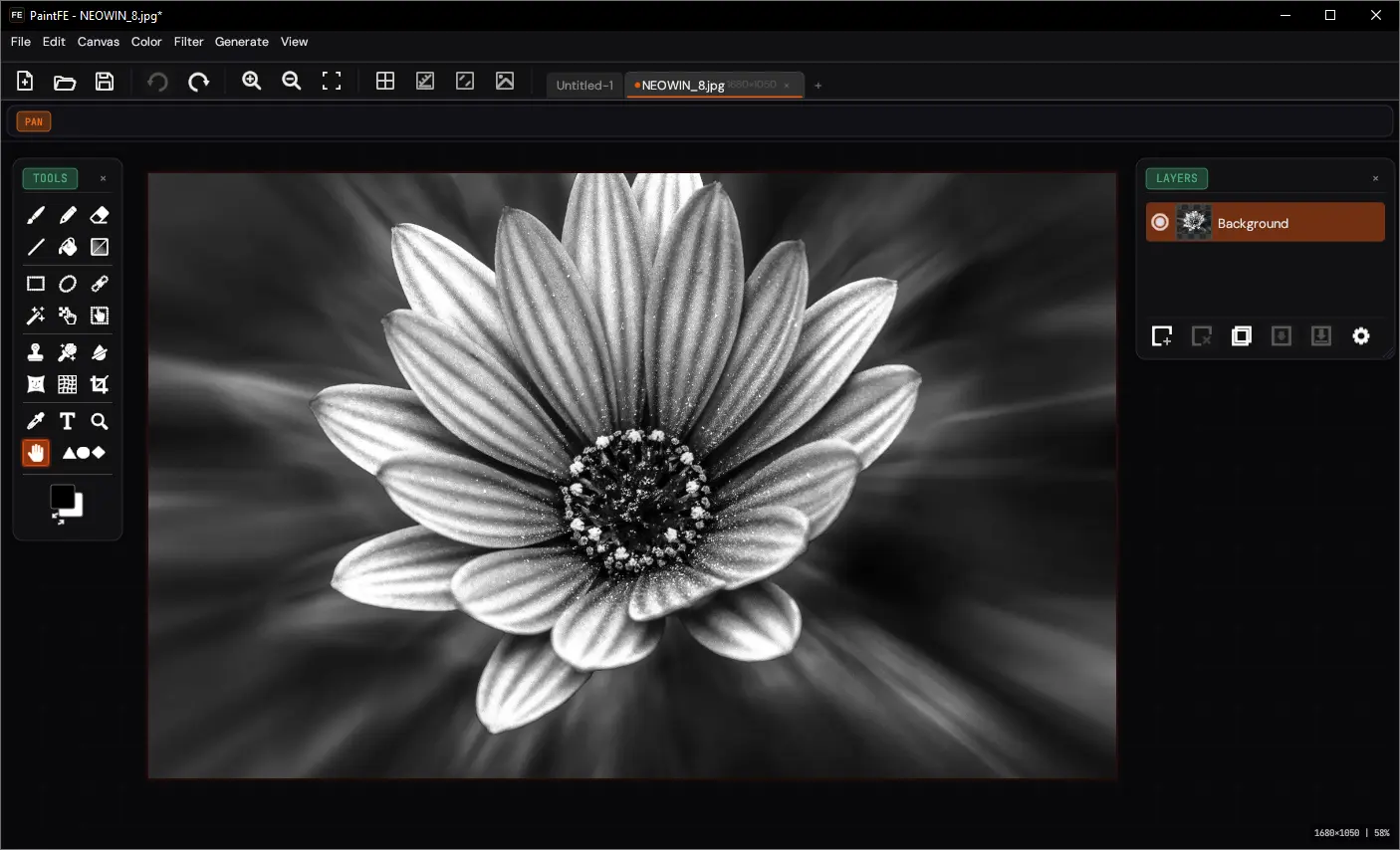
PaintFE is a fast, lightweight Windows raster image editor offering layers, blend modes, GPU-accelerated filters, gradients, mesh warp, and versatile brushes. It features advanced selection tools, clone stamp, content-aware fill, liquify, perspective crop, and shape primitives. Users can apply adjustments, effects, and filters including Gaussian Blur, HSL, Median, and Emboss with GPU acceleration. PaintFE supports animated GIF/APNG, text tools, color pickers, and a built-in Rhai scripting engine, all in a single portable executable—no installation required.
Tools
- Paint -- Brush, Pencil, Eraser, Line, Fill, Gradient. Brush tip library with variable spacing, soft/hard edges, Dodge/Burn/Sponge modes.
- Select -- Rect, Ellipse, Lasso, Magic Wand, Move Pixels, Move Selection. Add/Subtract/Intersect modes. Color Range selection via Edit > Select Color Range.
- Warp and Retouch -- Clone Stamp, Content-Aware Fill, Color Remover, Liquify (WGSL compute shader, CPU fallback), Mesh Warp (Catmull-Rom bicubic spline, GPU displacement pipeline, 2x2 to 6x6 grid), Perspective Crop.
- Utility -- Color Picker, Text (system fonts), Zoom, Pan, 17 shape primitives.
Filters and Adjustments
- Adjustments -- Auto Levels, Desaturate, Invert, Sepia, Brightness/Contrast, Curves, Exposure, HSL, Levels, Color Temperature.
- Filters -- Gaussian Blur, Box Blur, Motion Blur, Sharpen, Reduce Noise, Median, Pixelate, Unsharp Mask, Emboss, Edge Detect.
- Effects -- Vignette, Glow, Halftone, Oil Painting, Crystallize, Ink, Perspective, Distort (Bulge/Twist/Wave/Ripple), Noise, Scanlines, Glitch, Drop Shadow, Outline, Contour.
- Gaussian Blur, HSL, and Median (at smaller radii) have GPU compute paths. CPU/GPU selection is automatic.
PaintFE 1.2.6 changelog:
Highlights
- New non-destructive layer masks are now fully integrated into the layer workflow.
- Editing reliability improved across tools with safer auto-commit behavior on layer switches.
- UI and theming got a broad polish pass, especially for light themes and control customization.
What's new
- Layer Masks
- Add layer mask (reveal all)
- Add layer mask from selection
- Toggle mask editing and paint directly on masks
- Enable or disable masks
- Invert, apply, or delete masks
- Undo and redo support for mask painting and mask operations
Tools and Editing
- Tool previews now commit automatically when changing layers
- Shapes edits now record correctly in history
- Shapes now include side stretch handles
- Align tool can target selection bounds
- Triangle shape alignment and centering improved
Text and Fonts
- Fedora and Linux text input path improvements
- Font dropdown behavior restored to pre-egui-update expectations
- Hovering text-layer settings gear now shows a pointing cursor
UI and Theme
- Better icon contrast and behavior on lighter themes
- New interface customization controls for tool shelf, icon buttons, steppers, and text input backgrounds
- Effects and Atmosphere interface settings section removed for a cleaner settings surface
Fixes and Maintenance
- Degree symbol rendering fixed in relevant effect dialogs
- Hover-and-delete in Layers panel now deletes the hovered active layer as expected
- Non-fatal X11/xkb Compose parse noise reduced in AppImage launcher setup
- Updated triangle shape goldens and lint-cleaned release branch
PaintFE 1.2.7 changes:
- Quick update focused on Magic Wand accuracy, selection semantics, and targeting precision.
Download: PaintFE 1.2.13 | 30.3 MB (Open Source)
View: PaintFE Website | Screenshot | Github
 Get alerted to all of our Software updates on Twitter at @NeowinSoftware
















4 Comments
Load the comments and join the conversation!
Read the comments, ask the editors questions, show respect and join the conversation.