Microsoft recently promised to fix Windows 11 and improve its stock file manager, but those features are yet to materialize. Until then, users who are not satisfied with File Explorer, or those who want a bit more than the default option, can use Files, a popular and feature-packed file manager for Windows 10 and 11. Its latest preview update, version 4.0.39, delivered a bunch of very handy improvements and new features, including the ability to customize what appears on the toolbar.
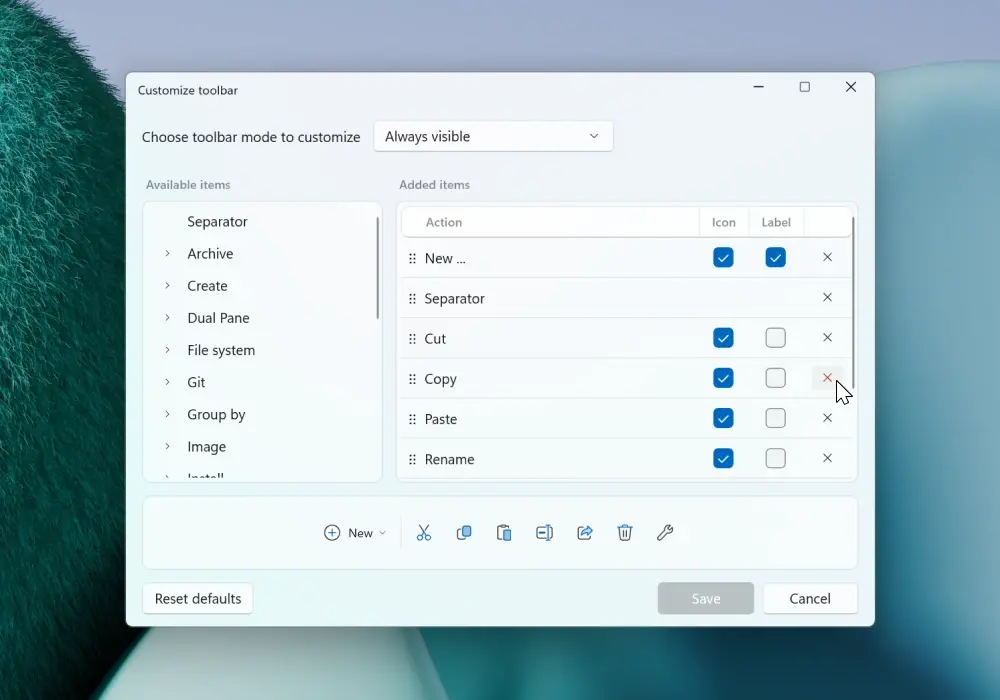
The main change in version 4.0.39 is toolbar customization. Now, you can create custom toolbars with the features and buttons that fit your workflow best. The app also lets you add or remove labels for each button on the toolbar. You can tweak your toolbar by right-clicking it and selecting "Customize toolbar." After that, you will see a new window with a list of available actions and a toolbar preview.
In addition to toolbar customization, Files 4.0.39 introduces a new keyboard shortcut for theme switching. If you want to switch between dark and light modes without opening settings, you can press Ctrl + Alt + T. Media files now have duration in tooltips, allowing you to see the length of a video or song, and the comment section received multi-line support.
Finally, there are two bug fixes:
- Fixed an issue where PowerToys Peek was not detected when installed in a custom path.
- Fixed an issue with the Preview Pane.
Files 4.0.39 Preview is available for download from the official website and the Microsoft Store. The Microsoft Store listing is paid (developers use it as a way for users to support them), while the app is available for free on the official website here. For now, there is no information on when the latest changes will be available in the stable release.



















6 Comments
Load the comments and join the conversation!
Read the comments, ask the editors questions, show respect and join the conversation.