
Files, a popular and feature-packed file manager for Windows 10 and 11, is a solid alternative for those who are not satisfied with what Microsoft offers by default. Recently, the app was updated to version 4.0.28, bringing some useful updates to context menus and bug fixes.
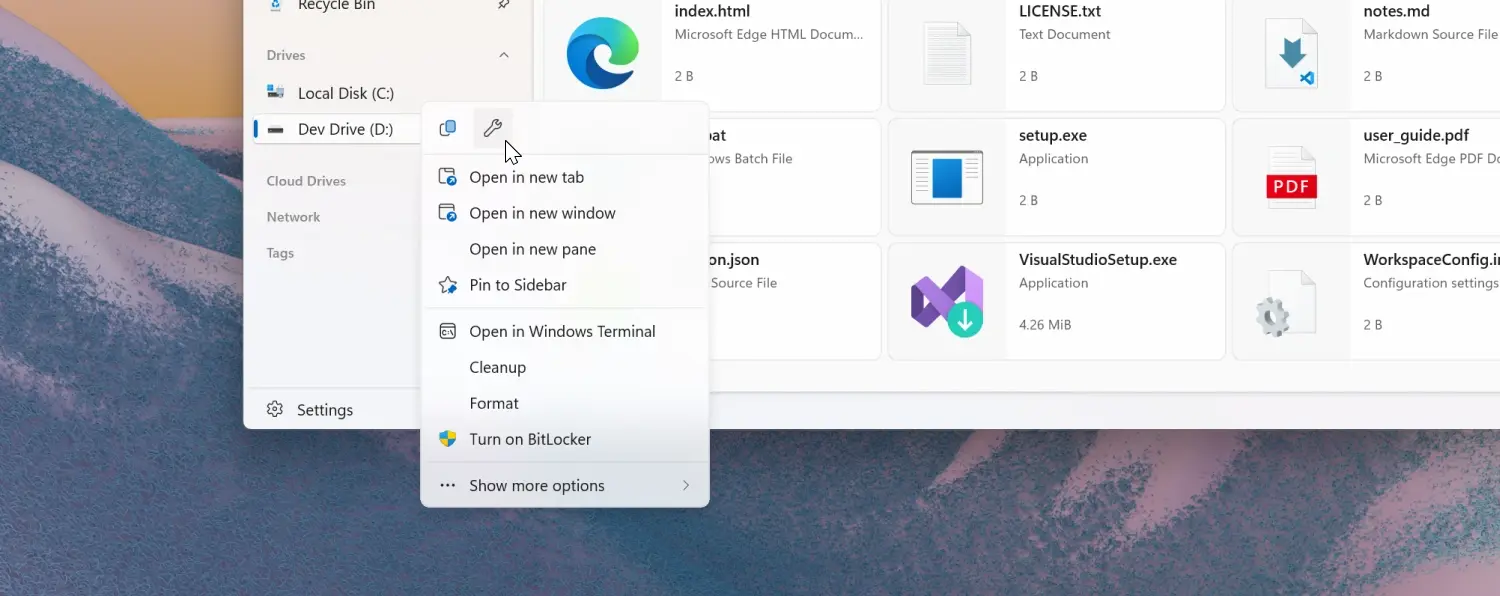
Files 4.0.28 is not the biggest release by any stretch of imagination, but it still has some welcome changes. For example, the properties option is now at the top of the menu for both the sidebar and the home screen, giving you quick access to this command without the need to go all the way to the bottom of the menu.
Next, Files now lets you remove certain options from its context menus. For example, the "Pin to Start" and "Pin to Sidebar" features can now be turned off in Settings > General > Context Menu Options.
Other changes in Files 4.0.28 include support for the Microsoft Store version of Dropbox, the ability to change icons for URL and shortcut files, and the ability to turn off smooth scrolling in Settings > General > Scrolling. As for fixed bugs, the list includes the following:
- Fixed an issue where the ‘Open With’ menu was missing for script files.
- Fixed an issue where switching tabs via the scroll wheel didn’t work correctly.
- Fixed an issue where SEER would reopen after manual closure.
- Fixed an issue where setting Files Stable as the default, then opening Files Preview would switch the default incorrectly.
- Fixed an issue where the Info Pane wasn’t hidden on the Release Notes page.
- Fixed an issue with tag searches containing spaces.
- Fixed inconsistent file type display for hidden items.
In addition to announcing the update, developers revealed that future updates would bring performance improvements for thumbnails, making them load faster. These improvements will show up in the preview channel first before making it to all users in the stable release.
You can download Files for free from the official website. If you want to support the developer, you can purchase the app in the Microsoft Store using this link.


















7 Comments
Load the comments and join the conversation!
Read the comments, ask the editors questions, show respect and join the conversation.