
There is no question that Microsoft wants everyone to upgrade to Windows 11, and unless you are enrolled on ESU (Extended Security Updates), it is probably best to upgrade to Windows 11 in order to have the latest security fixes. The company also offers tools to do so including a small new Windows 11 feature update tool for version 25H2.
However, after successfully making an upgrade, users can often find themselves faced with performance issues as one Facebook user noticed. They had performed an in-place upgrade to Windows 11 from 10 but noticed that their drive performance had reduced by magnitudes. The drive, an NVMe SSD, that was used here was a Samsung 970 Evo and it only managed to put up sequential reads and write speeds of 897 MB/s and 859 MB/s, respectively, a throughput much lower than what the potential of this SSD is.
The user was tech savvy enough to notice the difference as they ran a benchmark using CrystalDiskMark, a drive performance measuring tool. Samsung 970 Evo claims sequential speeds of up to 3400 MB/s reads and 2500 MB/s writes.
Thankfully for the user, a driver update was able to fix the issue as they noted over four times boost in case of sequential reads and nearly three times gain in the sequential writes after installing the new driver. The user posted their finding to alert others about such OS upgrade problems. They wrote: "A healthy reminder to run benchmarks after an upgrade from Windows 10 to 11. The 970 Evo needed a driver to get back up to speed when it didn't need one previously under Windows 10."
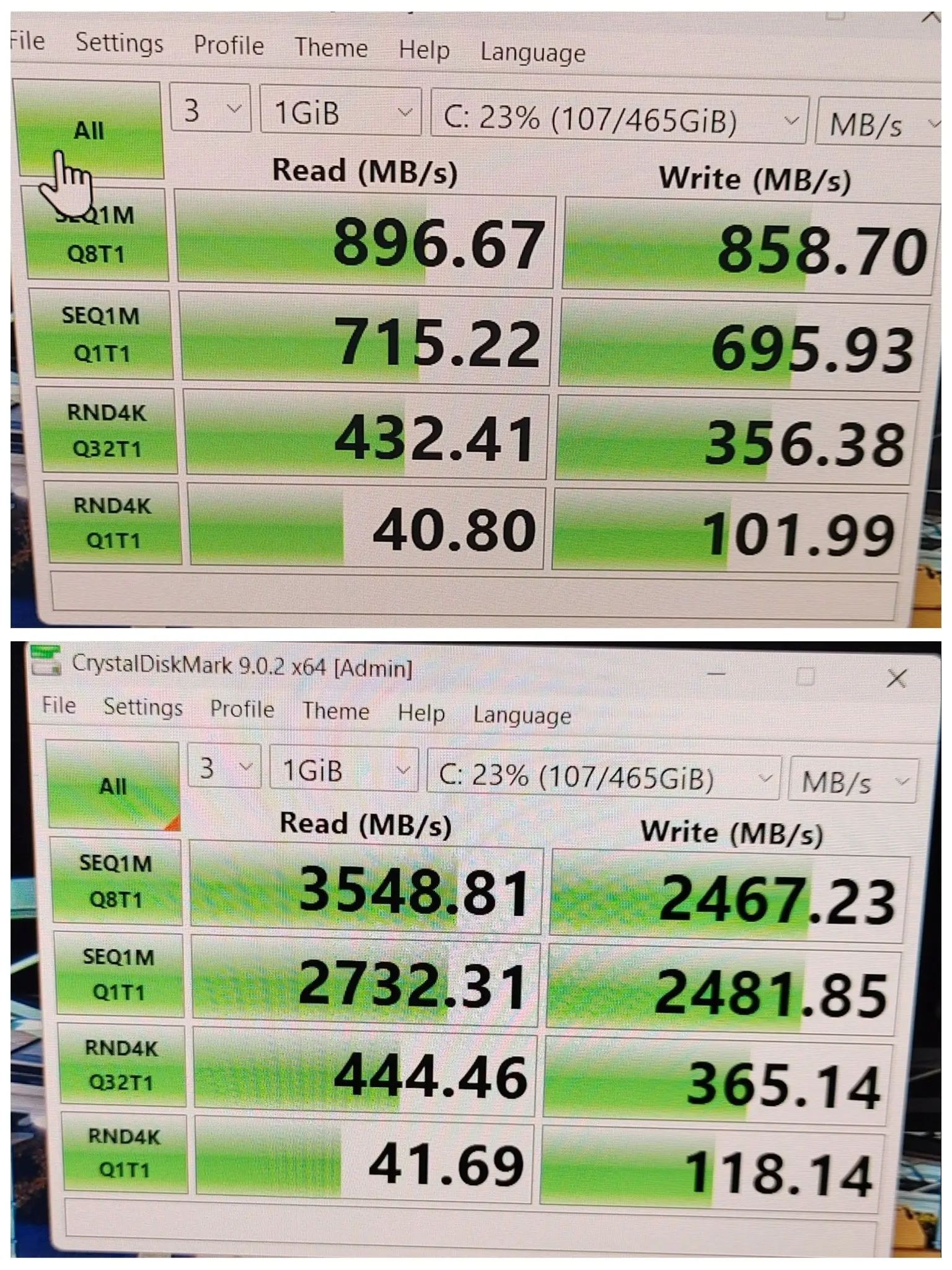
Interestingly, as you can see above, the random performance did not see any significant change; perhaps a heavier load could have led to different results as it would have hit the SLC cache more, which affects random throughput. That would indeed slow the PC down greatly as the system snappiness depends a lot on the drive's I/O capabilities.
Windows 11, especially newer versions 24H2 and 25H2, differ significantly from Windows 10 22H2; the latter shares similarity in codebase with Windows 11 22H2 and 23H2.
Aside from drivers, firmware updates after an OS upgrade can be very important too as we have seen before. For those with a Samsung drive who use the Magician app, make sure to download the latest version of the software as it fixes major issues.
Source and image: Dabeedski Da Rozaski (Facebook)


















9 Comments
Load the comments and join the conversation!
Read the comments, ask the editors questions, show respect and join the conversation.