
After Microsoft killed WordPad, Notepad started getting a lot more attention from developers. The app received plenty of new features, such as basic text formatting, some AI integration, and more (some believe that Notepad is losing its focus with all these changes). Now, Microsoft quietly released a new update that introduced reworked context menus.
The new context menus now look more in line with Windows 11 24H2's updated menus, which were also backported to Windows 11 23H2. The new variant has common actions like copy, cut, paste, select all, and delete in the upper row, giving you quick access to the most used commands. The rest of the menu remains unchanged, with options like Search with Bing, Write, Rewrite, Spelling, Summarize, and more.
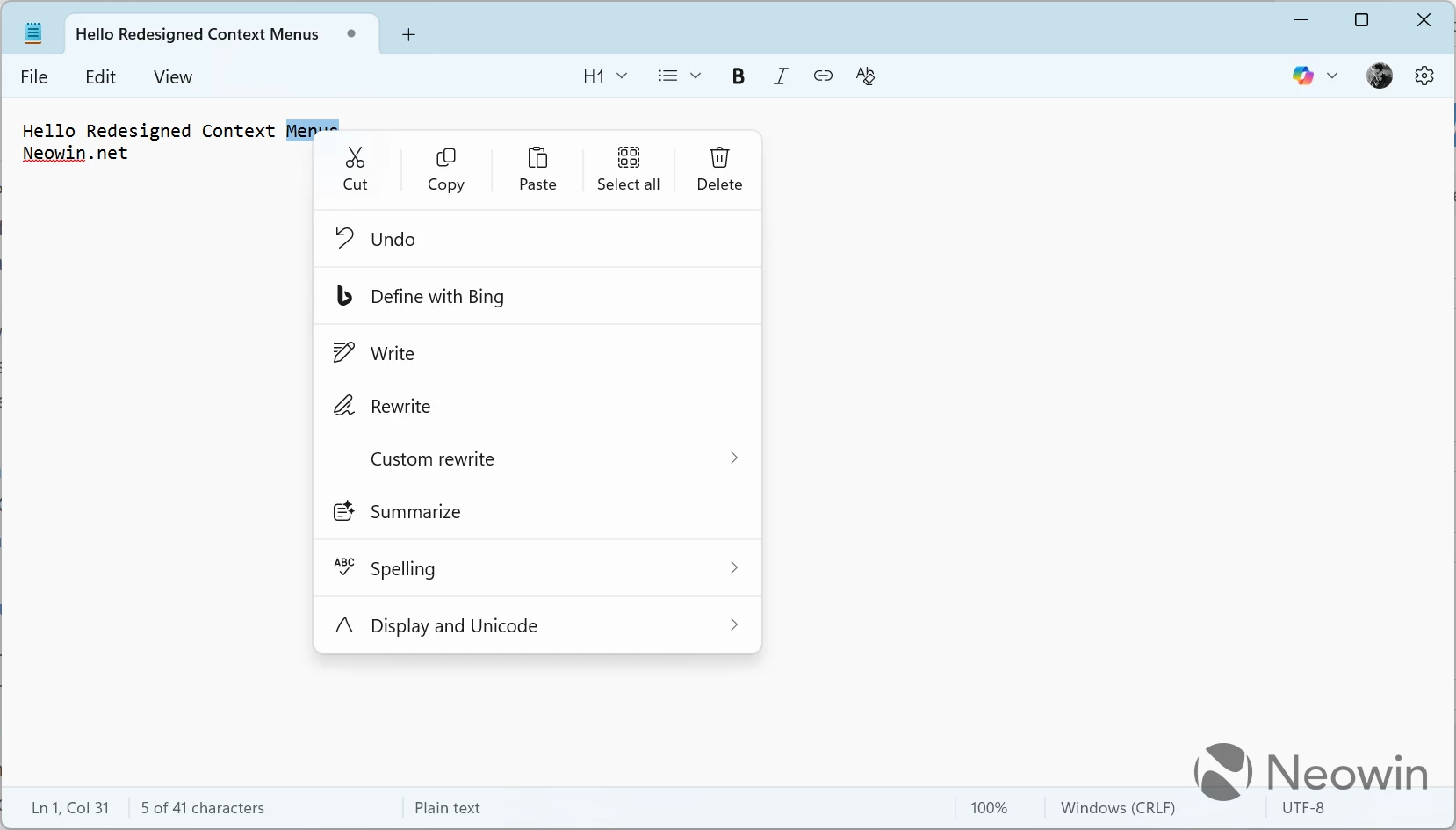
The updated menus are available in Notepad version 11.2507.26.0, which is currently rolling out to Windows 11 Insiders. However, as usual, you can get it on a stable release with a direct download. Here is how to do it:
- Go to store.rg-adguard.net and select ProductID in the first drop-down.
- Paste 9MSMLRH6LZF3 into the search box.
- Select Fast in the next drop-down.
- Click the button with a checkmark.
- Find Microsoft.WindowsNotepad_11.2507.26.0_neutral_~_8wekyb3d8bbwe.msixbundle (or higher version) and click it. Note: Microsoft Edge will show a warning that the file cannot be downloaded safely. You can dismiss the warning since the file is being downloaded directly from Microsoft.
- Launch the downloaded file and click Update. Wait for Windows to install the update, then Notepad will launch automatically. Right-click anywhere and behold the new context menu.
Microsoft will most likely announce the updated context menus for Notepad in an upcoming Windows 11 preview build later this week.
What do you think about the redesigned context menus in Notepad? Share your thoughts in the comments.
Source: Deskmodder

















17 Comments
Load the comments and join the conversation!
Read the comments, ask the editors questions, show respect and join the conversation.