Video Codec Converter (VCC) is a fast, user-friendly desktop GUI for batch video conversion and transcoding with FFmpeg. It supports popular codecs like AV1, H.264, H.265/HEVC, H.266/VVC, VP9, and MPEG-4, letting you convert multiple videos quickly without using command-line tools.
VCC leverages GPU acceleration with NVIDIA NVENC, AMD AMF, and Intel QSV for lightning-fast encoding. Users can trim, merge, and resize videos, copy or remove audio and subtitles, and apply resolution presets. Advanced features like auto-crop and film grain synthesis make professional video enhancements simple and efficient.
Designed for simplicity and speed, VCC offers batch processing, drag-and-drop support, progress tracking, preset profiles, and a live embedded FFmpeg terminal. The standalone Windows executable includes light/dark themes, making batch video conversion, transcoding, and encoding fast, flexible, and accessible for all users.
Video Codec Converter (VCC) features:
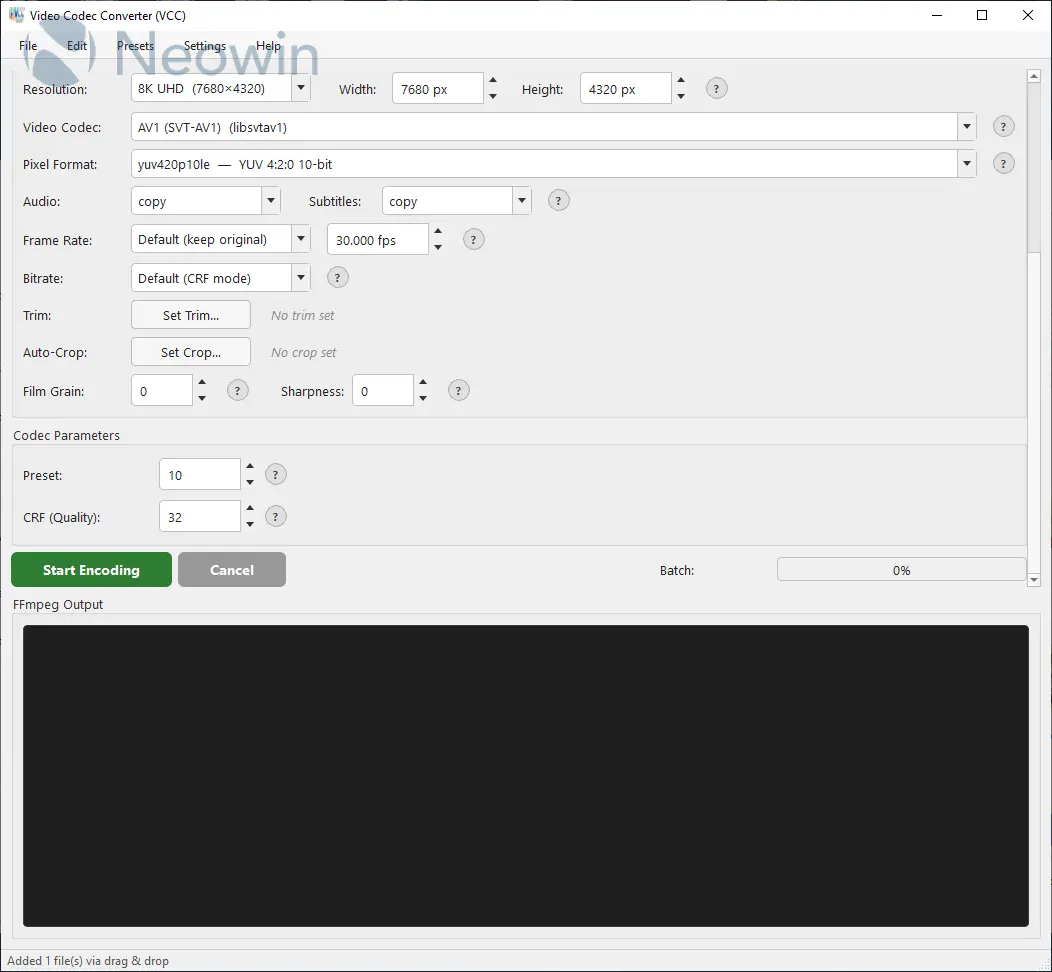
- 8 Video Codecs — AV1 (SVT-AV1), H.264, H.265/HEVC, H.266/VVC, VP9, AV1 (libaom), MPEG-4, AV1 (rav1e)
- GPU Encoding — Auto-detected NVIDIA NVENC, AMD AMF, and Intel QSV hardware encoders (10–50× faster)
- 15 Pixel Formats — yuv420p, yuv420p10le, yuv444p, and more
- Audio Control — Copy, re-encode (AAC/Opus/MP3/FLAC/Vorbis), or remove audio
- Resolution Presets — Quick presets for 360p through 8K, or set custom dimensions
- Subtitle Handling — Copy subtitles or remove them
- Batch Processing — Select multiple files or entire directories
- Drag & Drop — Drop video files or folders directly onto the window
- Batch Progress Bar — Overall progress across all files in the queue
- Preset Profiles — Save and load your encoding settings (Presets menu)
- Video Trimming — Set start/end times to trim videos during conversion
- Output Format Selection — Choose from 14 container formats (MKV, MP4, WebM, AVI, MOV, TS, FLV, WMV, OGG, M4V, MPG, 3GP, MXF) which are codec-aware or auto-detect
- Concatenate / Merge — Merge multiple video files into a single output file
- Auto-Crop — Detect and remove black bars (letterbox/pillarbox) per file using FFmpeg cropdetect
- Film Grain Synthesis — SVT-AV1 film grain synthesis for efficient grain encoding (0–50)
- Sharpness Control — Loop filter sharpness for SVT-AV1 and VP9 (0–7)
- Embedded Terminal — Live FFmpeg output displayed in the app
- Built-in Help — Menu bar with Codec, Pixel Format, Audio, Resolution, FPS, Bitrate, GPU Encoding, Film Grain, and Sharpness guides
- Dark / Light Theme — Toggle between dark and light mode via Settings menu (preference saved across sessions)
- Scroll-safe Controls — Mouse wheel won't accidentally change dropdown values
- Single EXE — Standalone .exe, no Python installation required for end users
Video Codec Converter (VCC) 1.2.2 changelog:
- Linux version, darkmode auto detect for GTK and KDE, help dialogs theme fixes.
Download: Video Codec Converter (VCC) 1.2.2 | 35.8 MB (Open Source)
View: Video Codec Converter Home Page | Screenshot
 Get alerted to all of our Software updates on Twitter at @NeowinSoftware

















0 Comments
Load the comments and join the conversation!
Read the comments, ask the editors questions, show respect and join the conversation.