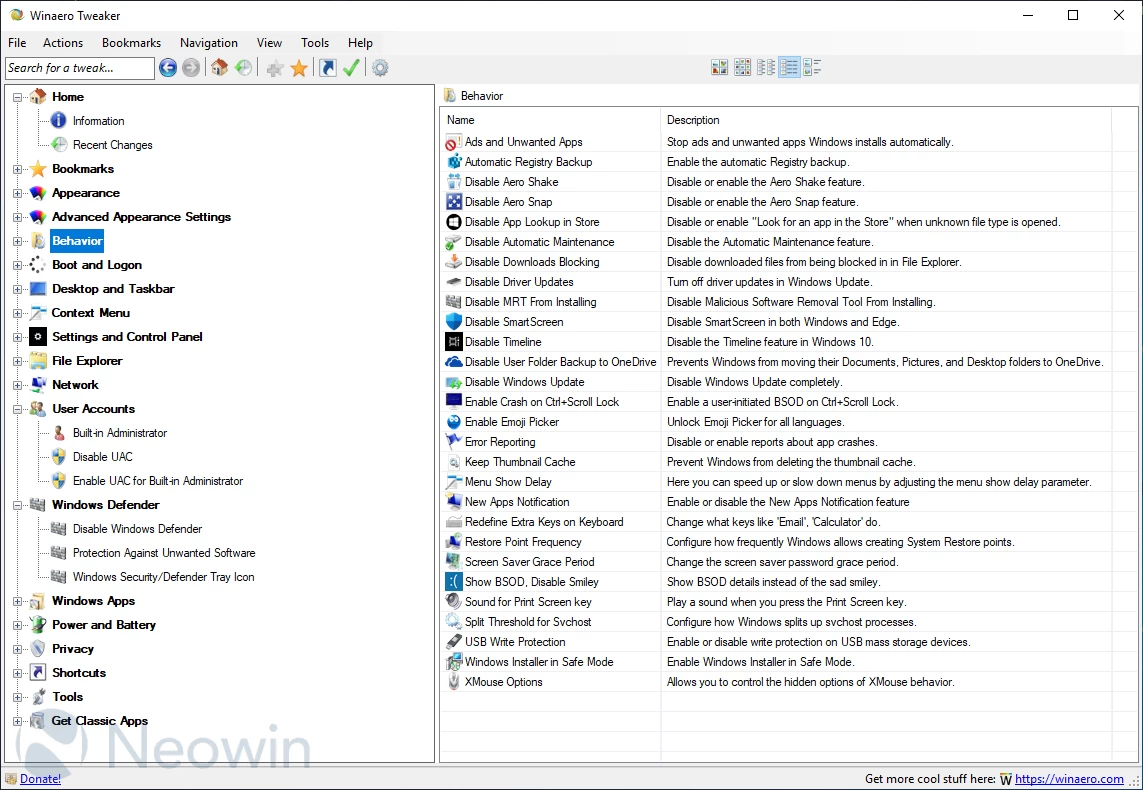
Winaero Tweaker is an an all-in-one customization utility that helps you to tweak Windows in just a few simple clicks. The program includes tweaks for every version of operating system from Windows 7 to Windows 11. Winaero Tweaker automatically detects the version of Windows OS you’re running and shows tweaks and customization options accordingly. The software can be installed as a portable app so you can take it with you as you move from one computer to another.
Here's a partial features list:
- Information - View information about your PC hardware and OS.
- Aero Colors - Change all Windows Aero settings including those which can't be changed with Control Panel.
- Aero Lite - Activate the hidden Aero Lite theme.
- Alt+Tab Appearance - Change hidden secret options of the Alt+Tab dialog.
- Colored Title Bars - Enable colors for window title bars in Windows 10.
- Dark Color Scheme - Here you can enable the dark color scheme for Windows 10 system settings and apps.
- Inactive Title Bars Color - Change the color of inactive title bars in Windows 10.
- Disable Aero Shake - Disable or enable the Aero Shake feature.
- Disable Driver Updates - Turn off driver updates in Windows Update.
- Disable Web Search - Disable Web Search in taskbar and Cortana in Windows 10.
- Disable Action Center - Disable or enable the Action Center feature in Windows 10.
- Disable Live Tiles - Disable Live Tiles all at once for Universal(Metro) apps.
- Activate Windows Photo Viewer - Activate Windows Photo Viewer in Windows 10.
- Auto-update Store apps - Disable or enable auto-update of Store apps in Windows 10.
- Disable Cortana - Disable Cortana in Windows 10.
- Disable Windows Defender - Disable Windows Defender in Windows 10.
- Microsoft Edge Download Folder - Change the default download folder in Microsoft Edge.
- Stop Unwanted Apps - Stop unwanted apps Windows installs automatically.
- Windows Defender Tray Icon - Show or hide Windows Defender tray icon.
- App Switcher Hover Timeout - Change the App Switcher hover timeout delay.
- Charms Bar Hover Timeout - Change the Charms Bar hover timeout delay.
- Modern App Closing Options - Speed up closing time of Metro apps for mouse and touch.
- Start Screen Power Button - Show or hide the Power button on the Start screen.
- Disable Telemetry - Prevent Windows 10 from spying on you.
- ... and many more.
Winaero Tweaker 1.64.2 - Key changes:
Colorize Taskbar
- A new "Colorize taskbar" option has been added under the Windows 11 section. It allows the system accent color to be applied to the taskbar in light mode (previously only in dark mode). Users may need to adjust the accent color if taskbar text is hard to read.
Window Borders – Updated Behavior
- The Advanced Appearance > Window Borders setting no longer applies changes immediately. Modifying the border size now requires signing out and back in. This change resolves previous issues where adjusting borders altered font sizes unexpectedly due to a deprecated API, particularly at non-standard DPI settings.
Aero Lite Improvements
- The Appearance > Aero Lite option has been refined. Resetting to the default theme no longer leaves the Windows 11 taskbar colored by Aero Lite. Legacy Command Buttons have been replaced with standard buttons to maintain proper appearance. These updates also support the new "Colorize taskbar" functionality through added workarounds.
Download page: Winaero Tweaker 1.64.2 | 5.3 MB (Freeware)
View: Winaero Tweaker Home Page | Screenshot
 Get alerted to all of our Software updates on Twitter at @NeowinSoftware
















0 Comments
Load the comments and join the conversation!
Read the comments, ask the editors questions, show respect and join the conversation.