Microsoft has released a couple of new Windows 11 builds for Insiders flighting the Canary channel. The first build, 28020.1803, under KB5083824, slightly improves the visuals of one of the Settings functions, among other things. Meanwhile, the second build, 29560.1000, has fixes for USB, and more. The full changelog for the builds are given below.
First we have the one for build 28020.1803:
Changes and Improvements gradually being rolled out with toggle on*
- This update includes a small set of general improvements and fixes that improve the overall experience for Insiders running this build on their PCs.
[Input]
- Pen settings: we have made refinements to the Pen settings page including small changes to the options for the pen tail button. A new option, “Same as Copilot key”, enables the pen tail button to launch the same app as the Copilot key. Feedback: Share your thoughts in Feedback Hub (WIN + F) under Devices and Drivers > Bluetooth – Keyboards, Mice, and Pens.
- Improved reliability of configuring fluid dictation option in voice typing (Windows key plus H) settings.
[Settings]
- The Settings Developer Mode dialog is updating to be visually consistent with the rest of Windows 11 dialogs.
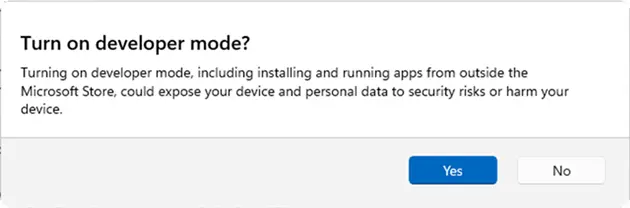
Feedback: Share your thoughts in Feedback Hub (WIN + F) under Settings > All other settings.
[Other]
- Removed extraneous unexpected error from sfc /scannow.
Second we have the changelog for build 29560.1000:
Changes and Improvements gradually being rolled out with toggle on*
- This update includes platform changes in moving to a new active development build.
[General]
- Fixed an issue causing some Insiders to experience an increase in freezes after the latest flights.
- Fixed an issue resulting in attached USB devices not working for some Insiders after the latest flight.
- Improved reliability of Setting Screensaver Settings back to None.
You can find the official blog posts here (link1, link2) on Microsoft's website.
















0 Comments
Load the comments and join the conversation!
Read the comments, ask the editors questions, show respect and join the conversation.