
Microsoft has just rolled out the new Language Community app that lets you submit better translations for settings and apps in Windows 10. In fact, it will even sync suggestions from other users and allow you to upvote the best one if it already exists.
As Microsoft puts it on the Store listing for the app:
Help us make Windows translations better! Capture screenshots of Windows translations that need improvements. Send us your translation suggestions or vote for translation suggestions submitted by other Windows Insiders. Join the Windows Insider program and help shape Windows in your language.

As you can see in the above image, after opening the Language Community app and selecting "Capture Text", you can click on any text area in a settings window or app which then brings up the suggestions screen. In our testing we could even select areas of text in the Windows 10 Skype app.
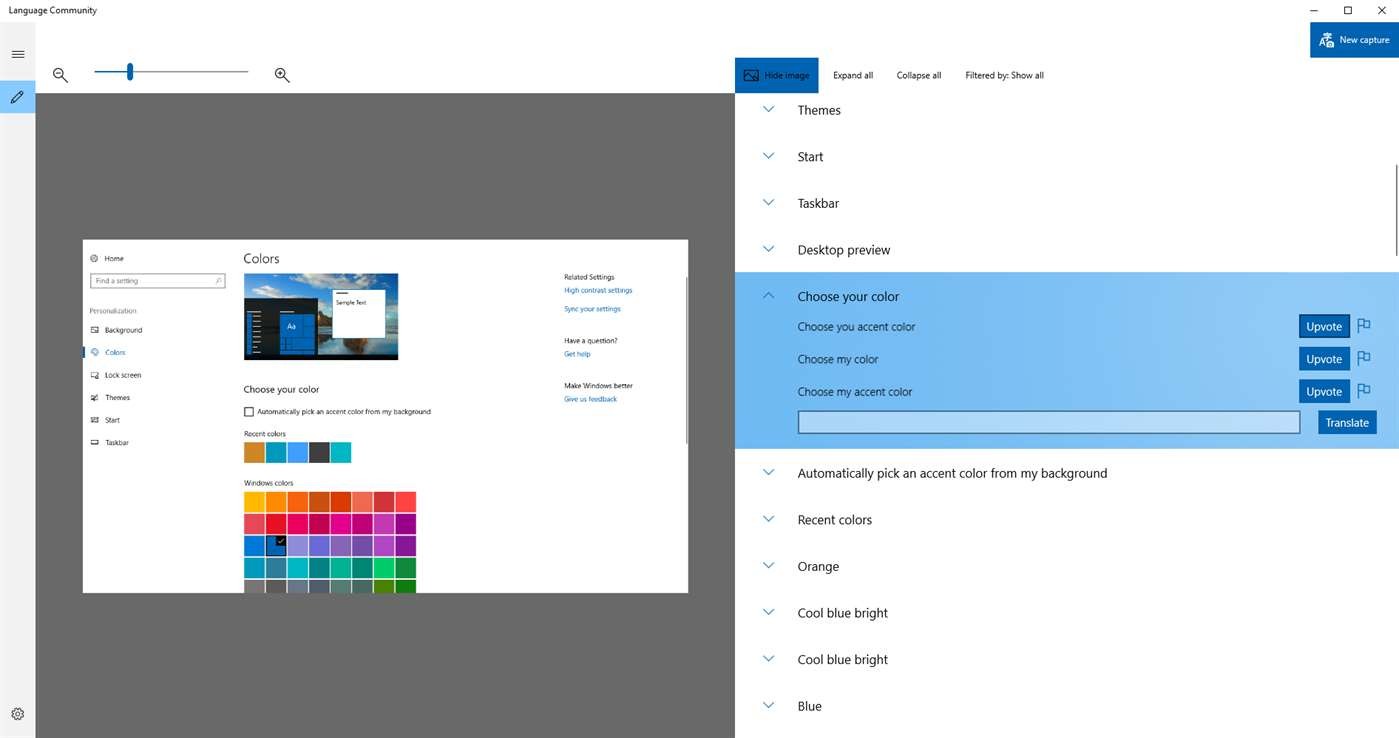
When clicking on the desired bad translation, you'll be prompted to enter your own suggestion, or you can choose to upvote others that have already been submitted.
The app can be downloaded right now from the Windows Store, but it does require the Windows 10 Fall Creators Update (build 16232.0 and up) which won't arrive for everyone until October 17. So for now at least, it is only available to Windows Insiders.
Source: Aggiornamenti Lumia (Italian)
















9 Comments
Load the comments and join the conversation!
Read the comments, ask the editors questions, show respect and join the conversation.