
Windows 8.1 was the last operating system to offer nearly full control over its update mechanism. Do not want updates? No worries, go to the Control Panel and turn them off. However, in 2015, things changed when Microsoft introduced Windows 10. Ever since, Windows updates have been essentially unavoidable for regular users, as long as they do not resort to radical methods.
Now, it is 2026, and things are changing once again.
Microsoft is finally giving users more control over Windows Update, a thing that many customers hate with burning passion. Soon, Windows 11 will let you pause Windows updates for "as long as you want," and the latest Windows 11 preview builds already have the right bits under the hood, offering a glimpse at what is coming.
@phantomofearth discovered the new Windows Update controls and shared the finding on X. Right now, Windows 11 lets you pause updates for up to five weeks, but in upcoming builds, the drop-down list will be replaced with a calendar control for you to specify when Windows Update should resume its operation.
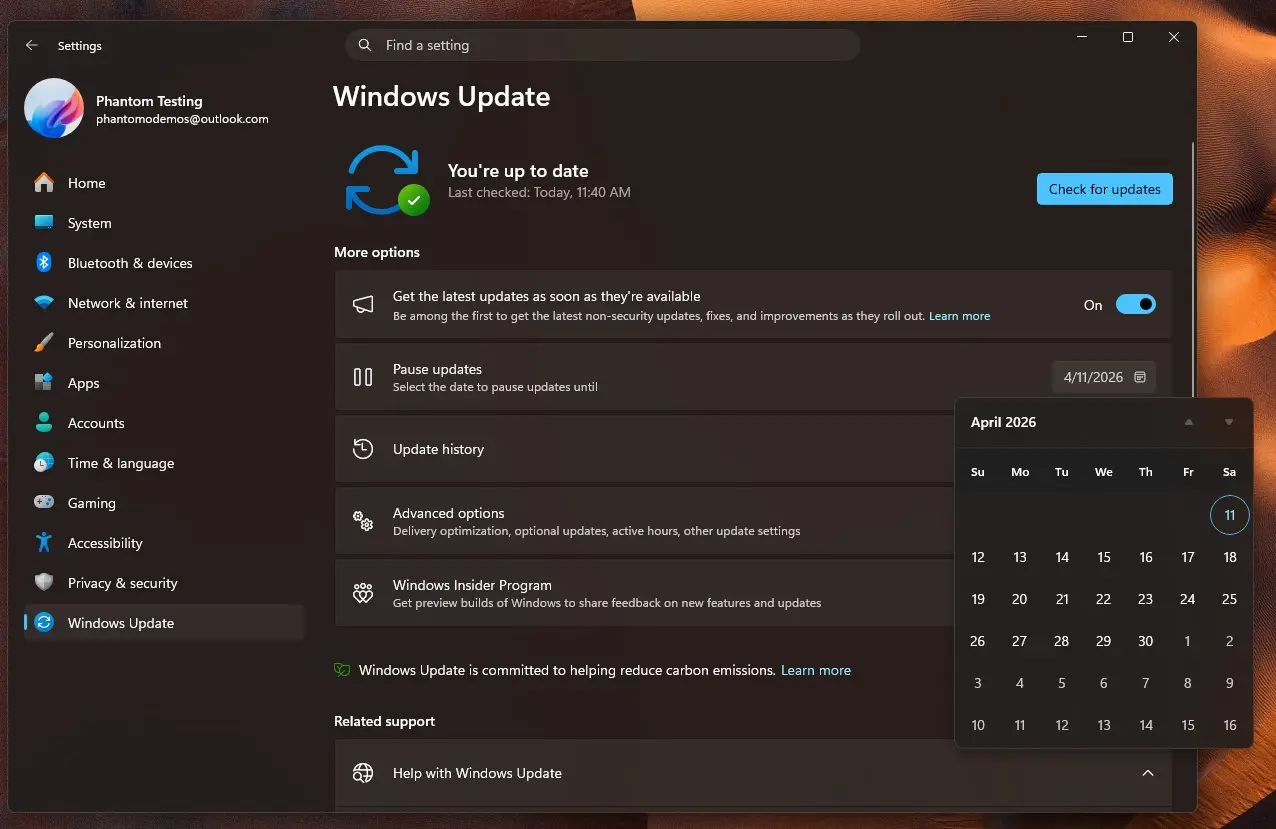
Microsoft has already shared a lot about its plans to improve Windows 11 and address users' complaints, but the exact details about Windows Update remain unknown. Microsoft is not saying how long Windows 11 will let you pause updates or what will happen once your Windows version reaches the end of support. Microsoft has a tradition of force-updating users on outgoing Windows versions, so it will be interesting to see how the company proceeds with the new approach.
In addition to changing how Windows Update works, Microsoft is revamping the Insider program. This week, it announced major changes, including a new build structure, no controlled feature rollouts, easier channel switching, and more.










_(1)_small.jpg)









19 Comments
Load the comments and join the conversation!
Read the comments, ask the editors questions, show respect and join the conversation.