
Windows 11's AI capabilities are not just all about Copilot. The operating system has a bunch of useful built-in features, such as Windows Studio Effects, which apply various enhancements to your camera. For example, you can blur your background, fix the eye contact, mute background noises, and do more. Windows Studio Effects are available for built-in webcams on Copilot+ PCs with Qualcomm, Intel, and AMD processors. Now, Microsoft wants to make Windows Studio Effects work with external cameras.
In the recently released Windows 11 preview builds from the Dev and Beta Channels, Microsoft has enabled Windows Studio Effects for cameras other than built-in webcams, such as external USB cameras or rear-facing cameras in tablets.
Here is what Microsoft said in the announcement post:
We are working to bring the Windows Studio Effects experience from integrated laptop cameras to a broader range of camera hardware, helping you stay professional and look your best across more setups. On supported Copilot+ PCs, we are rolling out the ability to use Studio Effect’s AI-powered camera enhancements with an additional, alternative camera – such as a USB webcam or your laptop’s built-in rear camera.
Microsoft used to roll out new AI features for Copilot+ PCs on Snapdragon-powered devices first, but this time, the company is rolling out new stuff for those with Intel-based devices. If you have a Copilot+ PC with an AMD or Snapdragon processor, you will get the necessary driver update at a later date.
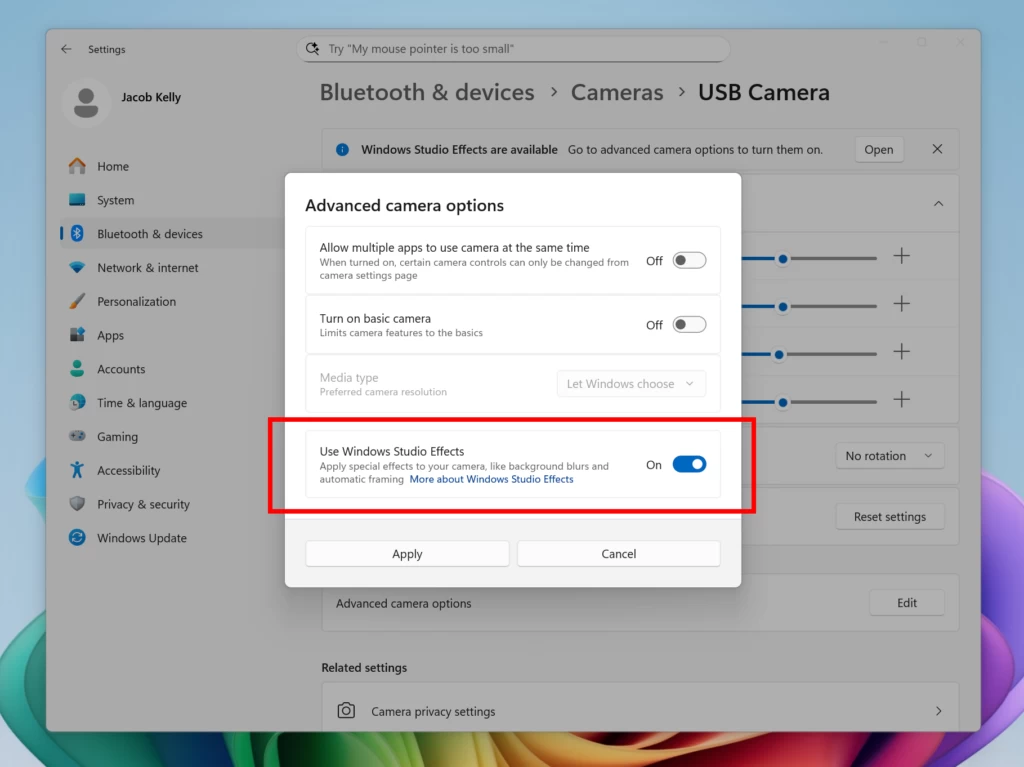
You can turn off Windows Studio Effects for external cameras by heading to Settings > Bluetooth & Devices > Cameras. Select your camera, click "Advanced Camera Options," and find the "Use Windows Studio Effects" toggle. After that, Windows 11 will let you adjust and toggle various Windows Studio Effects from the tray area on the taskbar.
The ability to enable Windows Studio Effects on external cameras will be useful for those planning to purchase a desktop Copilot+ PC, such as the one Steven Parker recently reviewed. For now, Copilot+ PCs have been mostly available in the form of tablets and laptops, but now, manufacturers are slowly introducing more form factors to the program.




















3 Comments
Load the comments and join the conversation!
Read the comments, ask the editors questions, show respect and join the conversation.