
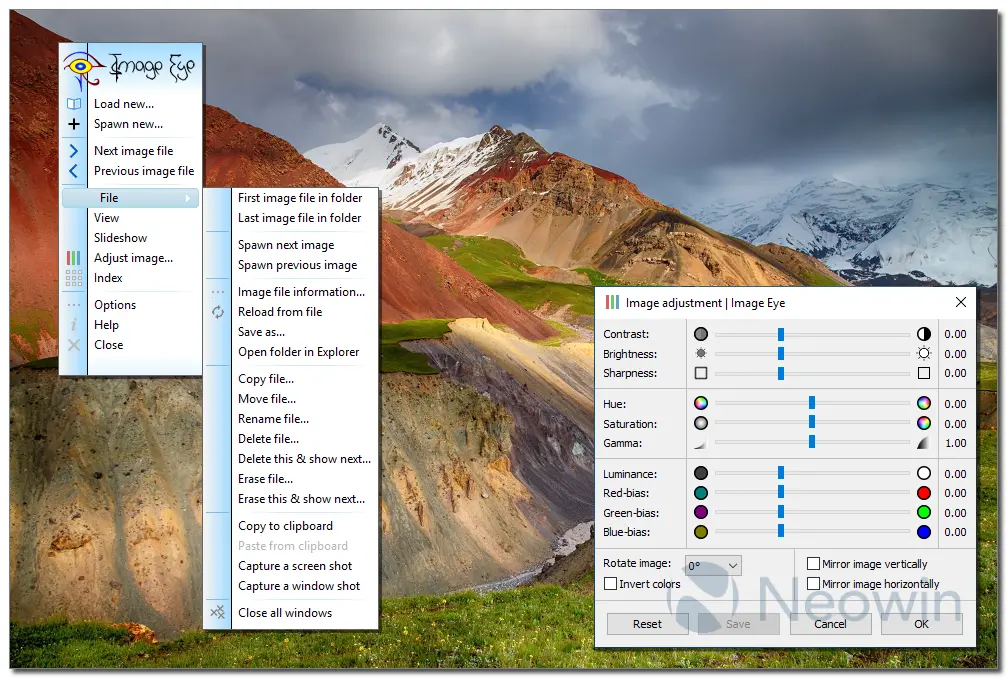
Image Eye is a fast, lightweight, and clutter-free Windows image viewer designed for users who want pure viewing performance without unnecessary menus or editing bloat. It delivers uncompromising image quality, instant navigation, and support for all common formats, including AVIF, WebP, GIF (animated), PNG, TIFF, PSD, RAW variants, and multi-page files.
Its index mode generates thumbnails extremely quickly, while adjustments like rotation, mirroring, zoom, brightness, contrast, sharpness, hue, saturation, and gamma can be saved non-destructively and automatically reapplied.
Under the hood, Image Eye uses deep-color precision, Floyd-Steinberg dithering, speculative decoding, asynchronous I/O, data and task parallelism, AVX/AVX2/SSE optimizations, and Catmull-Rom resampling for smooth, high-quality processing. It supports dark mode, NTFS long paths, portable use, customizable shortcuts, and multiple languages.
Additional features include secure file erase, screen capture, wallpaper setting, freeze-mode, fast directory browsing, cached thumbnail indexing, recursive folder view, and a simple slideshow scripting language. Image Eye remains freeware and focuses solely on exceptional image viewing—clean, fast, powerful, and highly optimized.
Image Eye 10.0 changelog:
Updated system requirements
- 64-bit now requires Windows 10/11 and x86-64-v3 (AVX/AVX2/FMA).
- 32-bit supports Windows 7–11 with SSE/SSE2.
- ARM64 build added for ARMv8-A.
Fast processing, dark mode, large Index
- New 256-bit SIMD code paths in x64 provide up to 2× faster processing for resizing, color conversion, and heavy image tasks.
- Added Windows dark mode support with automatic theme switching.
- Added NTFS long-path support (up to 32,767 characters).
- Index window now handles 10,000+ files reliably.
New format support
- AVIF (via libAvif 1.3.0 + Dav1d 1.5.3)
- BigTIFF
- Canon CR2/CR3 preview images
- PBM/PFM/PGM/PNM/PPM
Other changes
- Improved PSD/PSB handling, including ZIP compression and visible-layer composition.
- Updated libWebP to 1.6.0.
- JPEG decoding now uses more than two threads.
- Can now save as PNG (in addition to BMP).
- New modern “Open File” dialog (dark-mode compatible); Windows previews replace old custom preview.
- Added ultra-precision smooth scrolling; updated mouse-wheel navigation behavior.
- Index window supports navigating back into previously opened subfolders.
- Added image outline color option and improved overlay text (filename option + better alignment).
- Added command-line -index + -fullscreen combination.
- Options now include Check for updates.
- Numerous minor improvements and bug fixes.
Download: Image Eye 64-bit | 3.2 MB (Freeware)
Download: Image Eye 32-bit | 2.8 MB
Download: Image Eye ARM64 | 2.7 MB
Links: Image Eye Homepage | Screenshot
 Get alerted to all of our Software updates on Twitter at @NeowinSoftware
















0 Comments
Load the comments and join the conversation!
Read the comments, ask the editors questions, show respect and join the conversation.