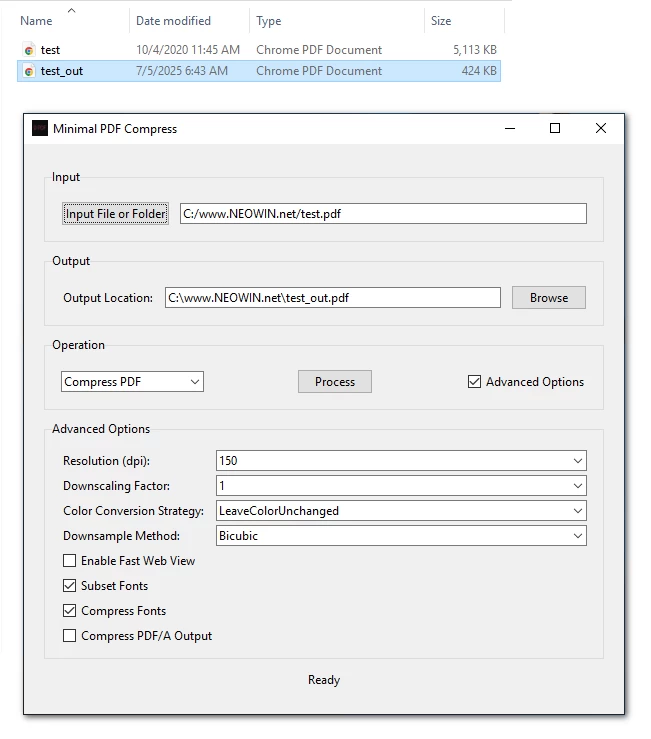
Minimal PDF Compress is a user-friendly, graphical desktop application designed to simplify PDF compression and conversion tasks using Ghostscript on Windows. It allows users to compress PDF files or convert them to PDF/A format with customizable options, all through an intuitive GUI (Graphical User Interface). Built with Python and Tkinter, this tool eliminates the need for command-line interactions, making PDF processing accessible to everyone.
For many users, the command prompt can be intimidating due to its text-based nature, complex syntax, and lack of immediate feedback. Ghostscript, while powerful, typically requires command-line expertise to perform tasks like PDF compression or conversion to PDF/A.
Note: Ghostscript's pdfwrite device doesn't technically "compress" PDFs in the traditional sense. Instead, it recreates a new PDF that may be smaller due to optimizations like removing unnecessary metadata, simplifying fonts, or recompressing images.
Minimal PDF Compress 1.8 changelog:
This is a major update focusing on a completely overhauled compression engine, powerful new utility features, and significant UI/UX enhancements across the entire application.
Features
- The compression logic has been rebuilt from the ground up for better results and more control.
- The Compress tab now features four distinct modes: standard Compression, Lossless optimization, conversion to archival PDF/A format, and a new Remove Images mode to create text-only documents for maximum compression.
- A new suite of best-in-class tools, including pngquant, jpegoptim, ECT, and Zopfli, for superior image compression.
- You can now convert the entire PDF to grayscale.
- An option to use the powerful Zopfli algorithm for maximum PNG compression.
- The "Stamp/Watermark" tool now supports sequential Bates numbering. Simply add the %Bates variable to your text stamp to automatically number your pages.
- You can now easily scale your image stamps from 10% to 200% of their original size using a simple slider.
- A new "Header/Footer" tab has been added.
- A clickable Table of Contents generator as a new page in your PDF based on the document's existing bookmarks.
- A new output setting allows you to only save the compressed file if it's actually smaller than the original.
- A better "Fast Mode" option is available in the compression settings that skips the most time-consuming optimization steps.
Bug fixes
- The new compression engine is not only more powerful but also more intelligent. It uses a multi-stage process, including Ghostscript downsampling followed by targeted image optimization and finalization with cpdf for the best possible size-to-quality ratio.
- Live previews for the Rotate and Stamp tabs are now "debounced," meaning they only update after you stop making changes. This makes the UI feel much faster and more responsive. It could be a lot better/faster if I implemented mupdf, but that would significantly increase the size of the app.
- Metadata handling now explicitly uses UTF-8, improving support for special characters in titles, authors, and keywords.
UI
- Every button, entry field, and option throughout the application has new tooltips explaining what it does! Just hover your mouse over any element to see a description.
- The main compression tab has been completely redesigned. The old dial has been replaced with two new components:
- A gauge that visually shows the percentage of file size saved after processing.
- A new slider for control of DPI.
- The Stamp and Header/Footer tabs now feature a new 9-point visual grid for selecting the position.
- The text entry field in the "Stamp/Watermark" tab now supports multiple lines of text.
Download: Minimal PDF Compress 1.8 | 33.8 MB (Open Source)
View: Minimal PDF Compress Home Page | Screenshot
 Get alerted to all of our Software updates on Twitter at @NeowinSoftware
















0 Comments
Load the comments and join the conversation!
Read the comments, ask the editors questions, show respect and join the conversation.