
One of the reasons it has become easier over the years to move from Windows to Linux is because of the development of web technologies. For example, back in 2008, when I first used Linux, Microsoft Word was a quintessential program to have installed on your computer. It wasn’t available for Linux and the best you could do was use OpenOffice, which as we all know, isn’t perfectly compatible with Office documents.
Developments in web technologies have made it possible to use things like Word and Google Docs in the web browser with perfect compatibility with Word documents and parity in feature support. It is a similar story with gaming, if you’re not a diehard gamer who wants the very best performance, you can use the browser to play games via services like Nvidia GeForce NOW.
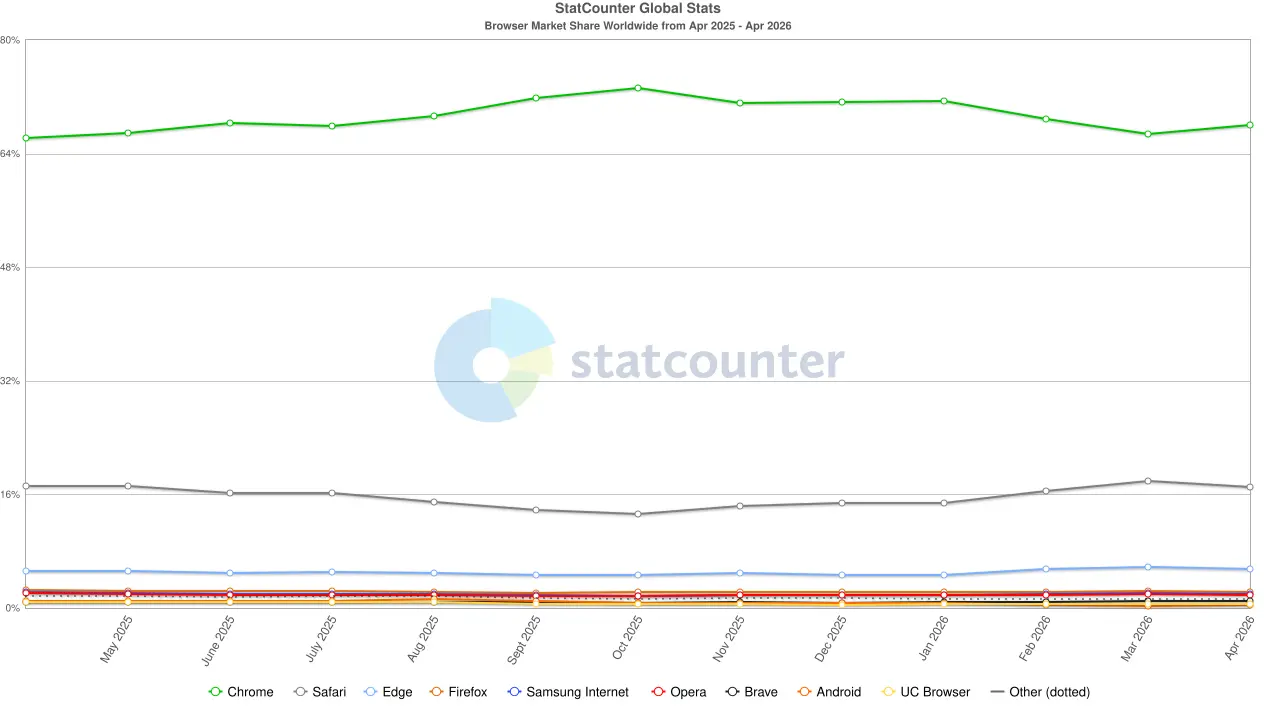
Alongside these developments, we have seen one web browser, Google Chrome, become utterly dominant across on the desktop and mobile, while other players have slunk into irrelevance. While this could be put down to the dominance of Android and Chrome being bundled as the default browser, I also think there is another reason that people stick with Chrome, and it is also the reason I use Chrome as my daily driver, and it is this: Chrome doesn’t get too adventurous adding new user-facing features or UI overhauls.
Just look at Firefox, Edge, Brave, and Opera. Mozilla is the chief offender when it comes to browser refreshes, it seems there is a complete UI overhaul every few years and every time they alienate their users, their market share falls. Edge, Brave, and Opera are not as bad with their UI overhauls, but they do shove a load of unnecessary features in people’s faces, which Google refrains from doing with Chrome - making it a simpler browser for people to use.
By keeping the browser simple, familiar, and decluttered, it allows users to focus on the websites they are visiting, rather than some stupid feature or nag (I’m looking at you, Edge) distracting them. Additionally, the time not spent doing UI tweaks ensures that the background features of the browser work properly and work with all the newest web technologies that enable more powerful web apps.
One of the reasons that you won’t see advertisements in Google Chrome is because Google can afford not to display them. It is a behemoth of a company rolling around in money and it can afford to just put the ads in Google Search or on YouTube, instead of bogging down the browser directly.
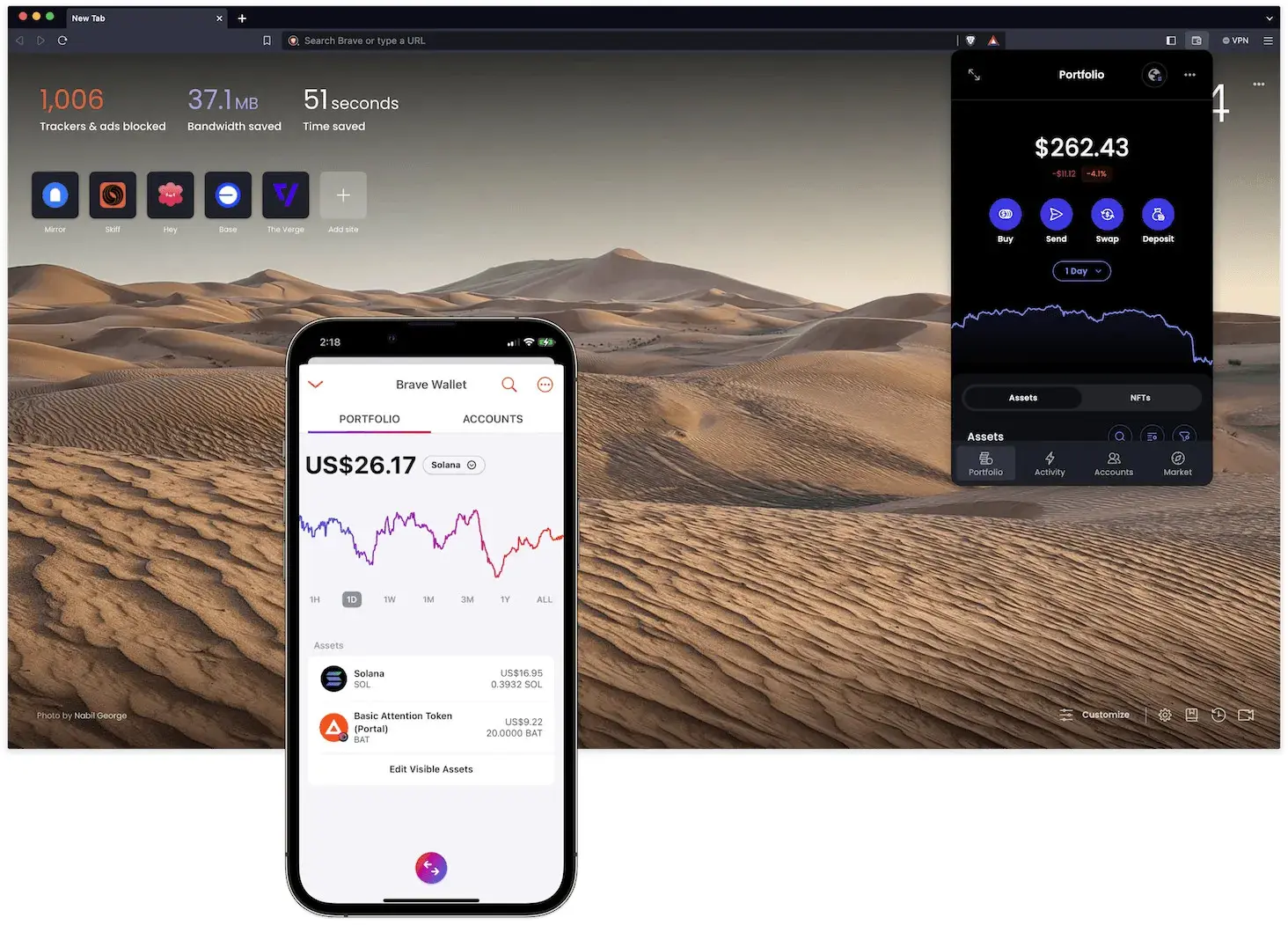
This is in direct conflict with Opera, which is just a browser company. It doesn’t have a search engine or a massive video sharing website to place ads in instead, so you get things such as sponsored tiles on your new tab page. In Brave, ever since it started, it has attempted to monetize via its cryptocurrency BAT. The idea being that users get rewarded for viewing Brave’s ads in the browser and then Brave taking a cut from advertisers. While this is optional, the inclusion of a wallet in the browser is extra clutter that Chrome users don’t need to worry about. It might be a nice feature for power users, but many people wouldn’t care about it.
One of the things I like about Chrome is that it hasn't changed much since I used the beta builds nearly 20 years ago, the icon tabs on top and single URL bar are all still there. Sure there are new features like tab groups and now split view, but these are in the background and you’d never know they were there unless you right-clicked on the tabs. This is what normal people want, they want to learn something once and then be productive.
Mozilla Firefox is the complete antithesis of this. We had the classic Firefox with tabs under the URL bar back with 3.5 and 3.6 then we got a reasonable overhaul with Firefox 4, where tabs were shifted to the top. After that we got the Australis, Photon, Proton, and now, Nova overhauls none of which seemed that necessary, but all brought big UI changes, potentially confusing more casual users. It is like the company gets bored if it doesn’t completely change things periodically, despite it invariably creating backlash from users.
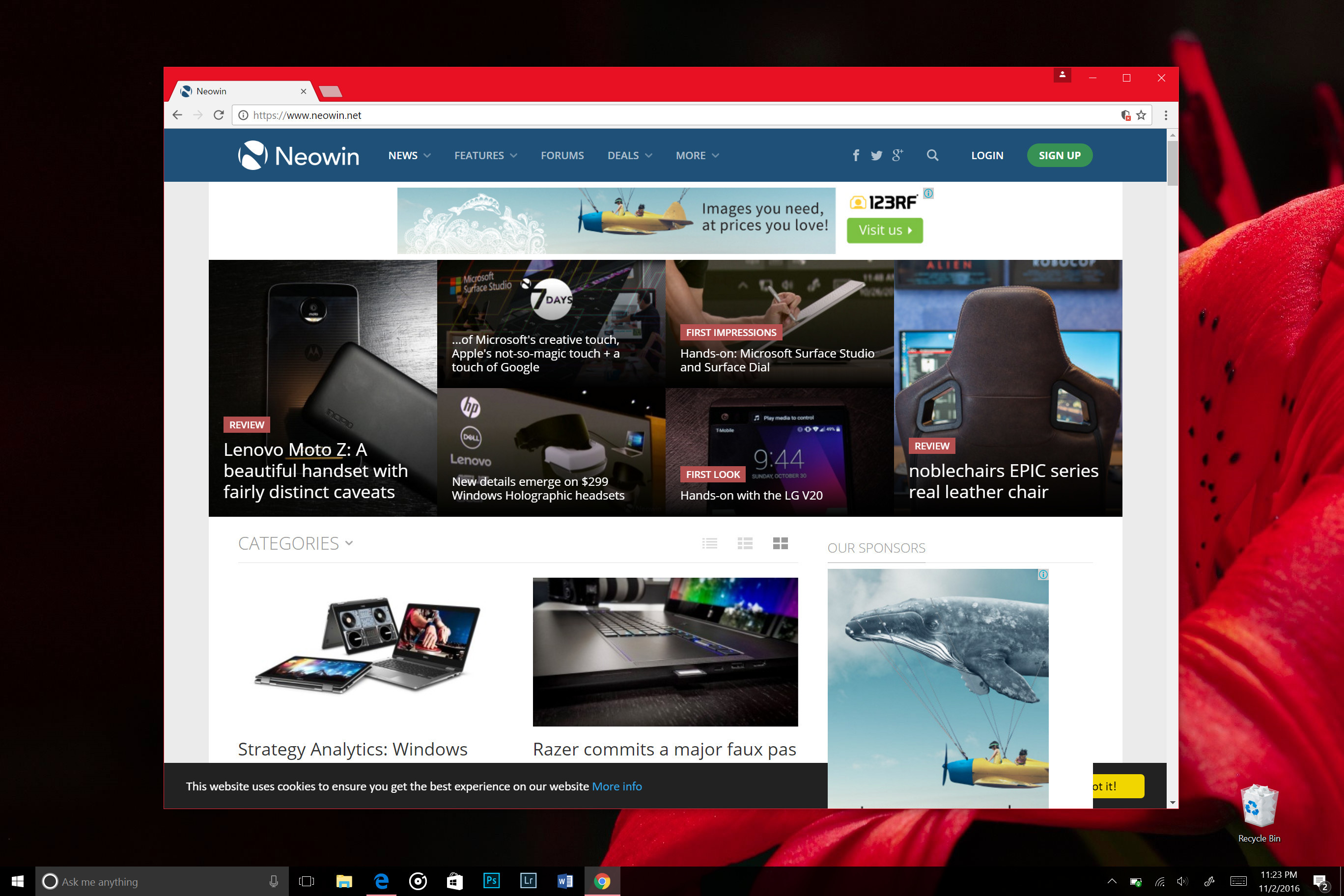
Google Chrome on the other hand has opted for a much more stable design. Back in 2008, Google unveiled its Chrome beta with tabs on top. For those not around back then, this was revolutionary, but Google could afford to be revolutionary as it was building the browser from scratch.
It emphasized separate tab processes to keep Chrome running fast and a minimalist interface to let you focus on the web page instead of the browser. Over the years, it has added features to Chrome such as extension support, but it managed to keep the browser quick and extensions tucked away in their own little section next to the URL bar.
Of course the browser has changed various aspects of the browser’s appearance too, but this is done very incrementally so that the user doesn’t notice too much. Making changes at such a slow pace gives people the chance to adapt. It’s a bit like that thing people say about boiling frogs in water, they don’t notice the small incremental changes. Thankfully, Chrome users only need to worry about Google’s data collection rather than a grizzly death.
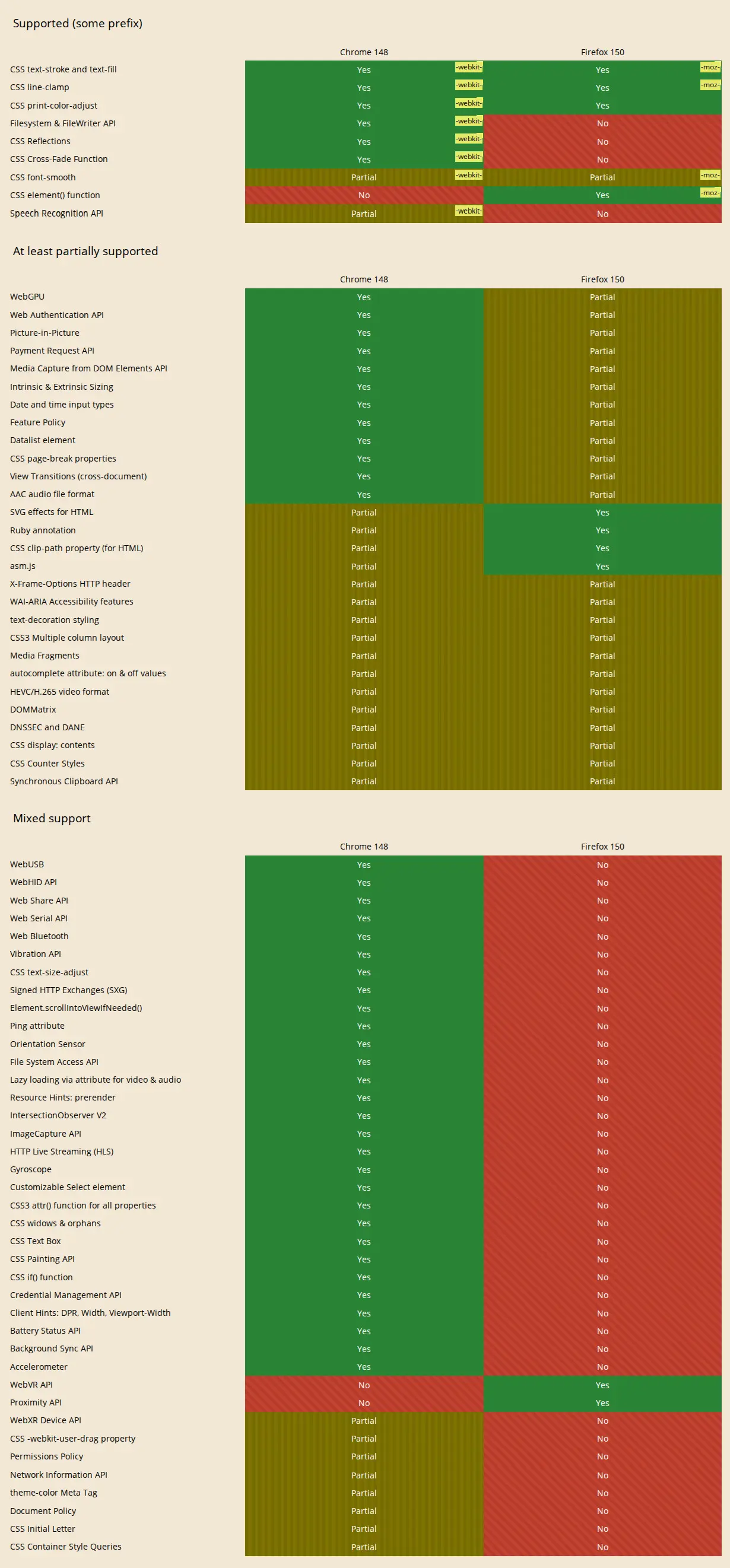
While Google might not be messing around with constant updates to the interface, it is always doing good work under the hood to keep the browser quick. For example, when you start using Chrome, it will ask if you want to use the Memory Saver feature which looks for tabs using a lot of memory and then lets you put them in an inactive state to reclaim memory. Also if you look at this comparison on CanIUse.com, you see that Chrome better supports web technologies so pages render better than in Firefox.
When compared to browsers like Vivaldi and Edge, which like to pack in all sorts of super advanced features in the case of Vivaldi or a crap ton of AI in the case of Edge, Chrome is quite minimalist. Chrome does have some AI features such as Help Me Write, recently started letting you open Gemini as a sidebar, and started downloading a local AI model, but has largely kept away from bundling unnecessary tools. If you want Chrome to do more, you add extensions - this is the philosophy that Firefox used to subscribe to.
Chrome is not perfect either by any stretch of the imagination, for example, when it was recently found out that Chrome was taking up 4GB of space for a local AI model, most commenters on Neowin believed that it shouldn’t be doing that without permission. The introduction of Gemini as a sidebar option is also a bit controversial for me when I can just open the Gemini website in a tab just as easily, why would I want this extra clutter in my browser?
Aside from these unwanted AI features, Chrome has a long-standing reputation of being bad for privacy. Google watches every website you visit and stores it in your account settings so that it can tailor ads to you and help brands sell more stuff. It generally offers less privacy features than Firefox and Brave, which does genuinely suck, though there are a couple of privacy features tucked away in the settings, such as changing to a different DNS for Chrome. That’s handy if you’re on a public network and want more privacy. With this said, it is possible to boost privacy in Chrome with extensions like uBlock or Privacy Badger, so it doesn’t necessarily need to have script blocking and such built into the browser itself.
While I appreciate the privacy features that come with other browsers, for me, and probably a lot of people, they do not trump a clean interface and predictability in Chrome’s functionality.
To summarize, I believe that many of the browser vendors are a bit obsessed with either frequently redesigning the browser or cramming their browser with too many peripheral features that could be delivered as browser extensions (such as wallets). At the end of the day, we go online to use the internet, not to experience our browser. For me, I think Google gets the browser right with Chrome, minus the privacy practices.
While companies are free to make whatever choices they want with regard to their browsers, I hope others take into consideration making more iterative improvements rather than big sweeping changes. I think this will ultimately help them retain users and even grow their market share so Chrome has more competition.



















32 Comments
Load the comments and join the conversation!
Read the comments, ask the editors questions, show respect and join the conversation.