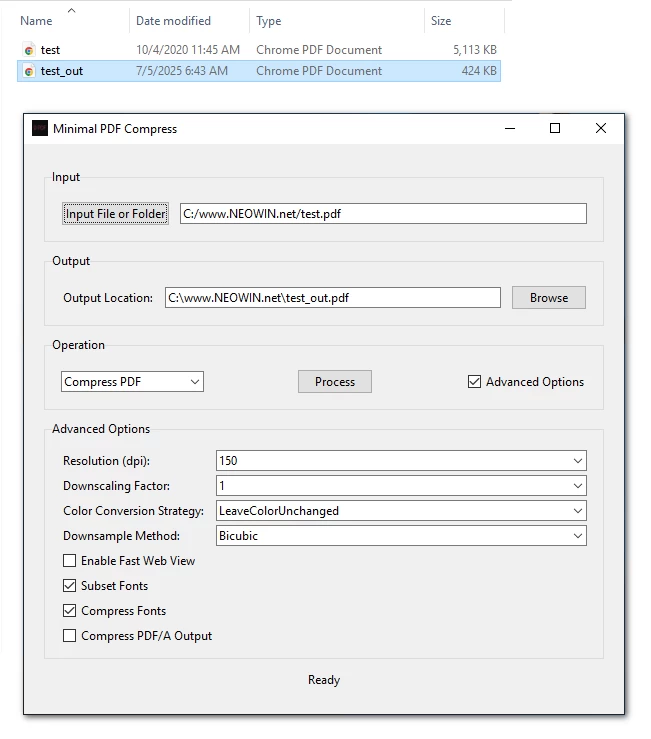
Minimal PDF Compress is a user-friendly, graphical desktop application designed to simplify PDF compression and conversion tasks using Ghostscript on Windows. It allows users to compress PDF files or convert them to PDF/A format with customizable options, all through an intuitive GUI (Graphical User Interface). Built with Python and Tkinter, this tool eliminates the need for command-line interactions, making PDF processing accessible to everyone.
For many users, the command prompt can be intimidating due to its text-based nature, complex syntax, and lack of immediate feedback. Ghostscript, while powerful, typically requires command-line expertise to perform tasks like PDF compression or conversion to PDF/A.
Note: Ghostscript's pdfwrite device doesn't technically "compress" PDFs in the traditional sense. Instead, it recreates a new PDF that may be smaller due to optimizations like removing unnecessary metadata, simplifying fonts, or recompressing images.
Minimal PDF Compress 1.6 changelog:
This is a major update focused on adding powerful new features, completely overhauling the user interface for a more intuitive workflow, and performing a significant refactoring of the entire codebase for better performance and stability.
Features & Enhancements
- Advanced Image Optimization: Added a new image optimization step using zlib and sam2p. This can help reduce JPEG-heavy pdf files.
- Live Previews: The Rotate and Stamp/Watermark tabs now feature a live preview pane. This allows you to see your changes in real-time before processing the entire document.
- Dynamic Text Stamping: The text stamping tool is improved.
- Full Settings Persistence: The application now saves and reloads the state of every option across all tabs. Your entire workspace, including file paths, selected options, and advanced settings, will be restored on next launch.
UI Improvements
- New Tabbed Interface: The UI has been completely redesigned from 3 generic tabs into 10 distinct, task-oriented tabs: Compress, Merge, Split, Rotate, Delete Pages, PDF to Images, PDF/A, Stamp/Watermark, Metadata, and Utilities.
- Enhanced Progress Reporting: A new processing popup provides a much clearer view of progress, with separate bars for the current file and the overall batch progress.
- Scrollable Panes: Tabs with many options now scroll, making the application much more usable on smaller screen resolutions.
- Improved Drag & Drop: Drag-and-drop support has been extended to all relevant tabs on Windows.
- Comprehensive Tooltips: Added dozens of new tooltips to explain new features and advanced setting.
Code & Backend Refactoring
- Modular Codebase: The project has been restructured into smaller, more logical files (constants.py, ui_components.py) to improve organization and maintainability.
- Robust Error Handling: Backend processes now report errors back to the UI more cleanly.
- Streamlined Logic: Core functions like file conversion have been refactored to separate folder iteration from single-file processing.
Installation
- Download the prebuilt Minimal PDF Compress.zip using the link below.
- Double-click the file to open the app — no setup required.
- If Ghostscript isn’t installed yet, the app will prompt you to get it.
What You’ll Need
- Ghostscript is required for the app to work. If you don’t have it, just download and install it from the official Ghostscript website.
Download: Minimal PDF Compress 1.6 | 36.7 MB (Open Source)
View: Minimal PDF Compress Home Page | Screenshot
 Get alerted to all of our Software updates on Twitter at @NeowinSoftware


















0 Comments
Load the comments and join the conversation!
Read the comments, ask the editors questions, show respect and join the conversation.