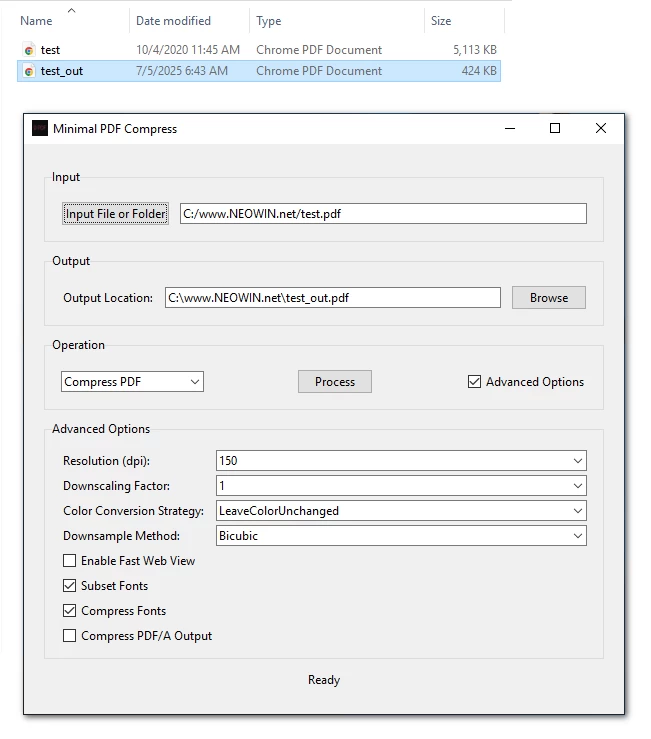
Minimal PDF Compress is a user-friendly, graphical desktop application designed to simplify PDF compression and conversion tasks using Ghostscript on Windows. It allows users to compress PDF files or convert them to PDF/A format with customizable options, all through an intuitive GUI (Graphical User Interface). Built with Python and Tkinter, this tool eliminates the need for command-line interactions, making PDF processing accessible to everyone.
For many users, the command prompt can be intimidating due to its text-based nature, complex syntax, and lack of immediate feedback. Ghostscript, while powerful, typically requires command-line expertise to perform tasks like PDF compression or conversion to PDF/A.
Note: Ghostscript's pdfwrite device doesn't technically "compress" PDFs in the traditional sense. Instead, it recreates a new PDF that may be smaller due to optimizations like removing unnecessary metadata, simplifying fonts, or recompressing images.
Minimal PDF Compress 1.7 changelog:
This is the largest update to MinimalPDF Compress ever. Version 1.7 introduces a completely redesigned user interface, a "smart" compression engine, powerful new tools, and major stability improvements.
New Features
- New Tool: PDF Repair A new "PDF Repair" utility has been added. It attempts to rebuild and fix corrupted or damaged PDF files using pikepdf.
- A dedicated Settings tab has been added to centralize application options. You can now create default output naming rules, automatically adding any prefix, suffix, and the current date or time to your processed files.
- The file list in the Merge tab has been upgraded from a simple listbox to a detailed Treeview, now showing the Page Count and File Size for each PDF you add.
UI Improvements
- The old interface has been replaced with a clean, modern "card-based" layout. Color palettes for both Light and Dark Mode have been refreshed for better readability and aesthetics.
- A visual quality dial has been added.
- Switches have replaced many checkboxes.
- The Merge, Split, Rotate, and other tools have been neatly organized into a secondary notebook under a main "Utilities" tab, decluttering the main window.
- *The separate, disruptive progress pop-up window has been removed. Progress is now shown on sleek progress bars integrated directly into the main application window.
- Each tool now has its own dedicated Drop Zone, making it easier to drag files to the correct function.
Compression Engine Rework
- "SMART" Compression Engine: The backend no longer relies on a single Ghostscript preset. The new engine intelligently runs your PDF through multiple compression "recipes" (including Ghostscript presets, cpdf squeezing, and pikepdf optimization) and automatically selects the version with the smallest file size. This ensures the best possible result every time.
- The image optimization process is now far more sophisticated. The engine extracts each individual image and tests it against multiple lossless compression tools (sam2p, pngout, jbig2) to find the absolute best compression format for that specific image before re-inserting it.
- The lossless path now also uses the SMART engine, trying different methods (cpdf, Ghostscript, pikepdf) and picking the smallest result, while also running the advanced image optimization routine.
- Three New Speed/Quality Levels: You can now choose between Fast, Normal, and Deep compression levels. These levels determine how many "recipes" the SMART engine will try, allowing you to balance processing speed with compression thoroughness.
Bug Fixes & Stability
- Communication between the user interface and the backend worker has been refactored to use a queue system. This decouples the processes, leading to a more responsive UI and preventing crashes during heavy processing.
- The internal code has been refactored to use Python dataclasses for managing settings. This makes the code cleaner, more reliable, and easier to maintain (thanks to supporter).
- The "Save Metadata" function now requires explicit confirmation before overwriting the original file to prevent accidental data loss.
- Live previews have been improved.
Download: Minimal PDF Compress 1.7 | 31.4 MB (Open Source)
View: Minimal PDF Compress Home Page | Screenshot
 Get alerted to all of our Software updates on Twitter at @NeowinSoftware

















0 Comments
Load the comments and join the conversation!
Read the comments, ask the editors questions, show respect and join the conversation.