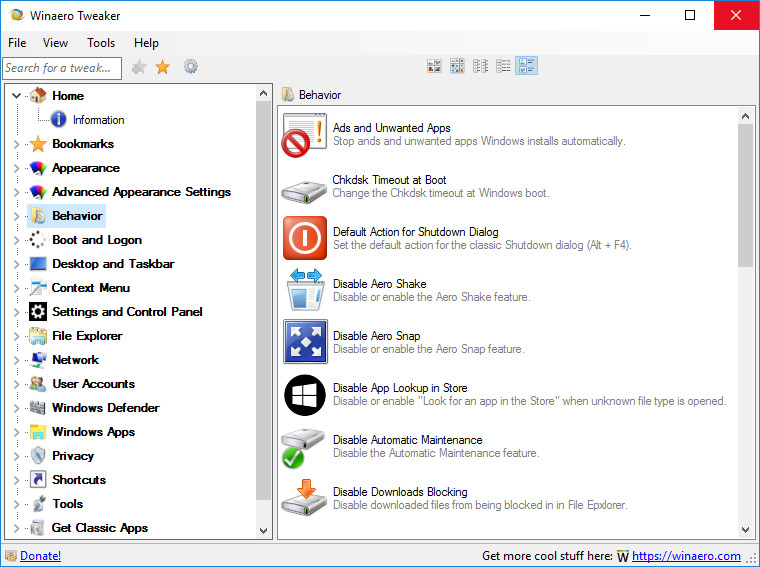
Winaero Tweaker is an an all-in-one customization utility that helps you to tweak Windows in just a few simple clicks. The program includes tweaks for every version of operating system from Windows 7 to Windows 10. Winaero Tweaker automatically detects the version of Windows OS you’re running and shows tweaks and customization options accordingly. The software can be installed as a portable app so you can take it with you as you move from one computer to another.
Here's a partial features list:
- Information - View information about your PC hardware and OS.
- Aero Colors - Change all Windows Aero settings including those which can't be changed with Control Panel.
- Aero Lite - Activate the hidden Aero Lite theme.
- Alt+Tab Appearance - Change hidden secret options of the Alt+Tab dialog.
- Colored Title Bars - Enable colors for window title bars in Windows 10.
- Dark Color Scheme - Here you can enable the dark color scheme for Windows 10 system settings and apps.
- Inactive Title Bars Color - Change the color of inactive title bars in Windows 10.
- Disable Aero Shake - Disable or enable the Aero Shake feature.
- Disable Driver Updates - Turn off driver updates in Windows Update.
- Disable Web Search - Disable Web Search in taskbar and Cortana in Windows 10.
- Disable Action Center - Disable or enable the Action Center feature in Windows 10.
- Disable Live Tiles - Disable Live Tiles all at once for Universal(Metro) apps.
- Activate Windows Photo Viewer - Activate Windows Photo Viewer in Windows 10.
- Auto-update Store apps - Disable or enable auto-update of Store apps in Windows 10.
- Disable Cortana - Disable Cortana in Windows 10.
- Disable Windows Defender - Disable Windows Defender in Windows 10.
- Microsoft Edge Download Folder - Change the default download folder in Microsoft Edge.
- Stop Unwanted Apps - Stop unwanted apps Windows installs automatically.
- Windows Defender Tray Icon - Show or hide Windows Defender tray icon.
- App Switcher Hover Timeout - Change the App Switcher hover timeout delay.
- Charms Bar Hover Timeout - Change the Charms Bar hover timeout delay.
- Modern App Closing Options - Speed up closing time of Metro apps for mouse and touch.
- Start Screen Power Button - Show or hide the Power button on the Start screen.
- Disable Telemetry - Prevent Windows 10 from spying on you.
- ... and many more.
Winaero Tweaker 0.12.1 changelog:
- The case sensitivity context menu is now available for Windows 1803+. Thanks to Walkman.
- The "Disable wide context menu" is now hidden for Windows 10 1809. Microsoft has removed this feature, so it doesn't work in October 2018 Update. Thanks to Jason.
- The "Disable Edge prelaunching" feature now works correctly for both 1803 and 1809 versions of Windows 10. Thanks to TairikuOkami.
- The "Disable Windows Update" feature now disables two extra services, Windows Update Medic Service and Update Orchestrator Service. Thanks to OMC.
New features
- The ability to remove the Windows Media Player context menu entries.
- The ability to customize the image thumbnail preview border shadow
Download page: Winaero Tweaker 0.12.1 | 2.3 MB (Freeware)
View: Winaero Tweaker Home Page | v0.12.1 Release Notes
 Get alerted to all of our Software updates on Twitter at @NeowinSoftware

















