Flyby11, now known as FlyOOBE, is a lightweight patching utility built to remove the restrictions that Microsoft enforces during the installation of Windows 11, particularly version 24H2. By bypassing hardware checks such as TPM, Secure Boot, CPU generation, and RAM requirements, it enables installation on devices that would otherwise be blocked as unsupported. Designed for simplicity and efficiency, Flyby11 provides a minimal yet effective solution for enthusiasts, IT admins, and power users who want to deploy Windows 11 seamlessly across a wider range of systems.
FlyOOBE also enhances the Windows Out-of-Box Experience (OOBE) by removing several limitations that typically appear during first-time setup. It can disable mandatory Microsoft account sign-in requirements, allowing the creation of a local account without workarounds. The tool also bypasses region and network checks, making it possible to complete setup even when internet access is unavailable or restricted.
FlyOOBE key features:
- Bypasses TPM requirement
- Bypasses Secure Boot requirement
- Bypasses unsupported CPU checks
- Bypasses minimum RAM requirement
- Removes other Windows 11 setup restrictions
- Works with Windows 11 version 24H2
- Lightweight and portable tool
- No installation required
- Simple interface and usage
What’s new in FlyOOBE 2.0:
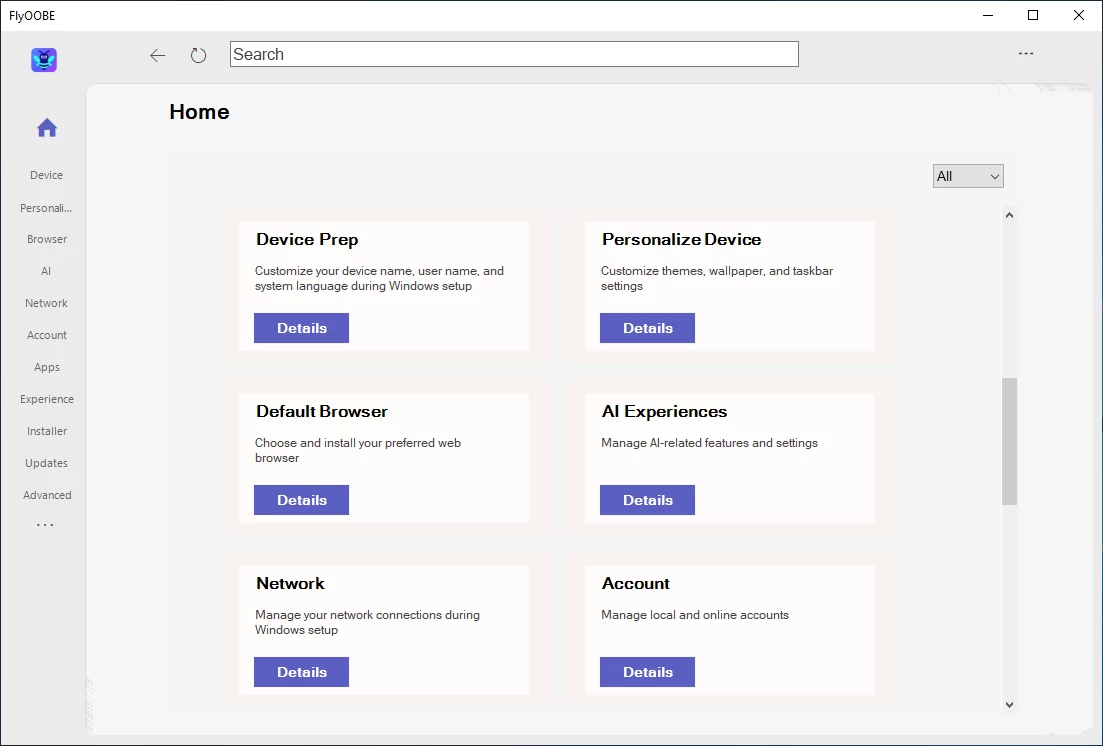
- Modernized and simplified Interface: cleaner, more focused, and less overwhelming, making the initial setup much easier for new and casual users
- Improved perfomance: The app is faster and more responsive, with reduced loading times and better resource management
- Extensions engine completely reworked under the hood, now using a new internal filtering system with a category dropdown.
- A brand-new app icon finally featuring a smart, friendly little bee inside 🐝
- Improved global search and refresh behavior for smoother control updates across views
- New centralized Home dashboard that intelligently categorizes and recommends OOBE setup pages and extensions. Many items are now discoverable via keyword tags. (The first experimental Copilot integration has been temporarily removed while refined.)
- Large-scale refactoring and transition to primarily asynchronous processing. Search, filtering, and loading operations no longer cause UI hangs
- New back navigation system with a full stack-based history, allowing you to rewind through previous pages just like in a browser
- Extensions shipped with the app can now also be uninstalled just like user-added ones
- New native activity monitor logs system actions in real time and can provide contextual help for extensions (when supported).
- Improved UI scaling and clarity on high-DPI displays
- New indexing system for all OOBE pages and extensions based on metadata, allowing tools like Flyby11 to be found using simple keywords such as ESU, 10, or 11
- New modern Copilot-inspired designs can now be found in the settings menu
- Extensions.md has been updated accordingly
- Dozens of Minor Fixes and Quality Improvements
Download: FlyOOBE (Flyby11) 2.0.770 | 437 KB (Open Source)
Links: FlyOOBE Website | Screenshot
 Get alerted to all of our Software updates on Twitter at @NeowinSoftware

















0 Comments
Load the comments and join the conversation!
Read the comments, ask the editors questions, show respect and join the conversation.