
Microsoft Flow is "a service for automating workflow across the growing number of apps and SaaS services that business users rely on", as the company described it last year. The service was formally announced in April, 2016, and apps for iOS and for Android (in beta) are already available.
Today, Microsoft announced in a blog post the release of some new features for the service, the major addition being Search by Service. According to Stephen Siciliano, Principal Group PM Manager at Microsoft Flow, the amount of available services (now 90 total) was making it difficult for users to find a specific trigger.
But starting this week, users will be able to see all the triggers from a service by simply selecting that service. Also, once a trigger is selected, the same process can be done to add an action, as can be seen in the following screenshots.
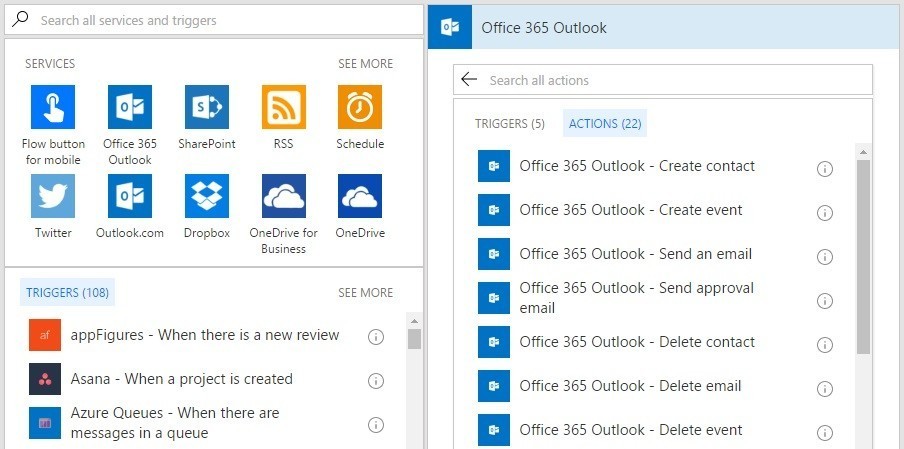
Another new feature is Switch Case. It is an important addition to the already available nested conditionals support, and it "will make it very easy to have parallel branches of conditional logic based on a single value".
Also, the Microsoft Flow team has improved the e-mail handling with Office 365 Outlook and Outlook.com. Now, users will be able to:
- Trigger when an email is flagged - for example, you can now automatically create a task in Todoist (or Wunderlist) whenever you flag an email in Outlook
- Flag an email as an action - create filters to flag emails - for example, automatically flag emails that come from your manager
- Move an email to another folder - you can also automatically move emails between folders
Furthermore, Flow can now connect to Local or Network File Systems. This feature will enable users to log or copy files from their own local Windows desktop PC to the cloud, as well as to connect to a team Network Share.
Finally, four new Premium services were added. Now, users can pay to use Stripe, IBM Informix and IBM DB2, and UserVoice with Microsoft Flow.
Source: Microsoft Flow via MSPoweruser


















3 Comments
Load the comments and join the conversation!
Read the comments, ask the editors questions, show respect and join the conversation.